Billing form preschool education 2026

Get Form
billing form preschool education Preview on Page 1

Here's how it works

01. Edit your form online
Type text, add images, blackout confidential details, add comments, highlights and more.
02. Sign it in a few clicks
Draw your signature, type it, upload its image, or use your mobile device as a signature pad.
03. Share your form with others
Send it via email, link, or fax. You can also download it, export it or print it out.

How to use or fill out billing form preschool education with our platform

Form edit decoration
9.5
Ease of Setup
DocHub User Ratings on G2
9.0
Ease of Use
DocHub User Ratings on G2
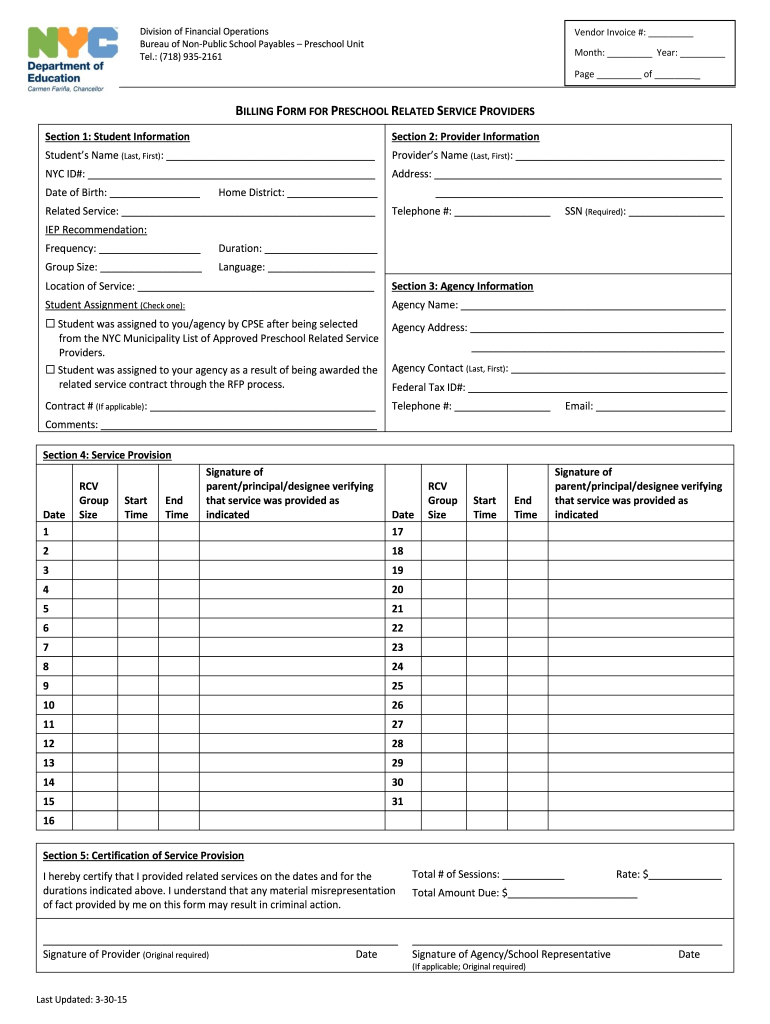
  1. Click ‘Get Form’ to open the billing form for preschool education in the editor.
  2. Begin with Section 1: Student Information. Fill in the student's name, NYC ID#, date of birth, home district, and related service details. Ensure accuracy as this information is crucial for processing.
  3. Proceed to Section 2: Provider Information. Enter your name, address, telephone number, SSN, IEP recommendations including frequency and duration of services, group size, language, and location of service.
  4. In Section 3: Agency Information, indicate whether the student was assigned by CPSE or through an RFP process. Complete agency details including name, address, contract number (if applicable), and contact information.
  5. Move to Section 4: Service Provision. Document each service date along with group size, start and end times. Obtain signatures from a parent or principal verifying that services were provided.
  6. Finally, complete Section 5: Certification of Service Provision by signing and dating the form. Include total sessions and amount due if applicable.

Start using our platform today to streamline your billing process for preschool education!

See more billing form preschool education versions

We've got more versions of the billing form preschool education form. Select the right billing form preschool education version from the list and start editing it straight away!
Versions Form popularity Fillable & printable
2015 4.8 Satisfied (250 Votes)
be ready to get more

Complete this form in 5 minutes or less

Get form

Got questions?

We have answers to the most popular questions from our customers. If you can't find an answer to your question, please contact us.
Contact us

Yes, you’ll find numerous apps for this on the web. Nevertheless, if you need to eSign your billing form preschool education without installing extra software, DocHub is the optimum choice you can make. This robust editor works on mobile devices just as on desktops. Open our editor in any internet browser, register or sign in to your account, and start processing your documents.

As a comprehensive document editing platform, DocHub is accessible on mobile devices. Open DocHub in your choice of mobile browser and use our smart mobile-friendly toolset to fill out your billing form preschool education.

Security and compliance

At DocHub, your data security is our priority. We follow HIPAA, SOC2, GDPR, and other standards, so you can work on your documents with confidence.

Learn more
ccpa2
pci-dss
gdpr-compliance
hipaa
soc-compliance