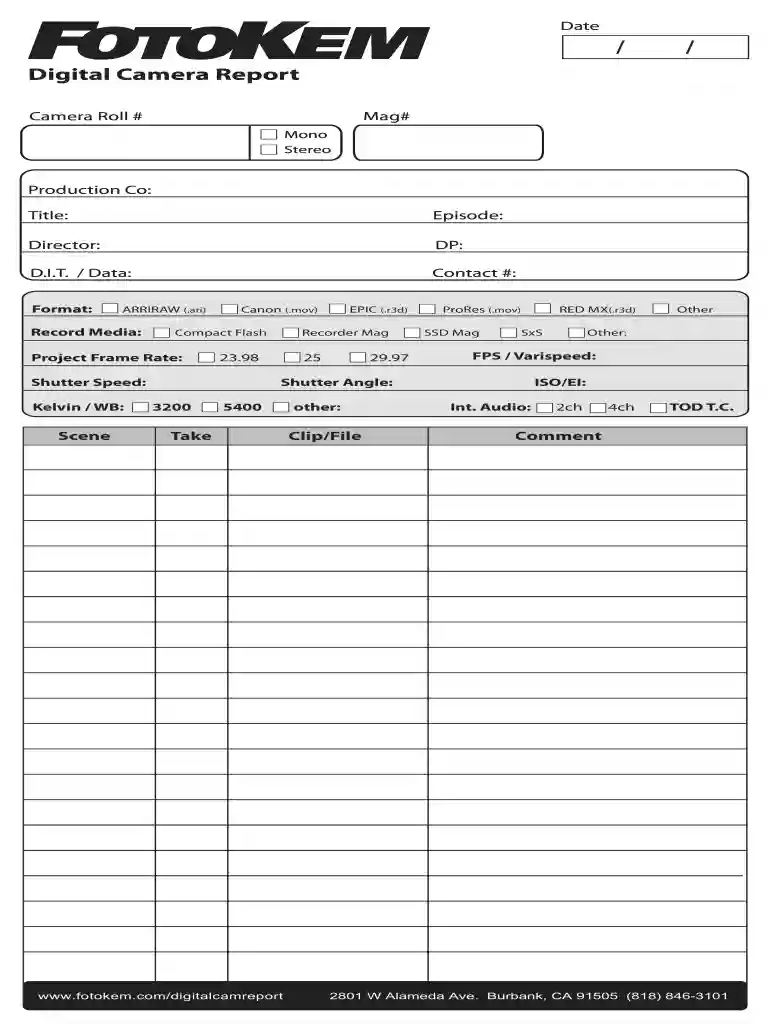
2013 camera report form Preview on Page 1

Fotokem form 2026

Here's how it works

  • 01. Edit your 2013 camera report form online

    Type text, add images, blackout confidential details, add comments, highlights and more.

  • 02. Sign it in a few clicks

    Draw your signature, type it, upload its image, or use your mobile device as a signature pad.

  • 03. Share your form with others

    Send camera report form via email, link, or fax. You can also download it, export it or print it out.

How to use or fill out fotokem form with our platform

Form edit decoration
9.5
Ease of Setup
DocHub User Ratings on G2
9.0
Ease of Use
DocHub User Ratings on G2
  1. Click ‘Get Form’ to open the fotokem form in the editor.
  2. Begin by entering the 'Date' at the top of the form. This is essential for record-keeping.
  3. Fill in the 'Camera Roll #' and 'Mag#' fields to identify your footage accurately.
  4. Specify whether the audio is Mono or Stereo by selecting the appropriate option.
  5. Complete the 'Production Co', 'Title', 'Episode', 'Director', and 'DP' sections with relevant details about your project.
  6. In the 'D.I.T / Data' field, provide contact information for data management purposes.
  7. Select the format of your recording from options like ARRIRAW, Canon, or ProRes, ensuring you choose what matches your equipment.
  8. Input technical specifications such as Project Frame Rate, Shutter Speed, and Kelvin/WB settings as applicable to your shoot.
  9. Finally, review all entries for accuracy before saving or sharing your completed form.

Start using our platform today to streamline your document editing and form completion process for free!

See more 2013 camera report form versions

We've got more versions of the 2013 camera report form form. Select the right 2013 camera report form version from the list and start editing it straight away!

VersionsForm popularityFillable & printable
20224.4 Satisfied (22 Votes)
20134 Satisfied (32 Votes)
20104.8 Satisfied (55 Votes)

be ready to get more

Complete this form in 5 minutes or less

Security and compliance

At DocHub, your data security is our priority. We follow HIPAA, SOC2, GDPR, and other standards, so you can work on your documents with confidence.

Related links

FotoKem - NPDES Compliance Evaluation Inspection Report

May 21, 2007 FotoKem is motion picture post production facility that among other operations develops motion picture film negatives and copies filmRead more

Learn more
SCA Community / SCA Knowledgebase - USC Cinematic Arts

Download copies of 310 508 Film Pickup and Processing, FotoKem Grant Guidelines, 480 546 Processing and Dallies, and more. Production Handbook Request forRead more

Learn more
Fotokem Film and Video

Fotokem Film and Video from the Audiovisual Identity Database, the motion graphics museum Logo (November 10, 1998)Read more

Learn more
If you believe that this page should be taken down, please follow our DMCA take down process here