Ssa pain questionnaire pdf 2026

Get Form
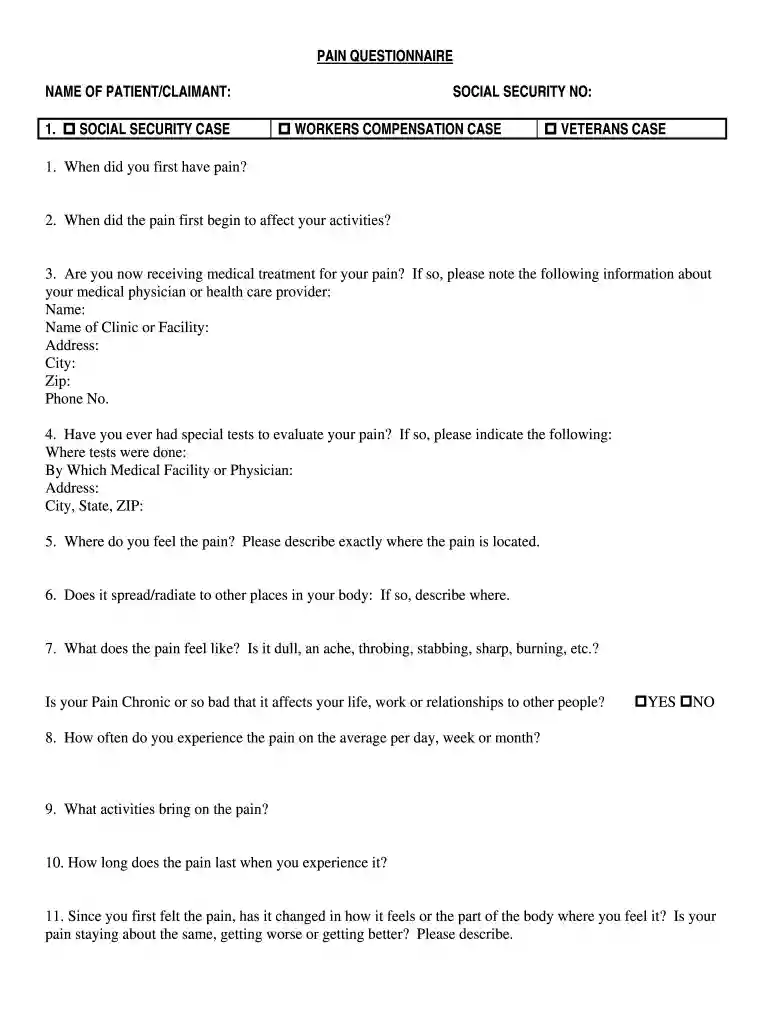
ssa pain questionnaire pdf Preview on Page 1

Here's how it works

01. Edit your ssa pain questionnaire pdf online
Type text, add images, blackout confidential details, add comments, highlights and more.

02. Sign it in a few clicks
Draw your signature, type it, upload its image, or use your mobile device as a signature pad.

03. Share your form with others
Send ssa pain questionnaire form via email, link, or fax. You can also download it, export it or print it out.

How to use or fill out ssa pain questionnaire pdf with our platform

Form edit decoration
9.5
Ease of Setup
DocHub User Ratings on G2
9.0
Ease of Use
DocHub User Ratings on G2
  1. Click ‘Get Form’ to open the SSA Pain Questionnaire PDF in the editor.
  2. Begin by entering your personal information at the top of the form, including your name and Social Security number. This ensures that your responses are correctly attributed.
  3. Proceed to Section 1, where you will describe your pain history. Answer questions about when the pain started and how it affects your daily activities.
  4. In Section 2, provide details about any medical treatment you are receiving. Include your physician's name, clinic information, and contact details.
  5. Continue through the form by detailing your pain characteristics in Section 3. Describe its location, intensity, and any medications you are taking for relief.
  6. Complete the work background section by listing your employment history over the past 15 years. Be sure to include job titles and duties performed.
  7. Finally, review all sections for accuracy before signing and dating the document at the end.

Start using our platform today to fill out your SSA Pain Questionnaire PDF easily and for free!

See more ssa pain questionnaire pdf versions

We've got more versions of the ssa pain questionnaire pdf form. Select the right ssa pain questionnaire pdf version from the list and start editing it straight away!
Versions Form popularity Fillable & printable
1993 4 Satisfied (24 Votes)
be ready to get more

Complete this form in 5 minutes or less

Get form

Got questions?

We have answers to the most popular questions from our customers. If you can't find an answer to your question, please contact us.
Contact us

You should use only trusted software solutions with strong data protection compliance to sign your paperwork electronically. DocHub is just the type of service you need! It stores data on Amazon Web Servers and complies with all necessary security criteria and eSignature laws, so it’s a reliable way to electronically sign your pain questionnaire ssa or other documents with this tool.

You can find the latest and most relevant version of the pain questionnaire social security in our DocHub forms collection. Browse it by categories or use the search field to locate the exact template that suits your case. You can open this form for editing once you find it.

Step 1 \u2014 Go to www.ssa.gov/benefits/disability and select \u201cApply for Disability.\u201d Step 2 \u2014 Fill out the Disability Benefit Application. Step 3 \u2014 Answer the disability questions. Step 4 \u2014 Mail or take the documents we ask for to your Social Security office.
If you live in the United States and you need a replacement form SSA-1099 or SSA-1042S, simply go online and request an instant, printable replacement form through your personal my Social Security account. A replacement SSA-1099 or SSA-1042S is available for the previous tax year after February 1.
You must be 18 or older to complete the Representative Payee Accounting Report online. If you are under 18 and a representative payee, you must complete the paper Representative Payee Report form you received in the mail and return it to the address shown on the form.

Security and compliance

At DocHub, your data security is our priority. We follow HIPAA, SOC2, GDPR, and other standards, so you can work on your documents with confidence.

Learn more

People also ask

How to Answer Disability Questionnaires Write clearly and legibly. Avoid erasures as much as possible. ... Do not leave any section of the form blank (unless otherwise specified). ... Give consistent answers. ... Answer the questions truthfully. ... Follow the instructions on the form.
If you live in the United States and you need a copy of your SSA-1099 or 1042S tax form, simply go online and get an instant, printable copy of your form with a my Social Security account.
How can I get a form SSA-1099/1042S, Social Security Benefit Statement? Using your personal my Social Security account, and if you don't already have an account, you can create one online. ... Calling us at 1-800-772-1213 (TTY 1-800-325-0778), Monday through Friday, 8:00 am \u2013 7:00 pm.
Representative payees can fill out the form and return it to Social Security by mail, or conveniently file it online at www.ssa.gov/myaccount/rep-payee.html. Organizational representative payees are able to complete their Representative Payee Report online by using Business Services Online.
You can apply: Online; or. By calling our national toll-free service at 1-800-772-1213 (TTY 1-800-325-0778) or visiting your local Social Security office.

pain ssa questionnaire