Type text, add images, blackout confidential details, add comments, highlights and more.

02. Sign it in a few clicks
Draw your signature, type it, upload its image, or use your mobile device as a signature pad.

03. Share your form with others
Send how to become a cps vendor via email, link, or fax. You can also download it, export it or print it out.

How to use or fill out cps vendor application with DocHub
Ease of Setup
DocHub User Ratings on G2
Ease of Use
DocHub User Ratings on G2
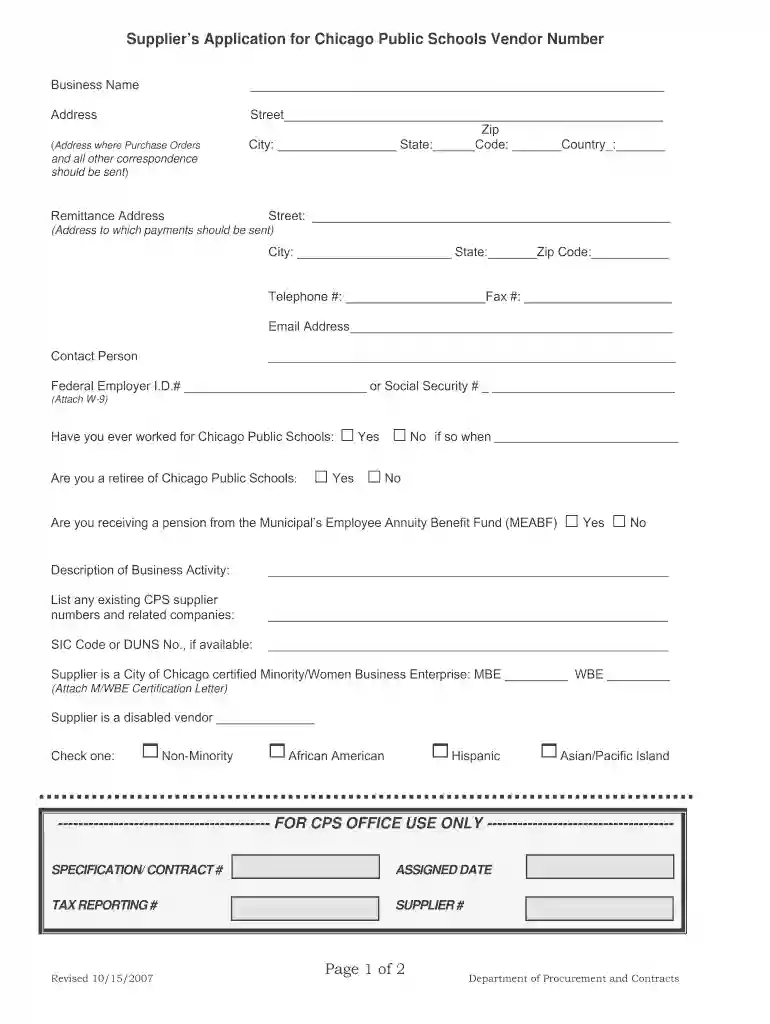
Click ‘Get Form’ to open the cps vendor application in our editor.
Begin by entering your Business Name and Address in the designated fields. Ensure that all information is accurate, as this will be used for correspondence.
Fill out the Remittance Address section with the address where payments should be sent. This is crucial for timely payment processing.
Complete the Contact Person details, including their telephone number and email address, to facilitate communication.
Provide your Federal Employer I.D. number or Social Security number as required. Attach a W-9 form if necessary.
Answer the questions regarding previous work with Chicago Public Schools and provide a description of your business activity.
If applicable, indicate if you are a certified Minority/Women Business Enterprise and attach the certification letter.
Review all entered information for accuracy before submitting. Use our platform’s features to save or print a copy for your records.
Start filling out your cps vendor application today using our platform for free!
We've got more versions of the cps vendor application form. Select the right cps vendor application version from the list and start editing it straight away!
Step 1: Familiarize Yourself With the Industry. Step 2: Determine Your Business Goals. Step 3: Lay the Foundation to Become a Vendor. Step 4: Get Any Necessary Licensing or Registrations. Step 5: Market to and Network With Your Target Audience. Step 6: Negotiate Your First Sale. Step 7: Learn to Use the Vendor Portal.
How do you become a vendor for Chicago Public Schools?
There are two ways to become a vendor for Chicago Public Schools: Contract. Become a Contract Vendor via a Bid or an RFP/RFQ. Sponsorship. Obtain a Sponsorship from a CPS Principal, Network Chief, or Department Director.
How to become a vendor for schools?
7 Steps to Becoming a Registered School Vendor Fill Out a District-Specific Application. Provide Necessary Vendor Information. Pay Associated Application Fees. Submit a Tax Form. Identify the Services Youll Provide. Register To Be Notified of New Procurements. Respond To Bidding Opportunities or RFPs.
How to become a vendor for Chicago Public Schools?
Obtain a Sponsorship from a CPS Principal, Network Chief, or Department Director. Schools, Departments, and Networks who plan on using your goods or services must file a sponsorship to onboard your firm as a new vendor. This process must be initiated by CPS and approved by CPS, not the vendor.
What is a school contracted vendor?
A school vendor is any company or individual contracted to provide products or services to a school, district, or educational institution. This includes: Food service providers (cafeteria, vending) School bus and transportation services. Cleaning and janitorial services.
cps vendor application
Cps vendor application pdfList of CPS vendorsList of CPS vendors PDFCPS food vendors listCPS vendor number lookupCps vendor list 2025CPS Supplier PortalChicago public schools vendors
cps approved vendors
Apple Inc.
This Certification Practice Statement (CPS) describes the practices employed by Apple Inc. (Apple) acting as the Certification Authority (AAI Sub-CA)
Use the LearnPlatform to search for and view information about CPS vendors, including subject matter content, associated grade levels, approval status,
If the sponsorship is accepted, a CPS Supplier Application will be sent to the prospective vendor for completion. If the sponsorship request is not accepted,
Cookie consent notice
This site uses cookies to enhance site navigation and personalize your experience.
By using this site you agree to our use of cookies as described in our Privacy Notice.
You can modify your selections by visiting our Cookie and Advertising Notice.