Belt verification form 2026

Get Form
asq certification form printable Preview on Page 1

Here's how it works

01. Edit your asq certification form printable online
Type text, add images, blackout confidential details, add comments, highlights and more.

02. Sign it in a few clicks
Draw your signature, type it, upload its image, or use your mobile device as a signature pad.

03. Share your form with others
Send asq certification form pdf via email, link, or fax. You can also download it, export it or print it out.

How to use or fill out the belt verification form with our platform

Form edit decoration
9.5
Ease of Setup
DocHub User Ratings on G2
9.0
Ease of Use
DocHub User Ratings on G2
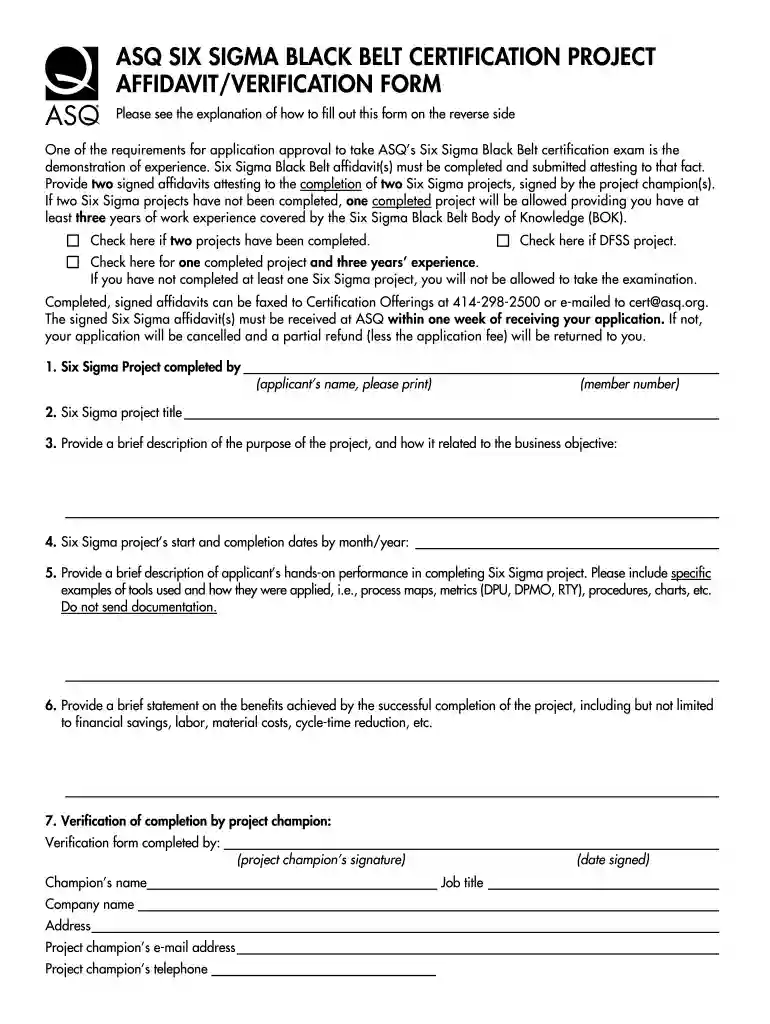
  1. Click ‘Get Form’ to open the belt verification form in the editor.
  2. Begin by entering your name and member number in the designated fields. This information is crucial for identification.
  3. Select the appropriate checkbox indicating whether you have completed two Six Sigma projects, a DFSS project, or one project with three years of experience.
  4. Fill in the title of your Six Sigma project and provide a brief description of its purpose and relation to business objectives.
  5. Input the start and completion dates of your project in month/year format.
  6. Describe your hands-on performance during the project, including specific tools used and their applications.
  7. Summarize the benefits achieved from your project, such as financial savings or efficiency improvements.
  8. Ensure that the verification section is completed by your project champion, including their signature, name, job title, and contact information.

Start using our platform today to easily complete your belt verification form for free!

See more belt verification form versions

We've got more versions of the belt verification form form. Select the right belt verification form version from the list and start editing it straight away!
Versions Form popularity Fillable & printable
2019 4.7 Satisfied (21 Votes)
2010 4 Satisfied (26 Votes)
be ready to get more

Complete this form in 5 minutes or less

Get form

Got questions?

We have answers to the most popular questions from our customers. If you can't find an answer to your question, please contact us.
Contact us
The use of the database is self-explanatory as given below: ​Click Here to Check For Poom/Dan Database. To use it, you must enter Dan registration information exactly into the Kukkiwon Database labeled cells: Name/PoomDan Number, Nationality, and Date of birth. Click the button to activate the database search engine.
To confirm the status held simply enter your Surname / Family Name and your ITF HQ membership number found on your membership card or any official membership renewal communication from ITF HQ and we will let you know the held information and status.
5 essential quick safety checks Webbing Check the webbing for any nicks, cuts, holes and fraying as this shows wear and could affect your seat belt effectiveness. Buckle look for any signs of damage. Fasten the seat belt and pull to check its secure. Check the stalk for any loose connection to the vehicle.
7-Step Full Body Harness Inspection Checklist Check the Webbing for Damage. Inspect Stitching Seams. Examine Metal Components (D-Rings, Buckles, Hardware) Assess the Tongue Grommets. Look for Chemical or Heat Damage. Verify Proper Fit Adjustments. Review Labels Compliance Marks.
So everyone relax. You do not have to walk in, or call, your local police and let them know youve just got your black belt. The only time theyre going to be interested in registering them for you is if youve committed a crime.

People also ask

What is the Black Belt Registry? The Black Belt Registry is a centralized system that recognizes and honors taekwondo practitioners from around the world. By registering, athletes can verify their belt status, connect with other black belts, and showcase their dedication to the art.

asq project form