Entira 2026

Get Form
entira patient portal Preview on Page 1

Here's how it works

01. Edit your entira patient portal online
Type text, add images, blackout confidential details, add comments, highlights and more.

02. Sign it in a few clicks
Draw your signature, type it, upload its image, or use your mobile device as a signature pad.

03. Share your form with others
Send entira portal via email, link, or fax. You can also download it, export it or print it out.

How to use or fill out entira with our platform

Form edit decoration
9.5
Ease of Setup
DocHub User Ratings on G2
9.0
Ease of Use
DocHub User Ratings on G2
  1. Click ‘Get Form’ to open the entira form in the editor.
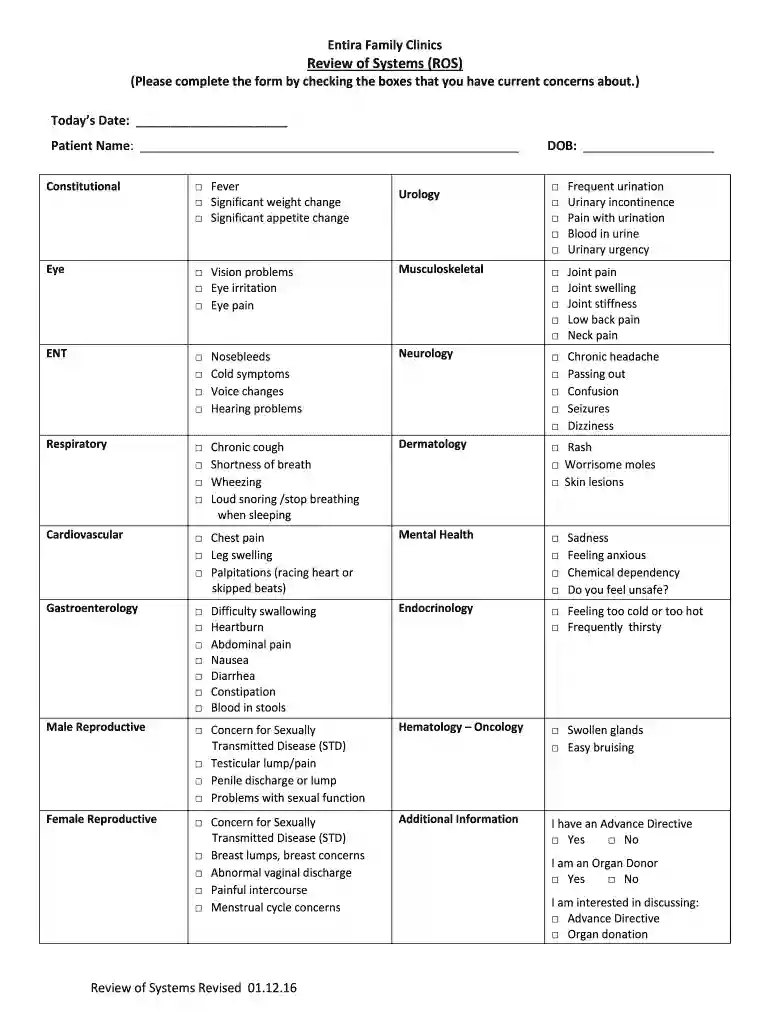
  2. Begin by entering today’s date and your name at the top of the form. This personal information is essential for accurate record-keeping.
  3. Proceed to the 'Review of Systems' section. Here, check the boxes next to any current concerns you have, such as fever or vision problems. This helps your healthcare provider understand your health status.
  4. Continue through each category—Constitutional, Eye, ENT, Respiratory, Cardiovascular, and so on—checking all relevant symptoms. Be thorough to ensure comprehensive care.
  5. In the 'Additional Information' section, indicate if you have an Advance Directive or if you are an Organ Donor by checking 'Yes' or 'No'.
  6. Once completed, review your entries for accuracy before saving or sharing the document directly from our platform.

Start using our platform today for free to streamline your form completion process!

See more entira versions

We've got more versions of the entira form. Select the right entira version from the list and start editing it straight away!
Versions Form popularity Fillable & printable
2016 4.8 Satisfied (141 Votes)
be ready to get more

Complete this form in 5 minutes or less

Get form

Got questions?

We have answers to the most popular questions from our customers. If you can't find an answer to your question, please contact us.
Contact us
Top 10 hospitals by staffed beds using an inpatient Epic EHR system RankHospital nameExplore dataset 1 AdventHealth Orlando (FKA Florida Hospital Orlando) Explore 2 Baptist Medical Center Explore 3 Montefiore Hospital - Moses Campus Explore 4 Cleveland Clinic Main Campus Explore6 more rows Feb 4, 2025
As your primary care clinic, Entira is home base for most of your medical needs. We also coordinate all of the care you receive at hospitals or from other specialists. Comprehensive, coordinated care is one of our hallmarks.
Epic and eClinicalWorks connection is currently being piloted with Minnesotas Entira Family Clinics, which utilizes eClinicalWorks EHR, and HealthEast Hospital, using Epics EHR.
By integrating with Epic, Teladocs health system clients can offer their providers and patients the ability to conduct telehealth video visits using existing workflows within their Epic EMR. Consumer telehealth and adoption of virtual care is past the point of inevitability.

Security and compliance

At DocHub, your data security is our priority. We follow HIPAA, SOC2, GDPR, and other standards, so you can work on your documents with confidence.

Learn more
ccpa2
pci-dss
gdpr-compliance
hipaa
soc-compliance