Soccer registration form template 2026

Get Form
soccer forms Preview on Page 1

Here's how it works

01. Edit your soccer forms online
Type text, add images, blackout confidential details, add comments, highlights and more.
02. Sign it in a few clicks
Draw your signature, type it, upload its image, or use your mobile device as a signature pad.
03. Share your form with others
Send soccer form via email, link, or fax. You can also download it, export it or print it out.

How to use or fill out soccer registration form template with our platform

Form edit decoration
9.5
Ease of Setup
DocHub User Ratings on G2
9.0
Ease of Use
DocHub User Ratings on G2
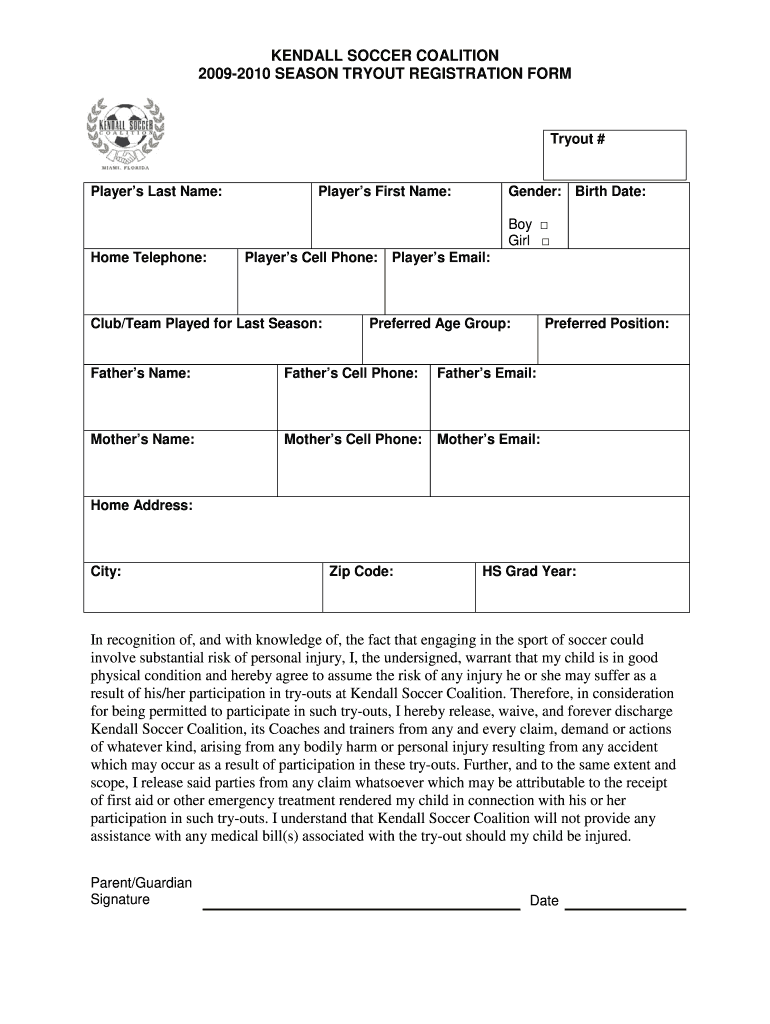
  1. Click ‘Get Form’ to open the soccer registration form template in the editor.
  2. Begin by entering the Tryout Number at the top of the form. This helps identify your application.
  3. Fill in the Player’s Last Name and First Name in the designated fields.
  4. Select the Gender by checking either 'Boy' or 'Girl'.
  5. Input the Player’s Birth Date, Home Telephone, and Cell Phone numbers accurately.
  6. Indicate the Club/Team played for last season and provide a valid Player’s Email address.
  7. Choose the Preferred Age Group and Position for your child.
  8. Complete the Parent/Guardian information by filling in names, cell phone numbers, and emails for both Father and Mother.
  9. Enter your Home Address, City, and Zip Code to ensure proper communication.
  10. Review the waiver section carefully before signing. Ensure you understand all terms regarding participation risks.
  11. Finally, sign and date at the bottom of the form to complete your registration.

Start filling out your soccer registration form today for free on our platform!

See more soccer registration form template versions

We've got more versions of the soccer registration form template form. Select the right soccer registration form template version from the list and start editing it straight away!
Versions Form popularity Fillable & printable
2009 4.8 Satisfied (197 Votes)
be ready to get more

Complete this form in 5 minutes or less

Get form

Got questions?

We have answers to the most popular questions from our customers. If you can't find an answer to your question, please contact us.
Contact us

Yes, and it’s really straightforward! DocHub is an online PDF editor with advanced document management capabilities that allow you rapidly edit your documents, complete blank fields and insert new ones for others to fill out, and create electronic signatures in several ways. Import your soccer registration form template, give information as required, and decide how you want to eSign your document - by typing your name, drawing your signature, uploading its image, or using a QR code.

As a comprehensive document modifying service, DocHub is available on smart phones. Open DocHub in your choice of mobile browser and use our intelligent mobile-friendly toolset to complete your team registration form template word.

Creating an HTML registration form in 6 steps Choose an HTML editor. Just like you need a word processor to create a text document, you need a text editor to create HTML code. Create your HTML file. Time to get down to business. Add basic text fields. Add additional fields. Add placeholders. Customise your HTML form with CSS.
The term form is often used in soccer to refer to either a player or a teams recent performance. A key aspect to the idea of form is that form influences future success. For example, one might say Typically I would favor Tottenham, but Aston Villa has been in great form since the international break.
AidaForm is a flexible online service that lets you easily create a free online registration form no HTML coding required: just drag and drop the fields you need, choose the visual style that matches the design of your website, and publish your form to get more people on your guest list.

Security and compliance

At DocHub, your data security is our priority. We follow HIPAA, SOC2, GDPR, and other standards, so you can work on your documents with confidence.

Learn more
ccpa2
pci-dss
gdpr-compliance
hipaa
soc-compliance

People also ask

Start with a form template Go to File New from Template. In Search, type form. Double-click the template you want to use. Select File Save As, and pick a location to save the form. In Save As, type a file name and then select Save.
Creating an HTML registration form in 6 steps Choose an HTML editor. Just like you need a word processor to create a text document, you need a text editor to create HTML code. Create your HTML file. Time to get down to business. Add basic text fields. Add additional fields. Add placeholders. Customise your HTML form with CSS.
To make a form, you should do the following: Gather personal information like date of birth, phone number and mailing address. Describe the application process and any membership requirements. Provide information about membership levels.
People often talk about form in soccer. You might hear commentators remarking that one player is in form while another player is in poor form. So what does this mean? Form typically refers to a players level of performance relative to their potential level of performance.

team registration form