




Here's how it works



How to use or fill out ecmc medical records with our platform

- Click ‘Get Form’ to open the ecmc medical records in the editor.
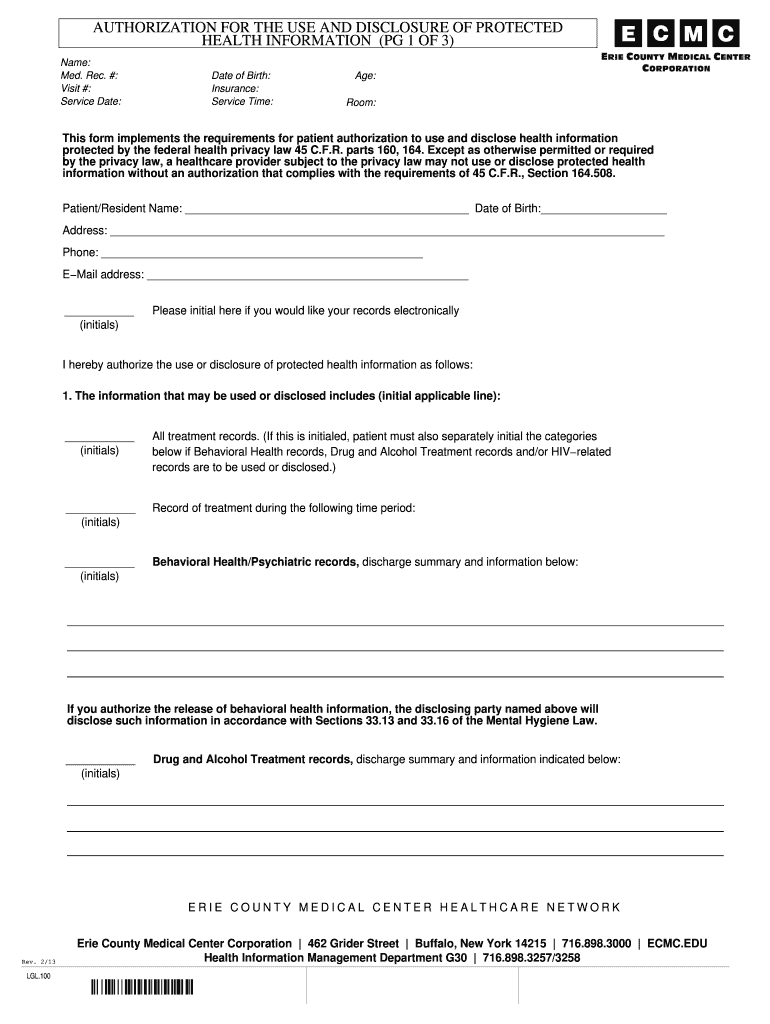
- Begin by entering your personal information, including your name, date of birth, and contact details. Ensure accuracy as this information is crucial for identification.
- In the authorization section, initial next to the types of records you wish to disclose. This includes treatment records and any specific categories like Behavioral Health or Drug and Alcohol Treatment.
- Specify the time period for which you authorize the release of your records by filling in the relevant dates.
- Complete the purpose of disclosure section by indicating whether it is for personal use or another reason. Be sure to provide any necessary details.
- Review all entries for accuracy before signing at the bottom of the form. Remember, you have a right to refuse signing if you feel uncomfortable.
Start using our platform today to easily fill out your ecmc medical records online for free!
It's free
See more ecmc medical records versions
Got questions?
What is the optimum way to electronically sign my ecmc patient portal login?
A lot of software applications are available out there for document modifying and signing. DocHub is one of the most in-demand online solutions that comply with all security and compliance requirements and ensures your electronically signed paperwork is legally enforceable. All you need to try it out is to create an account, upload your ecmc patient portal login, fill out the requested information, and click Sign. Generate your eSignature by typing, drawing it, uploading its picture to your template, or scanning a unique QR code.
How do you edit ecmc portal login in Chrome?
If you are using Chrome, there are two easy ways to modify your ecmc portal login online. First, go to the DocHub website, add your file, and modify it utilizing our toolbar. You may also install our Chrome extension and modify any document by dragging and dropping it in your web browser tab.
How do I contact musc medical records?
What is the easiest way to obtain medical records?
What is ECMC in Buffalo, NY?
Security and compliance
At DocHub, your data security is our priority. We follow HIPAA, SOC2, GDPR, and other standards, so you can work on your documents with confidence.
Learn more




