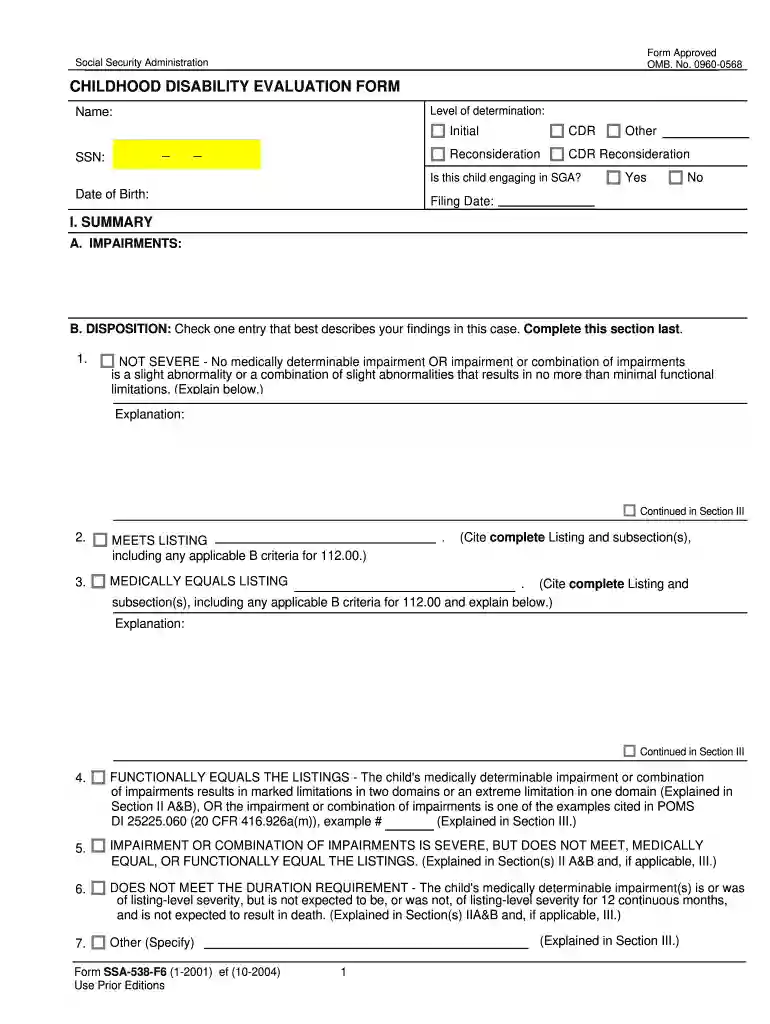
Form childhood disability 2026

Get Form
developmental evaluations Preview on Page 1

Here's how it works

01. Edit your developmental evaluations online
Type text, add images, blackout confidential details, add comments, highlights and more.

02. Sign it in a few clicks
Draw your signature, type it, upload its image, or use your mobile device as a signature pad.

03. Share your form with others
Send state assessment via email, link, or fax. You can also download it, export it or print it out.

How to use or fill out form childhood disability with our platform

Form edit decoration
9.5
Ease of Setup
DocHub User Ratings on G2
9.0
Ease of Use
DocHub User Ratings on G2
  1. Click ‘Get Form’ to open it in the editor.
  2. Begin by entering the child's name and date of birth at the top of the form. Ensure that you also provide the Social Security Number (SSN) and filing date.
  3. In Section I, summarize the child's impairments. Carefully check one entry that best describes your findings regarding severity, ensuring to complete this section last for accuracy.
  4. Proceed to Section II, where you will evaluate functional equivalence. Assess each domain by checking the appropriate box that indicates the degree of limitation for acquiring information, attending tasks, interacting with others, and more.
  5. In Section III, provide detailed explanations for your findings. This is crucial for clarifying any functional equivalence examples cited earlier.

Start using our platform today to easily fill out and manage your childhood disability forms online for free!

See more form childhood disability versions

We've got more versions of the form childhood disability form. Select the right form childhood disability version from the list and start editing it straight away!
Versions Form popularity Fillable & printable
2004 4.9 Satisfied (479 Votes)
be ready to get more

Complete this form in 5 minutes or less

Get form

Got questions?

We have answers to the most popular questions from our customers. If you can't find an answer to your question, please contact us.
Contact us

You should use only trustworthy software solutions with strong security compliance to sign your documents electronically. DocHub is just the type of service you need! It stores data on Amazon Web Servers and complies with all necessary security criteria and eSignature laws, so it’s a reliable way to eSign your developmental assessment or other forms with this tool.

When you go for analog methods of completing your disabilities developmental, it is simple to download your file for printing. Search DocHub’s Forms & Templates catalog to get the exact document template you need and open it for editing or download it on your device in the format of your liking. It is possible to complete your form electronically and put your handwritten signature on it right after printing or eSign your document with DocHub.

ADHD is not considered to be a learning disability. It can be determined to be a disability under the Individuals with Disabilities Education Act (IDEA), making a student eligible to receive special education services.
This listing requires that your child meet two sets of criteria. First, your child must have one of the following ADHD symptoms: hyperactive and impulsive behavior (such as difficulty remaining seated, difficulty waiting, restlessness, talking excessively, or behaving as if being "driven by a motor")
The monthly maximum Federal amounts for 2022 are $841 for an eligible individual, $1,261 for an eligible individual with an eligible spouse, and $421 for an essential person.

Security and compliance

At DocHub, your data security is our priority. We follow HIPAA, SOC2, GDPR, and other standards, so you can work on your documents with confidence.

Learn more
ccpa2
pci-dss
gdpr-compliance
hipaa
soc-compliance
be ready to get more

Complete this form in 5 minutes or less

Get form

People also ask

The SSA-3368: Adult Disability Report helps DDS to obtain a complete picture of the applicant's medical history and treatment. Complete information is essential. Be sure to include all information available to you.
Social Security Form SSA-3373-BK is a lengthy form that you fill out as a part of the process of applying for Social Security Disability benefits. It also goes by the Adult Disability Report or the Adult Function Report.
1. General information for recording statements on the SSA-795. Use an SSA-795 whenever a signed statement is required or desirable, except when we request some other form or questionnaire or we can readily adapt for the statement.
Cost-of-Living Adjustment (COLA) Information for 2022 Social Security and Supplemental Security Income (SSI) benefits for approximately 70 million Americans will increase 5.9 percent in 2022.
An ADHD diagnosis, in and of itself, is not enough to qualify for disability benefits. As a child, you must have had measurable functional impairments (which show up as recurring poor performance in school) and as an adult, you must have measurable functional impairments that keep you from working.

developmental placement