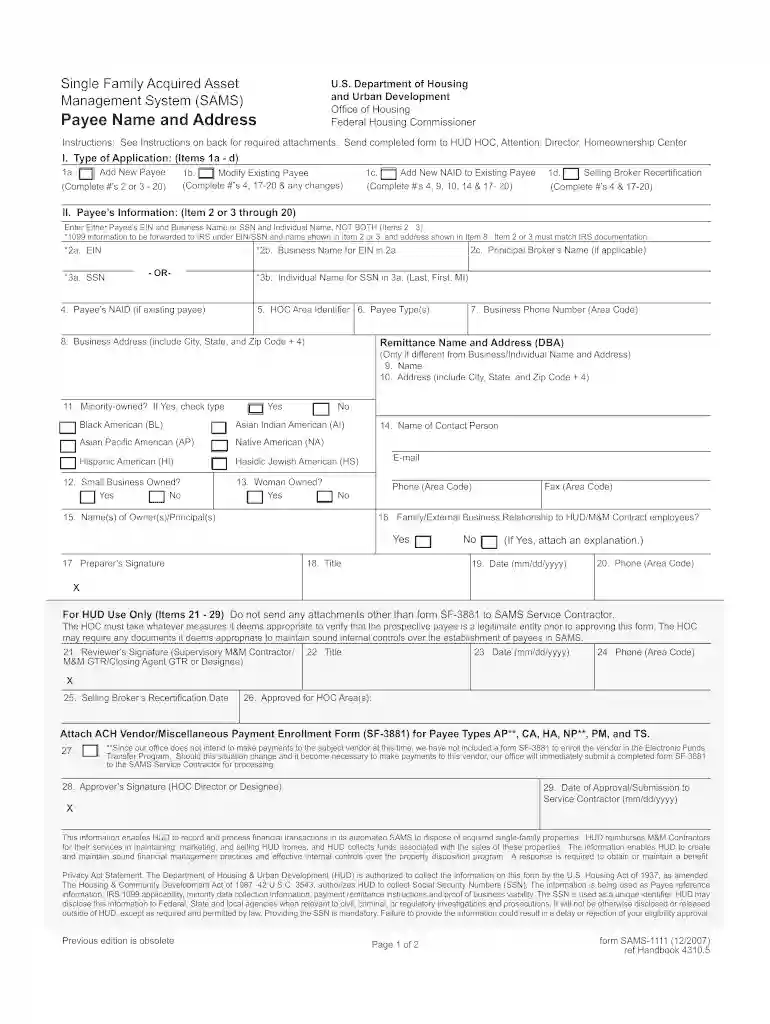
Sams 1111 2007 form-2026

Get Form
sams 1111 form Preview on Page 1

Here's how it works

01. Edit your sams 1111 form online
Type text, add images, blackout confidential details, add comments, highlights and more.

02. Sign it in a few clicks
Draw your signature, type it, upload its image, or use your mobile device as a signature pad.

03. Share your form with others
Send it via email, link, or fax. You can also download it, export it or print it out.

How to use or fill out sams 1111 2007 form with our platform

Form edit decoration
9.5
Ease of Setup
DocHub User Ratings on G2
9.0
Ease of Use
DocHub User Ratings on G2
  1. Click ‘Get Form’ to open the sams 1111 2007 form in the editor.
  2. Begin by selecting the type of application you are submitting: Add New Payee, Modify Existing Payee, Add New NAID to Existing Payee, or Selling Broker Recertification. Complete the relevant fields based on your selection.
  3. In the Payee’s Information section, enter either the Employer Identification Number (EIN) and Business Name or Social Security Number (SSN) and Individual Name. Ensure that this information matches IRS documentation.
  4. Fill in the Business Address, including City, State, and Zip Code. If applicable, provide a Remittance Name and Address if it differs from the Business/Individual Name.
  5. Complete additional sections regarding minority ownership status, small business status, and contact information for further clarity.
  6. Finally, ensure that all required signatures are completed before submitting your form through our platform for processing.

Start using our platform today to easily fill out your sams 1111 2007 form online for free!

See more sams 1111 2007 form versions

We've got more versions of the sams 1111 2007 form form. Select the right sams 1111 2007 form version from the list and start editing it straight away!
Versions Form popularity Fillable & printable
2016 4.8 Satisfied (301 Votes)
2007 4.4 Satisfied (83 Votes)
be ready to get more

Complete this form in 5 minutes or less

Get form

Got questions?

We have answers to the most popular questions from our customers. If you can't find an answer to your question, please contact us.
Contact us

You need to use only trustworthy software solutions with strong data protection compliance to sign your documents electronically. DocHub is just the type of service you need! It stores data on Amazon Web Servers and complies with all essential security requirements and eSignature regulations, so it’s a trusted way to eSign your sams 1111 2007 form or other forms using this tool.

In addition to an extensive toolset for editing PDFs on mobile devices, DocHub allows you to sign your sams 1111 2007 form along the way. Open our editor in your browser, make modifications using DocHub’s toolset, and finish your editing by eSigning the completed form.

You can find the documents to apply for a NAID on HUDHomestore.com using the NAID Registration link. When you have completed the application process, you will be issued a NAID. Once you have obtained a NAID, you can register at HUDHomestore.com and create a user name and password login.
0:27 3:18 Period. If no owner occupants bid during this time the home enters an extended listing.MorePeriod. If no owner occupants bid during this time the home enters an extended listing.

Security and compliance

At DocHub, your data security is our priority. We follow HIPAA, SOC2, GDPR, and other standards, so you can work on your documents with confidence.

Learn more
ccpa2
pci-dss
gdpr-compliance
hipaa
soc-compliance