Type text, add images, blackout confidential details, add comments, highlights and more.
02. Sign it in a few clicks
Draw your signature, type it, upload its image, or use your mobile device as a signature pad.
03. Share your form with others
Send scdmv online forms via email, link, or fax. You can also download it, export it or print it out.
How to use or fill out south lost dmv online with our platform
Ease of Setup
DocHub User Ratings on G2
Ease of Use
DocHub User Ratings on G2
Click ‘Get Form’ to open it in the editor.
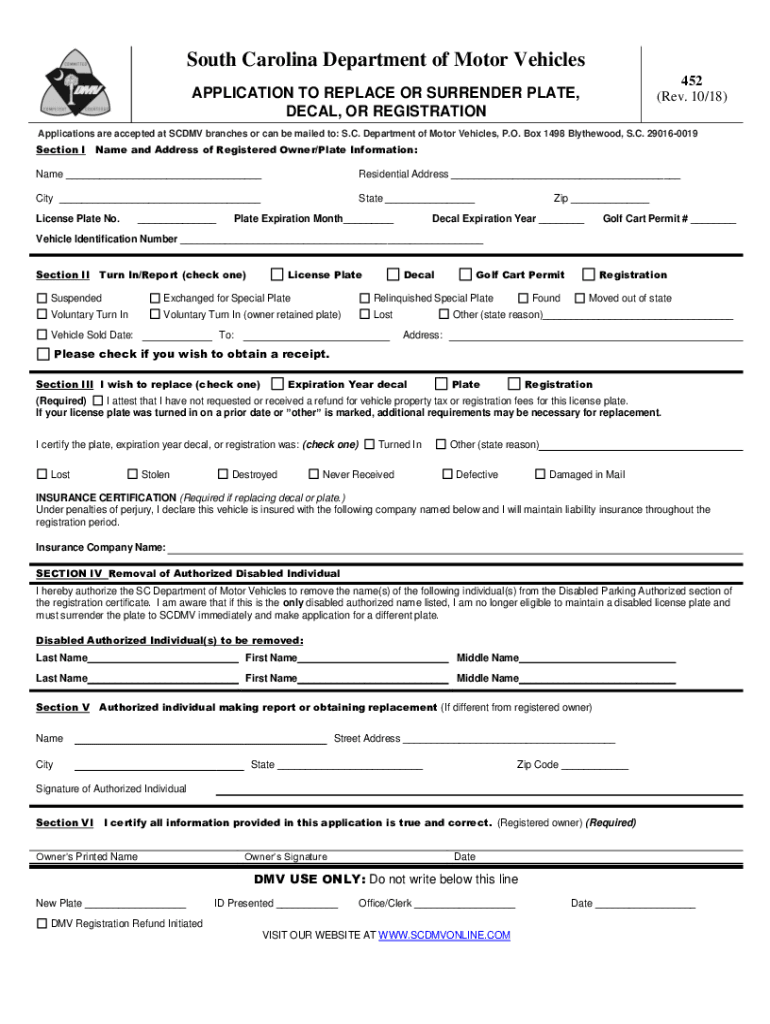
Begin by filling out Section I with your name, residential address, city, state, license plate number, and expiration details. Ensure all information is accurate for a smooth process.
In Section II, select the reason for your application by checking the appropriate box. If applicable, provide additional details such as the date of vehicle sale or other reasons.
Proceed to Section III to indicate what you wish to replace—be it a decal, plate, or registration. Remember to attest that you have not received any refunds related to this license plate.
Complete the insurance certification if replacing a decal or plate by entering your insurance company’s name.
If necessary, fill out Section IV regarding the removal of any authorized disabled individuals from your registration.
In Section V, provide details of any authorized individual making the report if different from the registered owner.
Finally, certify that all information is true in Section VI by providing your printed name, signature, and date.
Start using our platform today for free and streamline your DMV form completion!
We've got more versions of the south lost dmv online form. Select the right south lost dmv online version from the list and start editing it straight away!
Replace License, Permit, or ID Card - SCDMV - South Carolina
You can buy a replacement card below. If youve purchased a duplicate beginners permit, drivers license, or ID card online within the past 12 months, youRead more
The new online service allows customers to exchange their current license plate for a specialty plate or replace a lost, stolen or damaged plate with the sameRead more
Cookie consent notice
This site uses cookies to enhance site navigation and personalize your experience.
By using this site you agree to our use of cookies as described in our Privacy Notice.
You can modify your selections by visiting our Cookie and Advertising Notice.