




01. Edit your 2013 k 1 online
Type text, add images, blackout confidential details, add comments, highlights and more.

Type text, add images, blackout confidential details, add comments, highlights and more.

Draw your signature, type it, upload its image, or use your mobile device as a signature pad.

Send k 1 2013 via email, link, or fax. You can also download it, export it or print it out.
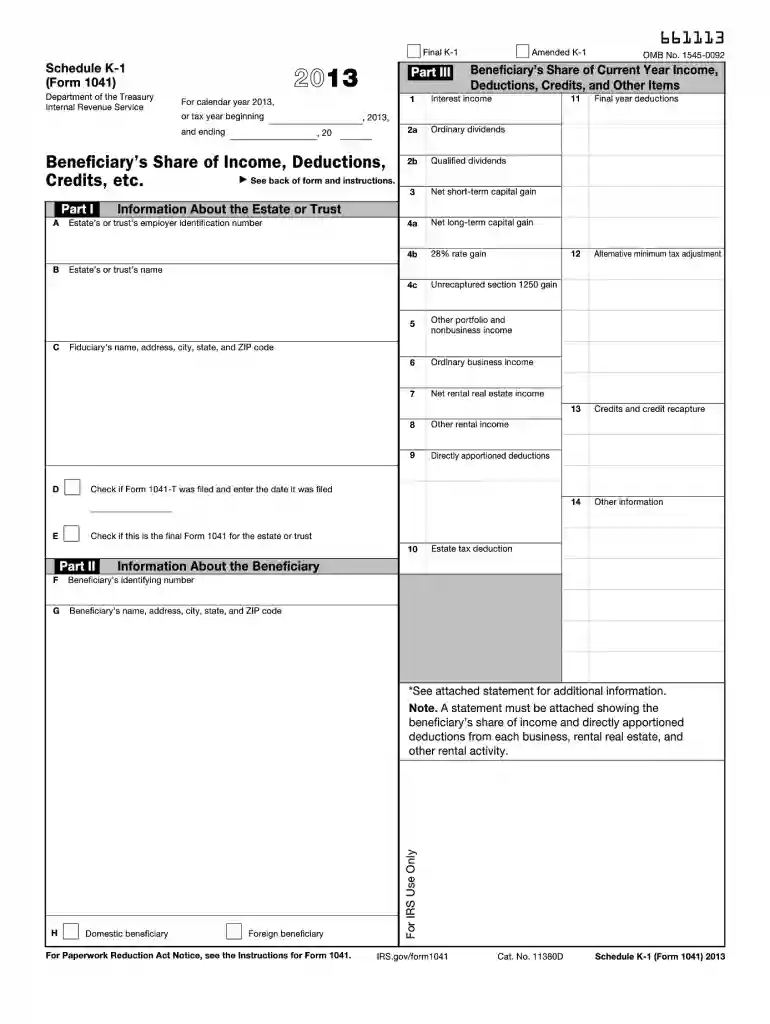
The 2013 Schedule K-1 (Form 1041) is an IRS form used to report a beneficiary's share of income, deductions, credits, and other financial details from an estate or trust. Beneficiaries use the data from this form to include their share of the estate’s or trust’s financial activities on their individual income tax returns. The form breaks down various types of income including dividends, capital gains, and rental income, providing a comprehensive snapshot of the beneficiary’s financial gains from the estate or trust.
To correctly use the 2013 Schedule K-1, beneficiaries should:
According to IRS guidelines for the Schedule K-1, the trustee or executor of an estate or trust is responsible for preparing and providing this form to each beneficiary. The beneficiary must then use this form to report income on their individual returns. It is crucial for beneficiaries to report this information accurately to avoid penalties and ensure compliance with tax obligations.
The filing deadline for the 2013 Schedule K-1 typically corresponds with the filing deadline for the estate’s or trust’s tax return. This usually falls on April 15 of the year following the tax year, unless there is an extension. Beneficiaries should receive their Schedule K-1 well before this date to ensure timely and accurate filing of their personal returns.
Beneficiaries should prepare the following alongside their Schedule K-1:
Failure to accurately and timely report income as indicated on the 2013 Schedule K-1 can result in penalties from the IRS, including fines and interest on unpaid taxes. Beneficiaries must remain vigilant in reporting this income to avoid complications.
Popular tax preparation software such as TurboTax and QuickBooks can aid beneficiaries in managing the complexities of the 2013 Schedule K-1 Form. These programs simplify data entry and ensure compliance by providing error-checking features and up-to-date tax rates and regulations.
We've got more versions of the 2013 k 1 form. Select the right 2013 k 1 version from the list and start editing it straight away!
| Versions | Form popularity | Fillable & printable |
|---|---|---|
| 2025 | 4.3 Satisfied (60 Votes) | |
| 2024 | 4.1 Satisfied (42 Votes) | |
| 2023 | 4.4 Satisfied (39 Votes) | |
| 2022 | 4.1 Satisfied (56 Votes) | |
| 2021 | 4.8 Satisfied (155 Votes) | |
| 2020 | 4.3 Satisfied (199 Votes) | |
| 2019 | 4.4 Satisfied (231 Votes) | |
| 2018 | 4.2 Satisfied (45 Votes) | |
| 2017 | 4.2 Satisfied (84 Votes) | |
| 2016 | 4.3 Satisfied (48 Votes) | |
| 2015 | 4 Satisfied (32 Votes) | |
| 2014 | 4.2 Satisfied (52 Votes) | |
| 2013 | 4 Satisfied (22 Votes) | |
| 2012 | 3.8 Satisfied (34 Votes) | |
| 2011 | 4 Satisfied (37 Votes) |
At DocHub, your data security is our priority. We follow HIPAA, SOC2, GDPR, and other standards, so you can work on your documents with confidence.
Oct 15, 2013 The following schedules may be issued. 1. Schedule K-1-T, Beneficiarys Share of Income and Deductions, completed by trusts or estates filing.Read more
This list identifies the codes used on Schedule K-1 for beneficiaries and provides summarized reporting information for beneficiaries who file Form 1040.Read more
List only depreciable property that requires or is entitled to a depreciation modification when computing ENI (see Form CT-399-I,. Instructions for Form CT-399)Read more


