




Here's how it works



How to use or fill out pa retired registration with our platform

- Click ‘Get Form’ to open the pa retired registration in the editor.
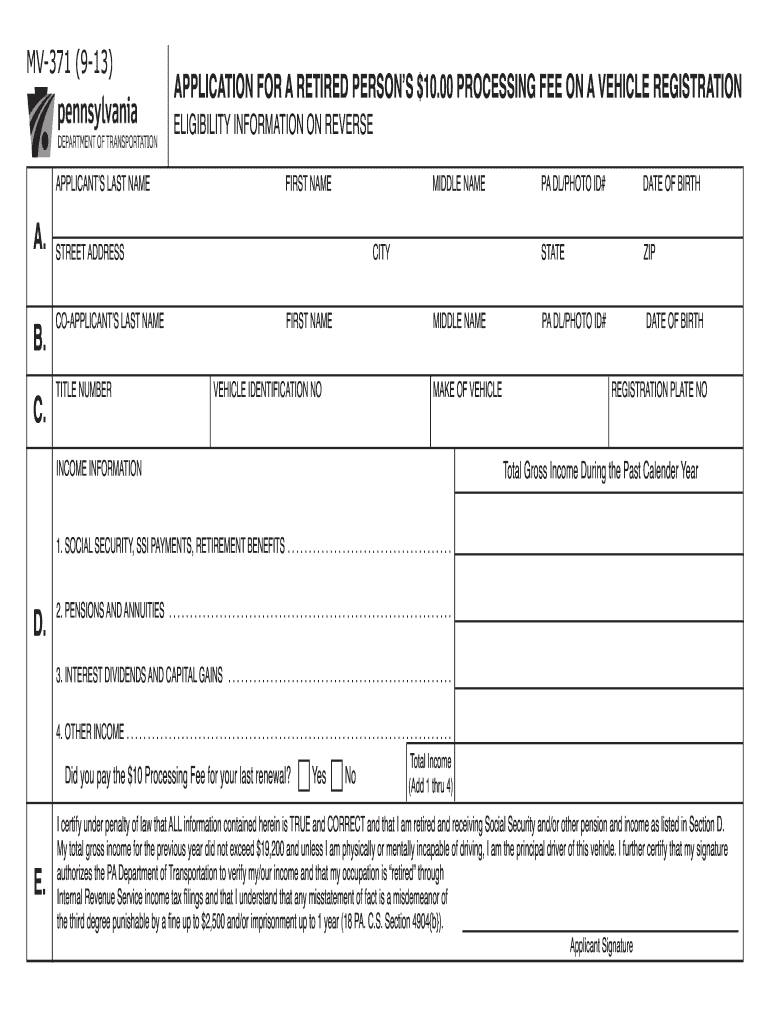
- Begin by entering your last name and first name in the designated fields. Ensure that you also include your middle name if applicable.
- Fill in your street address, city, state, and zip code accurately to ensure proper identification.
- Provide your PA DL/Photo ID number and date of birth. This information is crucial for verification purposes.
- In Section D, list your vehicle's make and Vehicle Identification Number (VIN).
- Complete the income information section by detailing all sources of income from the past calendar year, ensuring that total gross income does not exceed $19,200.
- Indicate whether you paid the $10 processing fee for your last renewal by selecting 'Yes' or 'No.'
- Finally, certify that all information is true by signing at the bottom of the form. This step is essential for compliance with legal requirements.
Start filling out your pa retired registration today on our platform for free!
It's free
See more pa retired registration versions
Got questions?
How can I eSign my pa retired status fact sheet from Gmail?
With DocHub, it’s pretty simple. The service offers users an add-on called DocHub for Gmail, which you can find in the Google Workspace Marketplace free of charge. Set it up and give it access to your Google account. Open your email with your pa retired status fact sheet attached and click on the add-on button in the right-side panel. Log in to your DocHub account, and upload the file to our editor, where you can complete it and sign.
Can I print my retired status registration pa and finish it on my own?
If you go for analog ways of completing your retired status registration pa, you can easily download your file for printing. Search DocHub’s Forms & Templates catalog to get the exact document template you require and open it for editing or download it on your device in the format of your liking. It is easy to complete your form electronically and put your handwritten signature on it right after printing or eSign your document with DocHub.
Security and compliance
At DocHub, your data security is our priority. We follow HIPAA, SOC2, GDPR, and other standards, so you can work on your documents with confidence.
Learn more




