Pan personal form online 2026

Get Form
employment letter job Preview on Page 1

Here's how it works

01. Edit your employment letter job online
Type text, add images, blackout confidential details, add comments, highlights and more.

02. Sign it in a few clicks
Draw your signature, type it, upload its image, or use your mobile device as a signature pad.

03. Share your form with others
Send psc 2 revised 2016 via email, link, or fax. You can also download it, export it or print it out.

How to use or fill out pan personal form online with our platform

Form edit decoration
9.5
Ease of Setup
DocHub User Ratings on G2
9.0
Ease of Use
DocHub User Ratings on G2
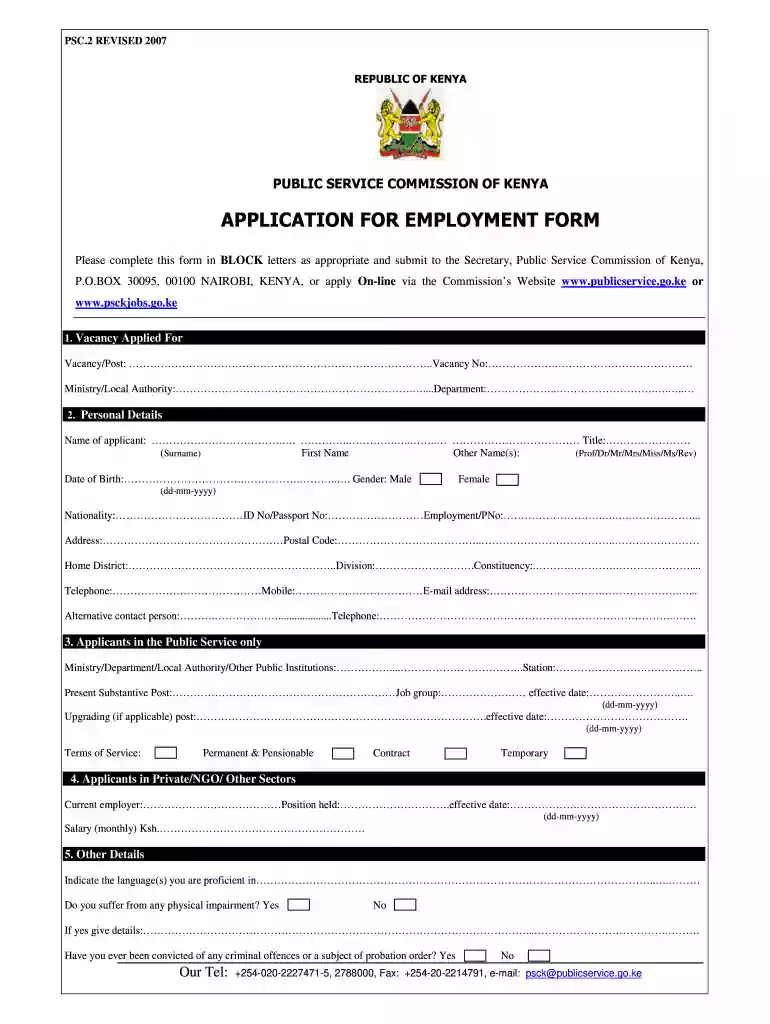
  1. Click ‘Get Form’ to open the pan personal form in the editor.
  2. Begin by filling out the 'Vacancy Applied For' section. Enter the vacancy/post title, vacancy number, ministry/local authority, and department as required.
  3. Proceed to the 'Personal Details' section. Fill in your name (surname, first name, other names), date of birth, gender, nationality, ID or passport number, and contact information including address and telephone numbers.
  4. If you are currently employed in the public service, complete the relevant fields under 'Applicants in the Public Service only'. Include your current post and job group details.
  5. For those from private sectors or NGOs, provide your current employer's name, position held, effective date of employment, and monthly salary.
  6. Fill out any additional details regarding language proficiency and any physical impairments if applicable.
  7. Complete sections on academic qualifications and employment history starting from the most recent positions held.
  8. Finally, provide personal references ensuring they are not relatives or Public Service Commission staff. Conclude by signing and dating the declaration at the end of the form.

Start filling out your pan personal form online for free today using our platform!

See more pan personal form online versions

We've got more versions of the pan personal form online form. Select the right pan personal form online version from the list and start editing it straight away!
Versions Form popularity Fillable & printable
2007 4.8 Satisfied (66 Votes)
be ready to get more

Complete this form in 5 minutes or less

Get form

Got questions?

We have answers to the most popular questions from our customers. If you can't find an answer to your question, please contact us.
Contact us
How To Apply For PAN Card Online Via UTIITSL Website? Step 1: Visit the UTIITSL website. Step 2: Click the Click to Appy under the PAN Card for Indian Citizen/ NRI tab or PAN Card for Foreign Citizen tab. Step 3: Select the Apply for New PAN Card (Form 49A) tab or Apply for New PAN Card (Form 49AA) tab.
Online application can be made either through the portal of Protean (formerly NSDL eGov) ( ) or portal of UTITSL (​​​​​​​​) or Instant E-PAN through Income-tax E-filing Portal ().
Copy of: Voters ID card. Passport. Aadhar card. Ration card having Applicants photo. Driving License. Photo ID card which are issued by central government, state government or any undertaking of public sector​ A certificate issued by a bank that should be duly attested, containing applicants photo and the bank a/c number.
Users can apply online for a Permanent Account Number PAN using this application form provided by the Income Tax Department, Ministry of Finance.
Apply for new Permanent Account Number (PAN) card, changes or corrections in PAN data through online form by Income Tax Department. Users can apply for new PAN card, changes or corrections in PAN data by selecting appropriate category of applicants such as individual, firm, company, etc.

Security and compliance

At DocHub, your data security is our priority. We follow HIPAA, SOC2, GDPR, and other standards, so you can work on your documents with confidence.

Learn more
ccpa2
pci-dss
gdpr-compliance
hipaa
soc-compliance

People also ask

Documents required to apply for a PAN card application online Voter ID card. Aadhaar card. Passport. Driving licence. Arms license. Photo identity card issued by central government or state government or any other public sector undertaking.
Step 1: Go to the e-Filing portal homepage and click Instant e-PAN. Step 2: On the e-PAN page, click Continue on the Check Status / Download PAN option. Step 3: On the Check status / Download PAN page, enter your 12-digit Aadhaar and click Continue.

post office government