
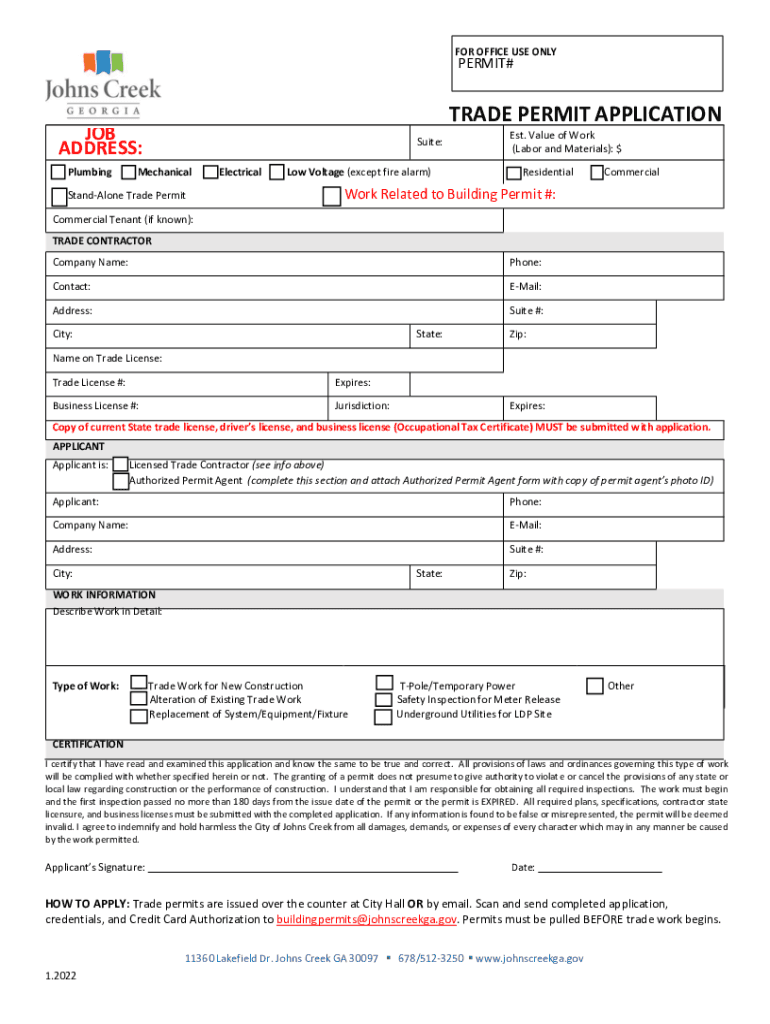







Definition and Meaning of the Office Use Only Applicant Information APPLICATION FOR
The "Office Use Only Applicant Information APPLICATION FOR" is a specialized document used primarily in bureaucratic and business processes. Its main purpose is to collect and verify specific applicant data that is necessary for the processing of various applications. This type of form is often used in contexts where detailed applicant tracking is critical, such as permit applications, licensing procedures, or employment onboarding processes. The term "Office Use Only" indicates that certain sections are reserved for administrative personnel, who further use this information to finalize internal processing steps.
Steps to Complete the Office Use Only Applicant Information APPLICATION FOR
Completing this application necessitates attention to detail and accuracy, as each section is designed to capture essential information. Here is a step-by-step guide to assist users:
-
Read Instructions Thoroughly: Before starting, read any provided guidelines or instructions to understand the requirements.
-
Gather Required Personal Information: This typically includes full name, contact details, identification numbers, and any relevant work or educational background.
-
Provide Specific Answers: For each prompted section, answer with precision. Avoid leaving any mandatory fields blank.
-
Complete Administrative Sections if Applicable: Although labeled "Office Use Only," understand if any part of this section requires cooperation, especially for submissions involving multiple parties.
-
Review and Verify: Double-check all provided information for accuracy. Errors could delay processing or lead to non-compliance issues.
-
Sign the Form: Ensure to sign and date the form where required.
-
Submit According to Guidelines: Follow the specified method of submission, whether online, via mail, or in person, adhering to any set deadlines.
Key Elements of the Office Use Only Applicant Information APPLICATION FOR
Several essential components are integral to this form, each designed to capture critical applicant information:
-
Personal Information Section: Typically includes fields for the applicant's name, address, phone number, and email.
-
Detailed Background Information: Sections may require job history, license numbers, or prior applications.
-
Office Use Only Section: Reserved for official verification and processing. This may include areas for date stamping, application numbers, or approval signatures.
-
Certification and Signature: A declaration where the applicant certifies the accuracy of the provided information and agrees to terms and conditions.
Legal Use of the Office Use Only Applicant Information APPLICATION FOR
The legal framework surrounding this form is established to ensure data privacy and compliance with applicable laws. Using this form without adherence to these rules can result in penalties or rejection of the application:
-
Data Protection: Compliance with data protection laws, such as protecting sensitive information on the form, is mandatory.
-
Authentication of Information: Applicants must provide truthful information, as any misrepresentation can lead to legal action.
-
Proper Authorization: Only authorized personnel should complete the "Office Use Only" sections to ensure integrity in the processing.
State-Specific Rules for the Office Use Only Applicant Information APPLICATION FOR
Various states may impose additional requirements or modifications to the standard application to reflect local laws or regulations:
-
State Variations: Some states may require additional information or specific documents to accompany the form.
-
Compliance with Local Legislation: Understanding local laws in relation to applicant data handling is critical for valid submission.
-
Adaptations for Local Needs: States may offer online systems for easier processing, which could include electronic submissions or downloadable forms.
Required Documents for Completion
In addition to filling out the application, supporting documentation is often required to verify the authenticity of the applicant’s information:
-
Identity Proof: Such as a driver’s license, passport, or social security number.
-
Professional Credentials: Certifications or licenses relevant to the application process.
-
Supplementary Information: Any additional forms or detailed documentation specified within the application instructions.
Submission Methods (Online, Mail, In-Person)
The method of submission can significantly impact the processing time and acceptance:
-
Online Submission: Many departments offer digital portals for direct upload and submission, which often have faster processing times.
-
Mail: For those who prefer postal services, ensure timely mailing and tracking if applicable.
-
In-Person Delivery: Direct submission at designated offices ensures immediate delivery and responses to any clarification needs.
Penalties for Non-Compliance
Failure to comply with the application’s requirements can result in several penalties ranging from delays to legal consequences:
-
Processing Delays: Incorrect or incomplete information may stall the application.
-
Fines: In cases of misleading information or non-compliance, financial penalties can be imposed.
-
Application Rejection: Failure to meet deadlines or provide necessary documentation can result in outright rejection.




