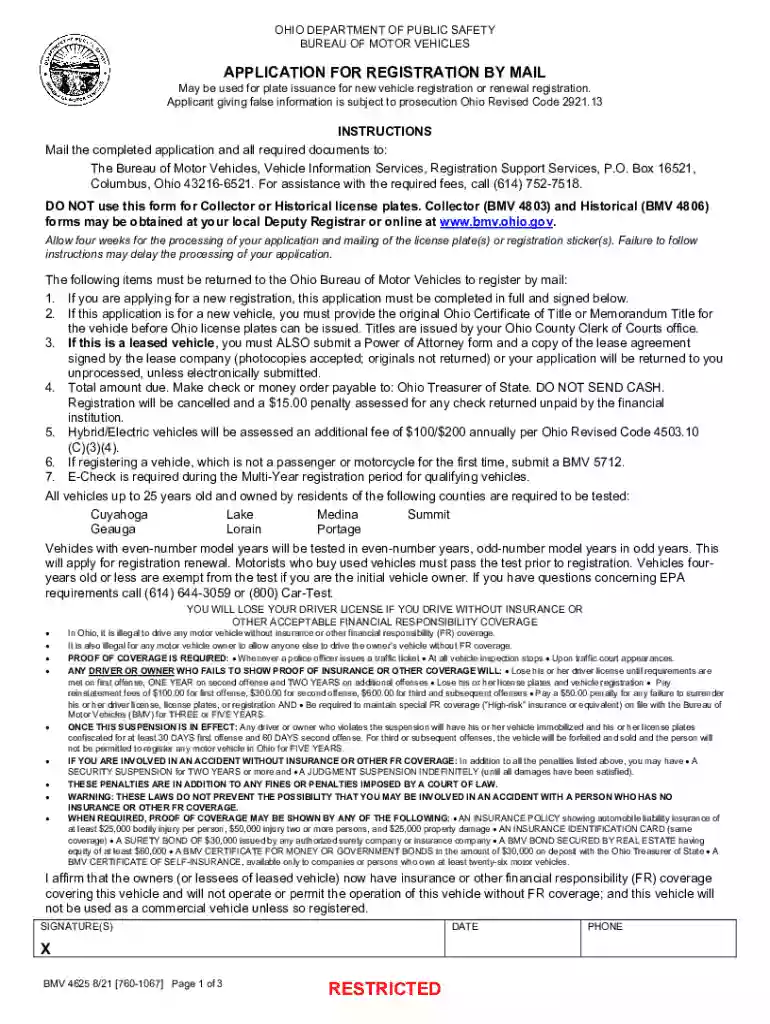
Bmv 4625-2026

Get Form
bmv 4625 Preview on Page 1

Here's how it works

01. Edit your bmv 4625 online
Type text, add images, blackout confidential details, add comments, highlights and more.

02. Sign it in a few clicks
Draw your signature, type it, upload its image, or use your mobile device as a signature pad.

03. Share your form with others
Send it via email, link, or fax. You can also download it, export it or print it out.

Definition and Purpose of BMV 4625

The BMV 4625, issued by the Ohio Department of Public Safety's Bureau of Motor Vehicles, serves as an application form for vehicle registration by mail. This document is integral for both new registrations and renewals, ensuring that vehicles are legally recorded under state requirements. Completing this form helps maintain compliance with Ohio's vehicle laws, enabling residents to operate motor vehicles on public roads without legal issues. The form requires applicants to provide detailed vehicle and personal information, facilitating seamless vehicle tracking and taxation processes.

How to Use the BMV 4625 Effectively

Utilizing the BMV 4625 form effectively involves understanding its sections and the required information. Users should carefully fill out each section, starting with personal identification details like the name and contact information of the vehicle owner. Next, provide complete vehicle details, including make, model, year, and Vehicle Identification Number (VIN). Ensure all information is accurate to avoid processing delays or potential rejections. When renewing registration, double-check previous entries for consistency. Once completed, the form should be submitted as per Ohio's specified methods to ensure timely processing.

Guidelines for Accurate Completion

  • Review requirements: Check that you have all necessary documents ready, such as a previous registration card and proof of insurance.
  • Fill out precisely: Enter each detail legibly, especially the VIN, to prevent errors in the vehicle record database.
  • Double-check information: Verify all data for accuracy before submission to minimize processing issues.

How to Obtain the BMV 4625 Form

Acquiring the BMV 4625 is straightforward, whether you choose to download it online or request a physical copy. The form is generally available on the Ohio Bureau of Motor Vehicles' official website, providing a digital option for immediate access. For those preferring a hard copy, a request can be made in person at a local Ohio BMV office. Additionally, the BMV can mail copies directly to residents upon request, ensuring accessibility for all applicants.

Steps for Online Access

  1. Visit the Ohio Bureau of Motor Vehicles' website.
  2. Navigate to the forms section.
  3. Search for "BMV 4625" to download the PDF version.
  4. Print the form, if necessary, for physical completion.

Steps to Complete the BMV 4625

Filling out the BMV 4625 form requires careful attention to detail, following a systematic approach for accuracy. Begin by gathering all necessary documents, such as proof of insurance, the vehicle title, and any previous registration documents. Proceed to fill out personal information, vehicle details, and insurance information in the relevant sections of the form.

Detailed Step-by-Step Process

  1. Personal Information: Fill out your full legal name, address, and contact number.
  2. Vehicle Information: Enter details such as make, model, year, and VIN.
  3. Insurance Proof: Provide details of your insurance policy, including the insurance company name and policy number.
  4. Sign and Date: Ensure that you sign and date the form to validate the information provided.

Required Documents for BMV 4625 Submission

When submitting the BMV 4625, it is essential to attach the appropriate documents to prevent processing delays. Generally, applicants must include proof of insurance coverage, which indicates adherence to Ohio's financial responsibility laws.

Typical Documentation Needed

  • Proof of Insurance: Insurance card showing current coverage.
  • Proof of Ownership: A vehicle title or a previous registration document.
  • Identification: A valid driver's license or state-issued ID.

Form Submission Methods: Mail, Online, and In-Person

Ohio provides multiple avenues for submitting the BMV 4625, accommodating various preferences and circumstances. While mail-in submission is traditional, the convenience of online and in-person options cannot be overstated.

Available Submission Options

  • Mail-In: Send the completed form and required documents to the designated BMV address.
  • Online Submission: Access the online submission portal through the Ohio BMV website for a digitized submission process.
  • In-Person: Visit local BMV offices to submit forms directly and address any immediate queries.

Important Terms Associated with the BMV 4625

Comprehending the terminology related to the BMV 4625 is crucial for accurately completing the form. Key terms often encountered include "VIN" (Vehicle Identification Number), "renewal," and "financial responsibility laws," each bearing significance in the registration process.

Clarifying Key Terminologies

  • VIN: A unique code used to identify individual motor vehicles, critical for vehicle registration.
  • Renewal: The process of extending the validity of an existing vehicle registration.
  • Financial Responsibility Laws: Legal requirements mandating that vehicle owners hold a minimum level of insurance coverage to cover potential liabilities.

Legal Use and Compliance of the BMV 4625

Compliance with the legal use of the BMV 4625 is vital to circumvent any penalties or legal issues. Users must ensure all information is truthful and complete as per Ohio's regulations. Meeting these criteria supports adherence to state laws and protects users from potential fines or penalties related to false information or insufficient insurance coverage.

Understanding the intricacies of how the BMV 4625 works and adhering to its requirements are imperative in successfully navigating Ohio's vehicle registration landscape.

See more bmv 4625 versions

We've got more versions of the bmv 4625 form. Select the right bmv 4625 version from the list and start editing it straight away!
Versions Form popularity Fillable & printable
2021 4.8 Satisfied (140 Votes)
2015 4 Satisfied (43 Votes)
be ready to get more

Complete this form in 5 minutes or less

Get form

Got questions?

We have answers to the most popular questions from our customers. If you can't find an answer to your question, please contact us.
Contact us
Google Forms is free online software that allows you to create surveys, quizzes, and more. Google Forms is part of Googles web-based apps suite, which also includes Google Docs, Google Sheets, Google Slides, and more.
Best free online form builder for quickly creating powerful forms Google Forms pros: Google Forms cons: Google Forms price: 100% free. Jotform pros: Jotform cons: Jotform price: Free plan available; paid plans start at $39/month. Feathery pros: Feathery cons:
Its easy to create fillable PDF form in Adobe Acrobat. Open Acrobat. Select a file or scan a document. Add new form fields. To change existing text boxes or images, click Edit in the toolbar. Save your fillable PDF.
How to sign a PDF and fill in a form Click the Select a file button above, or drag and drop a file into the drop zone. Select the PDF document you want to fill in and sign. Your file will be uploaded to Acrobat web. Use the tools in the Sign panel to fill in the form fields and add a signature to PDF. Click Next.
Open a PDF document in Acrobat. Click the Fill Sign tool in the right pane. Fill in your form: Complete form filling by clicking a text field and typing or adding a text box. You can add checkmarks and fill in radio buttons too.

Security and compliance

At DocHub, your data security is our priority. We follow HIPAA, SOC2, GDPR, and other standards, so you can work on your documents with confidence.

Learn more
ccpa2
pci-dss
gdpr-compliance
hipaa
soc-compliance
be ready to get more

Complete this form in 5 minutes or less

Get form

People also ask

Use eSignature to fill out a PDF form and sign it Flat forms are non-interactive forms that require extra effort and extra steps to be completed. An interactive form contains fields that you can select or fill in, eliminating the need to print the form and complete it by hand.
If you need to change some information, you can edit existing PDF text from your PC in three simple steps. Open the file in a PDF editor like Adobe Acrobat. Click the Edit PDF tool in the upper-right corner. Choose the text you want to edit and start writing.

Related links