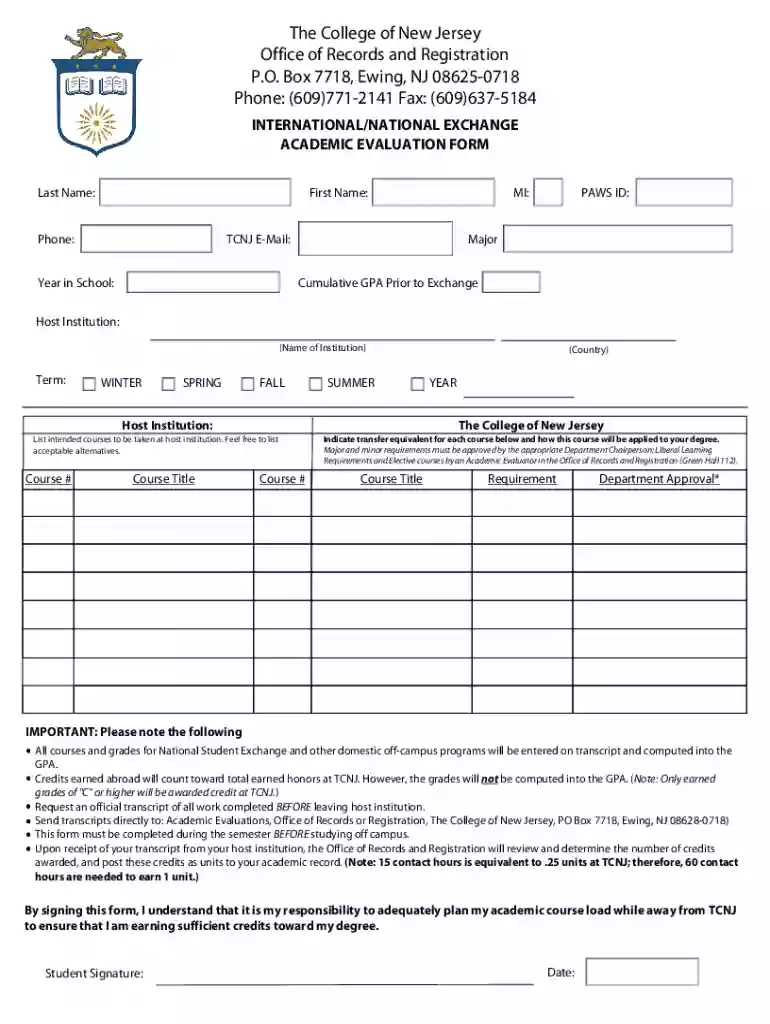
The College of New Jersey Office of Records and Registration 2026

Get Form
The College of New Jersey Office of Records and Registration Preview on Page 1

Here's how it works

01. Edit your form online
Type text, add images, blackout confidential details, add comments, highlights and more.

02. Sign it in a few clicks
Draw your signature, type it, upload its image, or use your mobile device as a signature pad.

03. Share your form with others
Send it via email, link, or fax. You can also download it, export it or print it out.

Definition & Meaning

The College of New Jersey Office of Records and Registration is a pivotal administrative body within the institution, responsible for maintaining accurate academic records and ensuring seamless registration processes. This office handles course enrollment, grade recording, issuance of transcripts, and the management of student data. It plays a vital role in safeguarding students' academic history and supporting them in achieving their educational goals. By providing consistent and reliable services to students and faculty, the office ensures smooth academic operations at the college.

How to Use The College of New Jersey Office of Records and Registration

To effectively utilize the services of the Office of Records and Registration, students should familiarize themselves with its wide range of offerings. These include registering for courses, requesting official transcripts, and applying for graduation. Students can access these services through the college's online portal, which offers an intuitive interface for navigating various academic needs. Additionally, office staff are available to assist students with any inquiries related to registration, course adjustments, and record verification. It is crucial for students to adhere to deadlines and guidelines provided by the office to ensure timely completion of academic processes.

Steps to Complete the The College of New Jersey Office of Records and Registration Form

  1. Access the Form: Obtain the form through the college’s online portal or directly from the Office of Records and Registration.
  2. Personal Information: Fill in your personal details, such as student ID, name, and contact information, ensuring accuracy.
  3. Course Details: List the courses you intend to register for, including course codes and corresponding sections as indicated in the course catalog.
  4. Approvals: Seek necessary approvals from departmental advisors or faculty members for course enrollments or changes.
  5. Submission: Submit the completed form either online through the student portal or physically at the office, adhering to submission deadlines.
  6. Confirmation: Await confirmation from the office regarding the processing of your registration or request. Keep a copy for your records.

Important Terms Related to The College of New Jersey Office of Records and Registration

  • Transcript: An official record of a student's academic performance, listing all courses taken and grades received.
  • Add/Drop Period: A designated timeframe at the beginning of each semester when students can adjust their course registrations without penalty.
  • Degree Audit: An evaluation tool that helps students track their progress toward meeting graduation requirements.
  • Enrollment Verification: A document verifying a student's enrollment status, often required for insurance or financial aid purposes.
  • Registrar: The official responsible for maintaining student records and overseeing registration processes.

Who Typically Uses The College of New Jersey Office of Records and Registration

The primary users of the Office of Records and Registration include students, faculty, and administrative staff at The College of New Jersey. Students rely on the office for course registration, transcript requests, and graduation applications. Faculty members interact with the office to verify student enrollments, submit grades, and update course offerings. Administrative staff collaborate with the office to ensure compliance with academic policies and maintain the integrity of student records.


decoration image ratings of Dochub

Key Elements of The College of New Jersey Office of Records and Registration

The office operates with several core elements designed to facilitate academic administration:

  • Student Records: Maintains and secures all academic records, ensuring privacy and accuracy.
  • Course Registration: Manages the registration process from initial enrollment through course completion.
  • Transcripts and Documentation: Issues official transcripts and enrollment verifications upon request.
  • Academic Calendars: Publishes and adheres to academic calendars that delineate important dates and deadlines for students and faculty.
  • Graduation Requirements: Provides guidance on fulfilling degree requirements and manages the application process for graduation.

Digital vs. Paper Version

The Office of Records and Registration offers both digital and paper formats for many of its services to accommodate different preferences and needs:

  • Digital Services: Most services are available digitally via the college's online portal, which streamlines interactions and reduces processing time. Students prefer this option for its convenience and immediate access to records.
  • Paper Forms: Paper forms are still available for those who prefer traditional submission methods or when digital access is limited. These forms can be submitted in person at the office for processing. Both formats ensure that all students and faculty can access the necessary services efficiently, regardless of their preferred method.

Application Process & Approval Time

The application process for various services offered by the office typically involves completing relevant forms and obtaining necessary approvals. The timeline for processing these applications varies based on the complexity of the request:

  • Course Registration: Usually processed immediately during the registration period through the online portal.
  • Transcript Requests: Typically fulfilled within seven to ten business days, depending on the method of delivery.
  • Graduation Applications: Require earlier submission and thorough review, with approval times communicated well in advance of graduation dates. Understanding these timelines ensures students and faculty can plan accordingly and avoid any unnecessary delays in their academic activities.

Who Issues the Form

The academic forms associated with The College of New Jersey Office of Records and Registration are issued by the office itself. These forms are carefully designed to meet the needs of students and faculty while ensuring compliance with institutional policies. The office takes responsibility for updating and distributing the forms, ensuring they reflect any changes in academic regulations or procedures. By centrally issuing these forms, the office maintains consistency and accuracy across all its operations.

See more The College of New Jersey Office of Records and Registration versions

We've got more versions of the The College of New Jersey Office of Records and Registration form. Select the right The College of New Jersey Office of Records and Registration version from the list and start editing it straight away!
Versions Form popularity Fillable & printable
2016 4.4 Satisfied (29 Votes)
2014 4 Satisfied (38 Votes)
be ready to get more

Complete this form in 5 minutes or less

Get form

Got questions?

We have answers to the most popular questions from our customers. If you can't find an answer to your question, please contact us.
Contact us
You must contact that school, even if it has changed location; You attended a degree granting college or university that closed. If the college or university was located in New Jersey, visit the Office of the Secretary of Higher Education for the location of the records; You attended a four-year nursing program; or.
Delivery Type Electronic credentials are delivered as soon as the sending institution processes the request, often within one business day. Printed Transcript requests will typically be mailed within 1 business day.
Here is a detailed, step-by-step guide to obtaining your academic transcript. Contact Your Educational Institution: docHub out to your school or universitys registrar or student records office. Submit an Application: Submit a form to request a transcript.
Most colleges allow you to order copies of transcripts online, by mail, or in person via the office of admissions or registrars office. Youll complete a transcript request form, pay a small fee, and may have to provide proof of identification.
How do I request an Official Transcript [Current Student]? Login to PAWS and go to Student Center. Look under Academics and open other academic list. Select Transcript: View Official and click blue double arrow. Fill out information and submit.

Security and compliance

At DocHub, your data security is our priority. We follow HIPAA, SOC2, GDPR, and other standards, so you can work on your documents with confidence.

Learn more
ccpa2
pci-dss
gdpr-compliance
hipaa
soc-compliance
be ready to get more

Complete this form in 5 minutes or less

Get form

People also ask

The College of New Jersey again earned a strong 4.5-star rating (out of five) on Moneys 2025 list of best colleges, sponsored by SoFi. TCNJ tied for the highest rating among New Jersey public institutions and tied for the second-highest rating in the state behind only Princeton.
Current students may request their transcripts through PAWS via the Academic Records tile and select Request Transcript (NSC) from the left hand menu. If you are having log-in problems or you cannot remember your login information, contact the HelpDesk at (609) 771-2660 or helpdesk@tcnj.edu.

Related links