



Here's how it works



How to use or fill out maricopa extend with our platform

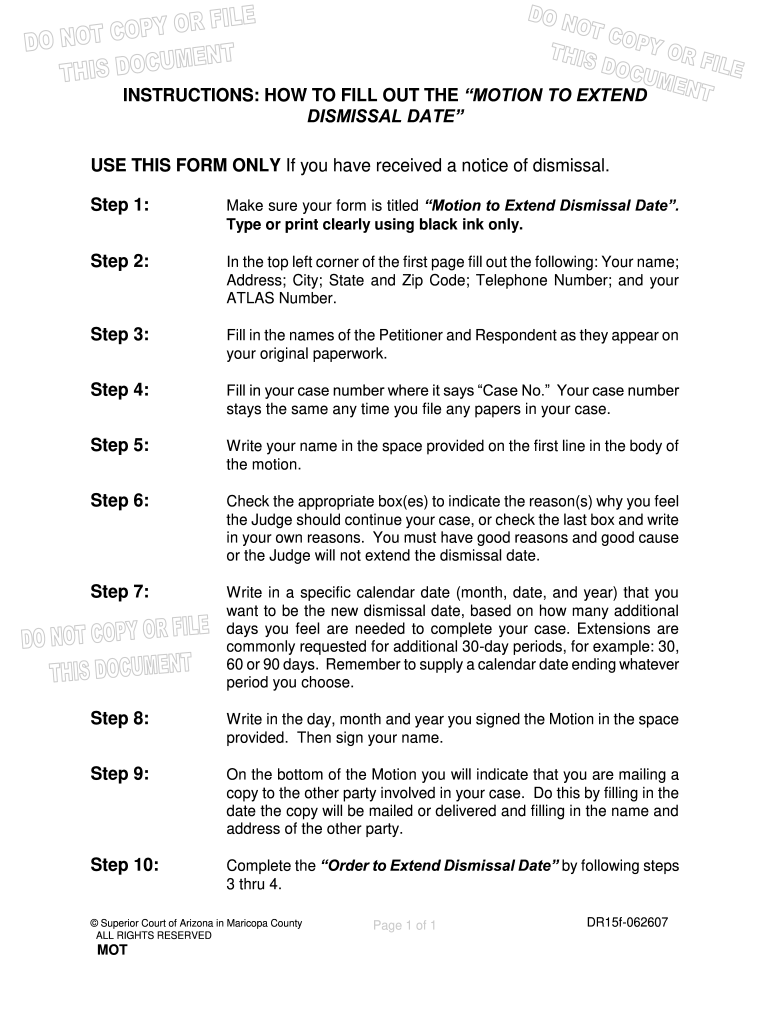
- Click ‘Get Form’ to open the 'Motion to Extend Dismissal Date' in the editor.
- In the top left corner, enter your name, address, city, state, zip code, telephone number, and ATLAS number clearly.
- Fill in the names of the Petitioner and Respondent as they appear on your original paperwork.
- Enter your case number where it says 'Case No.' This remains consistent for all filings related to your case.
- Write your name in the designated space within the body of the motion.
- Check the appropriate box(es) indicating why you believe an extension is warranted or provide your own reasons if necessary.
- Specify a new dismissal date by writing in a calendar date that reflects how many additional days you need.
- Indicate the date you signed the motion and sign your name in the provided space.
- At the bottom of the motion, fill in details about mailing a copy to the other party involved.
- Complete the 'Order to Extend Dismissal Date' by following steps 3 and 4 from above.
Start using our platform today for free to streamline your document editing and form completion!
It's free
See more maricopa extend versions
| Versions | Form popularity | Fillable & printable |
|---|---|---|
| 2007 | 4.9 Satisfied (381 Votes) |
Got questions?
What is the best way to electronically sign my maricopa extend?
A lot of software solutions are available out there for document modifying and signing. DocHub is one of the most in-demand online solutions that comply with all security and compliance requirements and guarantees your electronically signed documentation is legally enforceable. All you need to give it a try is to register an account, upload your maricopa extend, provide the necessary details, and click Sign. Generate your electronic signature by typing, drawing it, uploading its picture to your form, or scanning a unique QR code.
Can I edit maricopa extend on my phone?
As a comprehensive document modifying platform, DocHub is available on smart phones. Open DocHub in your choice of mobile internet browser and use our intelligent mobile-friendly toolset to fill out your maricopa extend.
Security and compliance
At DocHub, your data security is our priority. We follow HIPAA, SOC2, GDPR, and other standards, so you can work on your documents with confidence.
Learn more