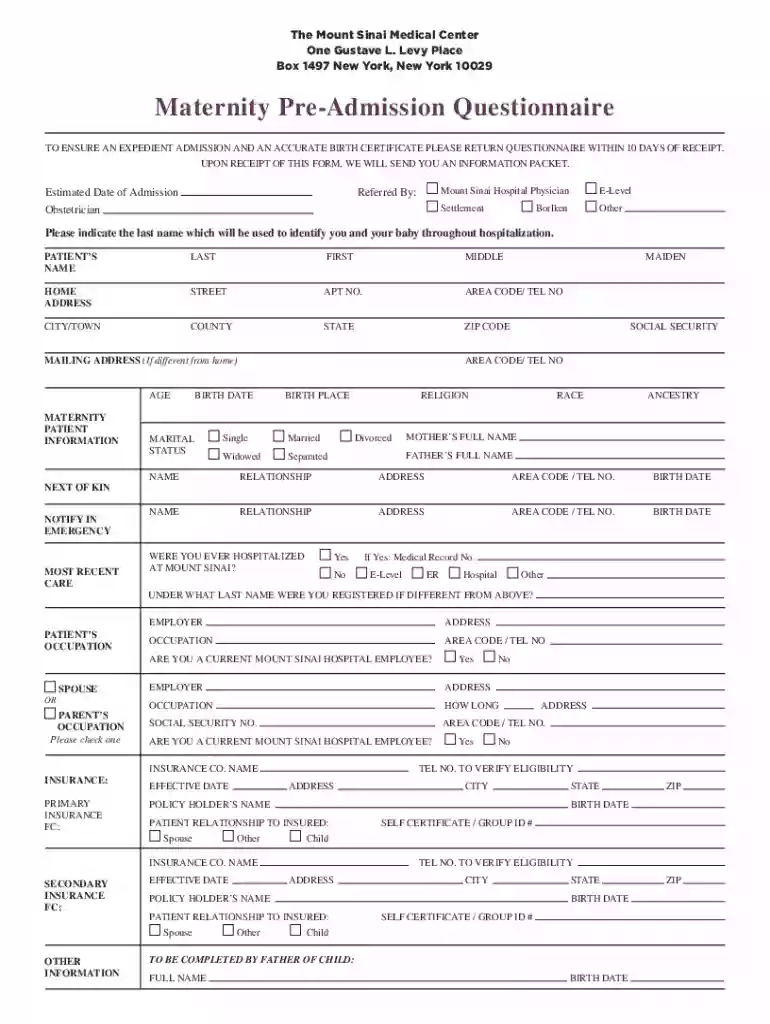
Maternity Pre-Admission Questionnaire 2026

Get Form
Maternity Pre-Admission Questionnaire Preview on Page 1

Here's how it works

01. Edit your form online
Type text, add images, blackout confidential details, add comments, highlights and more.

02. Sign it in a few clicks
Draw your signature, type it, upload its image, or use your mobile device as a signature pad.

03. Share your form with others
Send it via email, link, or fax. You can also download it, export it or print it out.

How to use or fill out Maternity Pre-Admission Questionnaire with our platform

Form edit decoration
9.5
Ease of Setup
DocHub User Ratings on G2
9.0
Ease of Use
DocHub User Ratings on G2
  1. Click ‘Get Form’ to open the Maternity Pre-Admission Questionnaire in the editor.
  2. Begin by entering your Estimated Date of Admission and the name of the referring physician. This information is crucial for accurate processing.
  3. Fill in your personal details, including your full name, home address, contact number, age, and marital status. Ensure that all fields are completed accurately to avoid delays.
  4. Provide information about your parents and next of kin. This section is important for emergency contacts during your stay.
  5. Indicate any previous hospitalizations at Mount Sinai and provide relevant details if applicable. This helps in maintaining your medical history.
  6. Complete the insurance information section thoroughly. Include primary and secondary insurance details to ensure coverage during your admission.
  7. Review all entered information for accuracy before submitting the form. Use our platform’s editing features to make any necessary adjustments easily.

Start filling out your Maternity Pre-Admission Questionnaire today for a seamless admission experience!

See more Maternity Pre-Admission Questionnaire versions

We've got more versions of the Maternity Pre-Admission Questionnaire form. Select the right Maternity Pre-Admission Questionnaire version from the list and start editing it straight away!
Versions Form popularity Fillable & printable
2022 4.7 Satisfied (62 Votes)
2015 4.2 Satisfied (42 Votes)
be ready to get more

Complete this form in 5 minutes or less

Get form

Got questions?

We have answers to the most popular questions from our customers. If you can't find an answer to your question, please contact us.
Contact us

Based on eSignature regulations, forms signed digitally have the same validity as traditionally approved ones. You can electronically sign almost any business and private documentation. Four types of paperwork still call for wet signatures only - wills and testamentary trusts, court orders and other court papers, state statutes governing divorce, adoption, or other family law, and notice of cancellation of utility services. If you follow the guidelines and use a trustworthy and compliant software solution, like DocHub, you can eSign your Maternity Pre-Admission Questionnaire without printing it.

Having a swift editing platform like DocHub, you do not need anything but a browser and internet connection to modify your Maternity Pre-Admission Questionnaire on the internet easily. Add your document or find the relevant form in DocHub’s catalog, open our editor with a single click, and finish it electronically. To revise your forms anytime, sign up a free profile with DocHub.

Pre-admission testing is a necessary step to ensure your health and safety before you undergo any surgical procedure. It is typically conducted within 30 days leading up to surgery. The optimal testing time should take place between two and four weeks prior to surgery to allow adequate time for results.
Hospital pre-registration for labor and delivery is basically the business end of giving birth. Its your chance to fill out the various forms required by your health care facility with the goal of speeding up your admission process.
When you have regular, painful contractions lasting one minute each and occurring at least every five minutes for more than two hours, its time to go to the hospital. This is the transition from early to active labor.

Security and compliance

At DocHub, your data security is our priority. We follow HIPAA, SOC2, GDPR, and other standards, so you can work on your documents with confidence.

Learn more
ccpa2
pci-dss
gdpr-compliance
hipaa
soc-compliance
be ready to get more

Complete this form in 5 minutes or less

Get form

People also ask

Pre-registering helps ensure a more relaxed and efficient check-in experience when the big day arrives. By taking care of the necessary paperwork in advance, you can focus on what matters most - welcoming your baby.
What happens during a preconception counseling appointment? A preconception counseling appointment may include exams and tests to check your health and a medical history to identify risk factors. Your provider can also educate you on improving your chances of becoming pregnant. Physical exam.

Related links