Type text, add images, blackout confidential details, add comments, highlights and more.
02. Sign it in a few clicks
Draw your signature, type it, upload its image, or use your mobile device as a signature pad.
03. Share your form with others
Send florida form 72190 via email, link, or fax. You can also download it, export it or print it out.
How to use or fill out Florida Form 72190 with our platform
Ease of Setup
DocHub User Ratings on G2
Ease of Use
DocHub User Ratings on G2
Click ‘Get Form’ to open it in the editor.
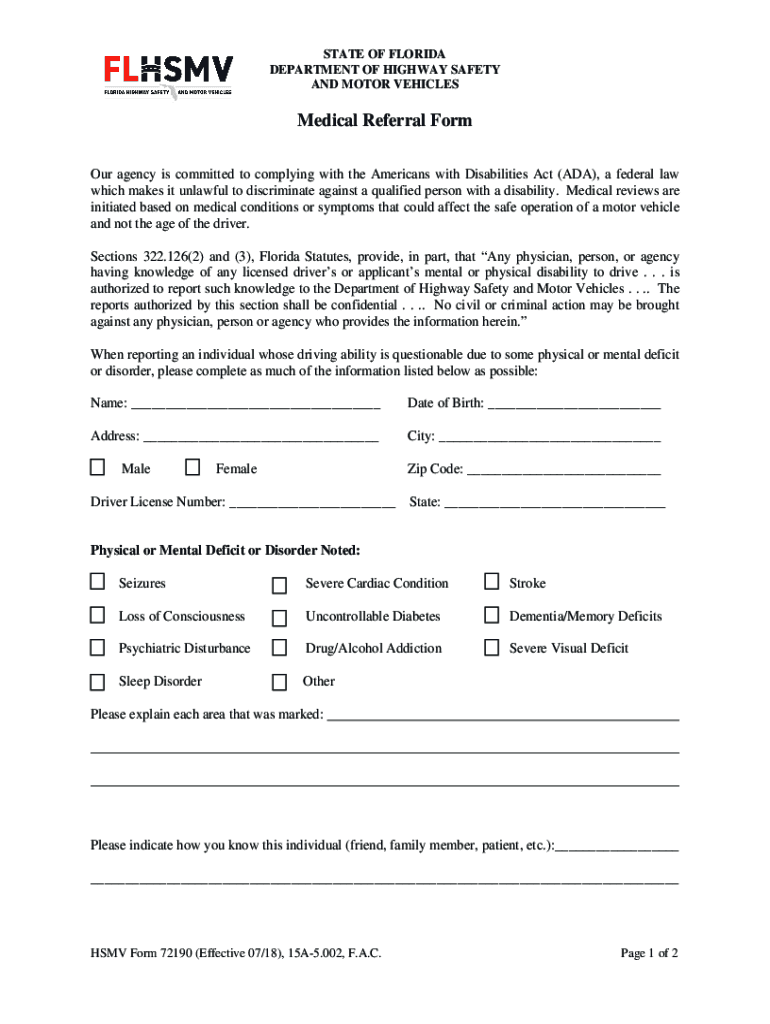
Begin by entering the individual's name and date of birth in the designated fields. Ensure accuracy as this information is crucial for identification.
Fill in the address, city, and zip code. Select the gender by checking either 'Male' or 'Female'.
Input the driver's license number and state. This helps link the report to the correct individual.
Mark any physical or mental deficits observed from the provided list. If applicable, explain each area marked in the space provided.
Indicate your relationship to the individual being reported (e.g., friend, family member). This context can be important for review purposes.
Complete your information as the reporting person, including name, agency (if applicable), and signature. Ensure all required fields are filled out before submission.
Finally, mail the completed form to the Bureau of Motorist Compliance at the address provided on the form.
Start using our platform today to fill out Florida Form 72190 quickly and efficiently!
HSMV Form 72190HSMV 72119 formFLHSMV medical report FormHSMV Form 72010 pdfFL DMV form 82040FLHSMV Report of Eye Exam Form 72010Fl DMV formsFl form 82053
Security and compliance
At DocHub, your data security is our priority. We follow HIPAA, SOC2, GDPR, and other standards, so you can work on your documents with confidence.
HSMV 72190 (Effective 07/18), 15A-5.002, F.A.C.. STATE OF FLORIDA DEPARTMENT OF HIGHWAY SAFETY AND. MOTOR VEHICLES. MEDICAL REFERRAL FORM. Our agency isRead more
Cookie consent notice
This site uses cookies to enhance site navigation and personalize your experience.
By using this site you agree to our use of cookies as described in our Privacy Notice.
You can modify your selections by visiting our Cookie and Advertising Notice.