




Here's how it works

01. Edit your wellness health screening claim form online
Type text, add images, blackout confidential details, add comments, highlights and more.

02. Sign it in a few clicks
Draw your signature, type it, upload its image, or use your mobile device as a signature pad.

03. Share your form with others
Send trustmark wellness health screening claim form via email, link, or fax. You can also download it, export it or print it out.
How to use or fill out Wellness Health Screening Rider Claim Form V08.19.docx with our platform

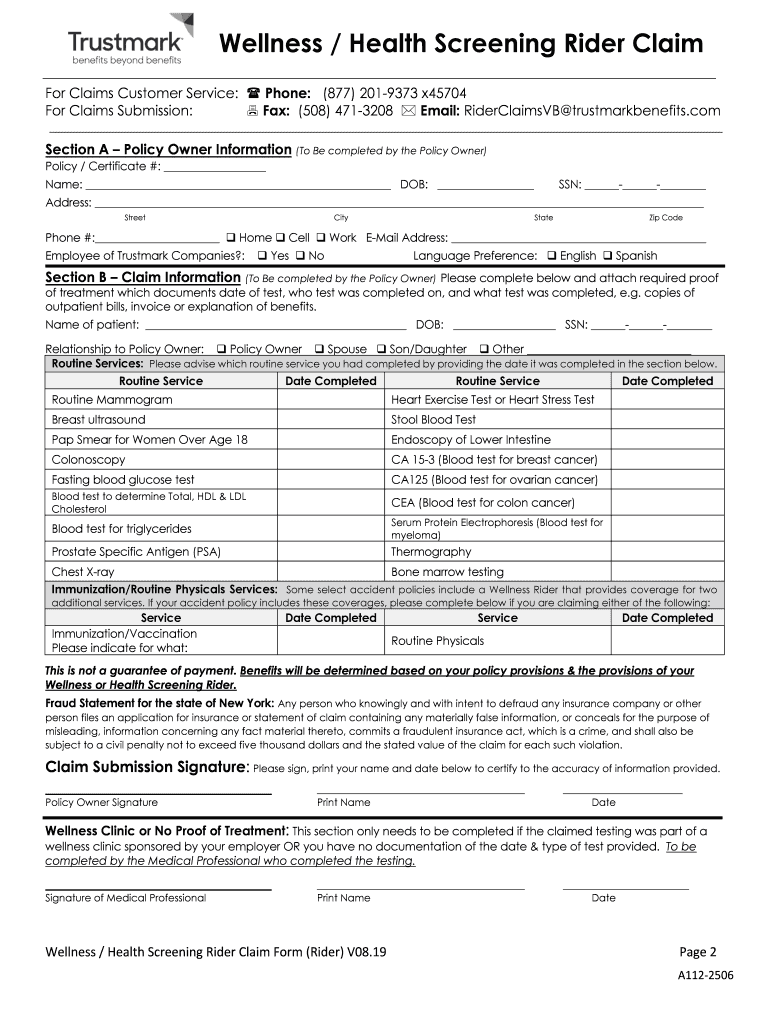
- Click ‘Get Form’ to open the Wellness Health Screening Rider Claim Form V08.19 in the editor.
- Begin by filling out Section A, which requires the Policy Owner's information. Ensure you provide your Policy/Certificate number, name, date of birth, and contact details accurately.
- Proceed to Section B to detail the claim information. Include the patient's name, relationship to the Policy Owner, and document all routine services completed along with their respective dates.
- Attach any required supporting documentation such as bills or test results that confirm the date of service and type of tests performed.
- Complete the Claim Submission Signature section by signing and dating it to certify that all provided information is accurate.
- If applicable, fill out sections for electronic communication consent and third-party authorization for better communication regarding your claim.
Start using our platform today for free to streamline your claims process effortlessly!
Fill out Wellness Health Screening Rider Claim Form V08.19.docx online
It's free
It's free
See more Wellness Health Screening Rider Claim Form V08.19.docx versions
We've got more versions of the Wellness Health Screening Rider Claim Form V08.19.docx form. Select the right Wellness Health Screening Rider Claim Form V08.19.docx version from the list and start editing it straight away!
Got questions?
We have answers to the most popular questions from our customers. If you can't find an answer to your question, please contact us.
Contact us
What is the Trustmark Wellness benefit?
If you have the wellness benefit,1 it can help you stay well by paying for the cost of screening tests, routine physicals or immunizations2, two per person, per calendar year, up to your benefits maximum. Plus, if you have family coverage, each family member is covered too, with up to 10 visits per year3.
What is the first step in completing a claim form?
2:57 6:57 It is okay to leave these lines blank. Write your name next to affidavit of fill in your name andMoreIt is okay to leave these lines blank. Write your name next to affidavit of fill in your name and your spouses name on the lines. Provided.
How do you fill out a health insurance claim form?
Typical sections of a claim form: Personal information like your name, address and date of birth. Insurance information such as a policy and group number. Reason for your visit including background information about your condition. Provider information including the doctors name and address.
How to fill out a health insurance affidavit?
Step-by-step procedure to file a claim Contact your insurer. The first step of claim process is to contact your insurer and intimate about the claim. Fill your claim form and attach the relevant documents. A surveyor conducts damage evaluation. Acceptance of your claim. Get the claim amount.
Security and compliance
At DocHub, your data security is our priority. We follow HIPAA, SOC2, GDPR, and other standards, so you can work on your documents with confidence.
Learn more




