




01. Edit your california public birth record online
Type text, add images, blackout confidential details, add comments, highlights and more.

Type text, add images, blackout confidential details, add comments, highlights and more.

Draw your signature, type it, upload its image, or use your mobile device as a signature pad.

Send it via email, link, or fax. You can also download it, export it or print it out.
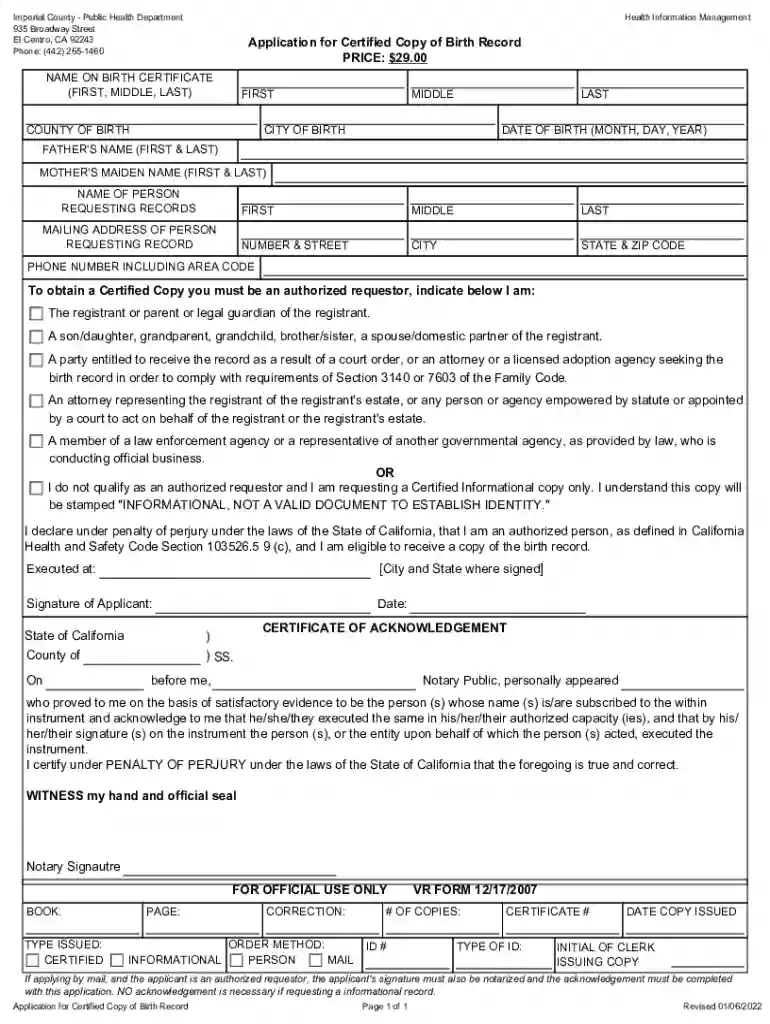
The "dandb businessdirectoryimperialcountyImperial County Public Health Department – El Centro, CA" form is an official application used to request a certified copy of a birth record. This document is essential for individuals who require legal verification of birth for various purposes such as applying for passports, enrolling in schools, or other governmental needs. The primary goal of the form is to ensure that applicants provide accurate personal and registrant details, which facilitates the issuance of certified birth records efficiently.
To effectively use this form, applicants must carefully follow each section's instructions, ensuring that all required information is provided accurately. Key components include providing personal details for both the requester and registrant, verifying eligibility for authorized requests, and understanding the process for submission. Ensuring that all sections are completed correctly minimizes delays in processing and enhances the likelihood of receiving the certified copy promptly.
Applicants can acquire the "dandb businessdirectoryimperialcountyImperial County Public Health Department – El Centro, CA" form through various channels. The form is available for download from the official Imperial County Public Health Department website, or it can be picked up in person at their El Centro office. Ensuring access to the latest version of the form is critical for processing it without issues.
Gather Required Information: Collect all necessary data such as personal identification, birth details, and requester information.
Fill Out the Personal Details Section: Input the registrant’s and requester's details as accurately as possible.
Verify Eligibility: Ensure you meet the criteria outlined for authorized requestors, such as being a close relative or legal guardian.
Payment: Prepare the required payment of $29.00. Ensure the method of payment accepted by the department (e.g., check or money order) is used.
Notarization (If Applicable): If submitting by mail, follow the instructions for notarization to validate your identity.
Submission: Decide on your submission method—either online, in-person, or by mail.
This application is predominantly utilized by individuals who need to obtain legally recognized birth records. Typical users include:


Those eligible to request a certified copy must usually be closely related to the person whose birth record is being sought, such as:

The processing time for the application varies based on the submission method and accuracy of information provided. Upon submitting the form, verification of the provided details will occur, usually resulting in a response within several weeks. Applicants are encouraged to ensure all information is precise to avoid delays.
To successfully complete this application, the following documents are typically required:
We've got more versions of the california public birth record form. Select the right california public birth record version from the list and start editing it straight away!
Upload your dandb businessdirectoryimperialcountyImperial County Public Health Department - El Centro , CA to DocHub (once you’ve created an account for this). If you need to fill out fields in it, use appropriate tools from the upper pane. For example, drop Signature Fields, assign each to specific person, and click on Sign → Request signatures from others. Customize your message for your recipients and click Send Request. You can also send your paperwork by fax or as a Signing link instead of using email (you’ll find these options by navigating to the Menu → Send)
When you edit your dandb businessdirectoryimperialcountyImperial County Public Health Department - El Centro , CA with DocHub, you simply will not need to look for other applications or services to eSign it. An electronic signature is part of DocHub’s comprehensive editing toolset, which allows you to apply changes in your form without switching between platforms. Simply complete your form, double-check the correctness of the information and place your electronic signature at the end to make it submission-ready within minutes.
At DocHub, your data security is our priority. We follow HIPAA, SOC2, GDPR, and other standards, so you can work on your documents with confidence.


