




Here's how it works



How to use or fill out SSA 623 form with our platform

- Click ‘Get Form’ to open the SSA 623 form in the editor.
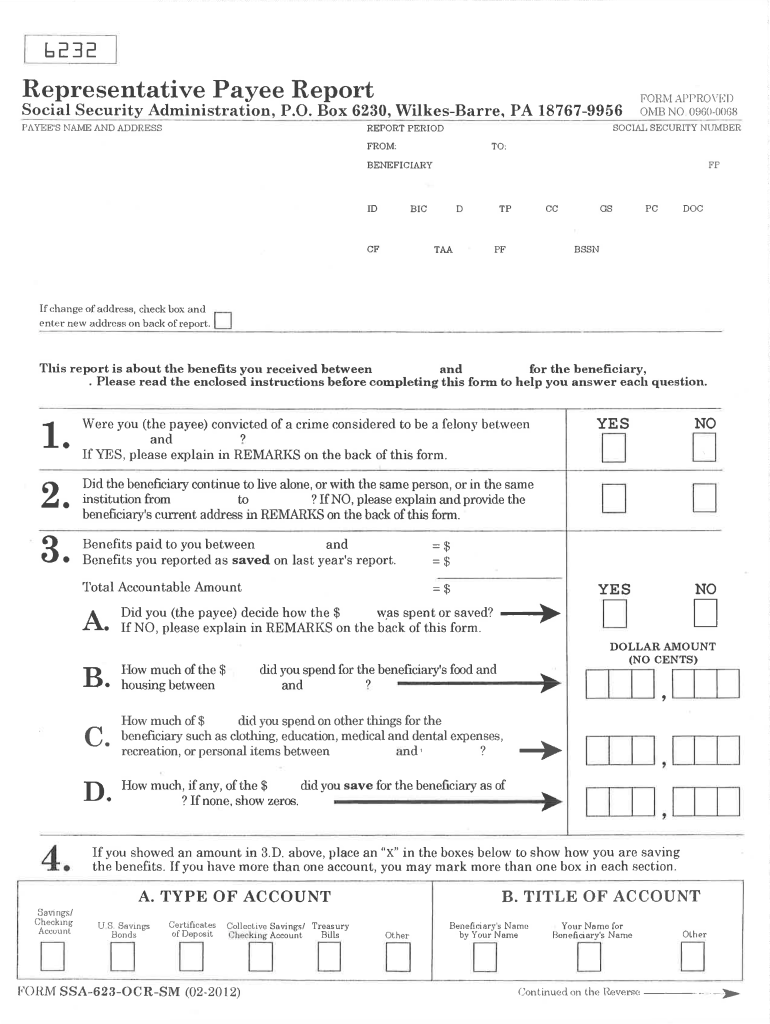
- Begin by entering the payee's name and address at the top of the form. Ensure that all details are accurate to avoid processing delays.
- Fill in the Social Security number and report period, specifying the dates for which you are reporting benefits received.
- In section 1, indicate whether you decided how the benefits were spent. If not, provide explanations in the remarks section on the back of the form.
- Complete sections regarding amounts spent on food, housing, and other expenses for the beneficiary. Be precise with dollar amounts and ensure clarity.
- If applicable, check boxes indicating how benefits are saved in various accounts. This includes savings accounts or U.S. Savings Bonds.
- Finally, sign and date the form. If signed by mark, ensure two witnesses also sign as required.
Start using our platform today to fill out your SSA 623 form easily and for free!
It's free
See more ssa 623 form versions
| Versions | Form popularity | Fillable & printable |
|---|---|---|
| 2012 | 4.8 Satisfied (305 Votes) |
Got questions?
How can I sign my ssa 623 form on iOS?
With DocHub, you can quickly sign your ssa 623 form or any other paperwork on iOS, even without installing additional applications. You can access your DocHub account from any internet-connected browser and fill out and sign your form in any preferred method with just a few clicks.
How to complete and sign ssa 623 online?
You can quickly complete, modify, and even eSign your ssa 623 using DocHub. Create a new profile and start your free trial. After that, you may upload the document with the form and easily make all the needed edits. No need to print on paper or use a third-party application to sign it, as you can put your electronic signature on your document quicker through DocHub.
What is an SSA 623 form?
What are the rules for a representative payee?
How do I report a representative payee to Social Security?
Security and compliance
At DocHub, your data security is our priority. We follow HIPAA, SOC2, GDPR, and other standards, so you can work on your documents with confidence.
Learn more




