




Here's how it works



How to use or fill out CUSTODY AND PARENTING TIME AGREEMENT FORM with our platform

- Click ‘Get Form’ to open the CUSTODY AND PARENTING TIME AGREEMENT FORM in the editor.
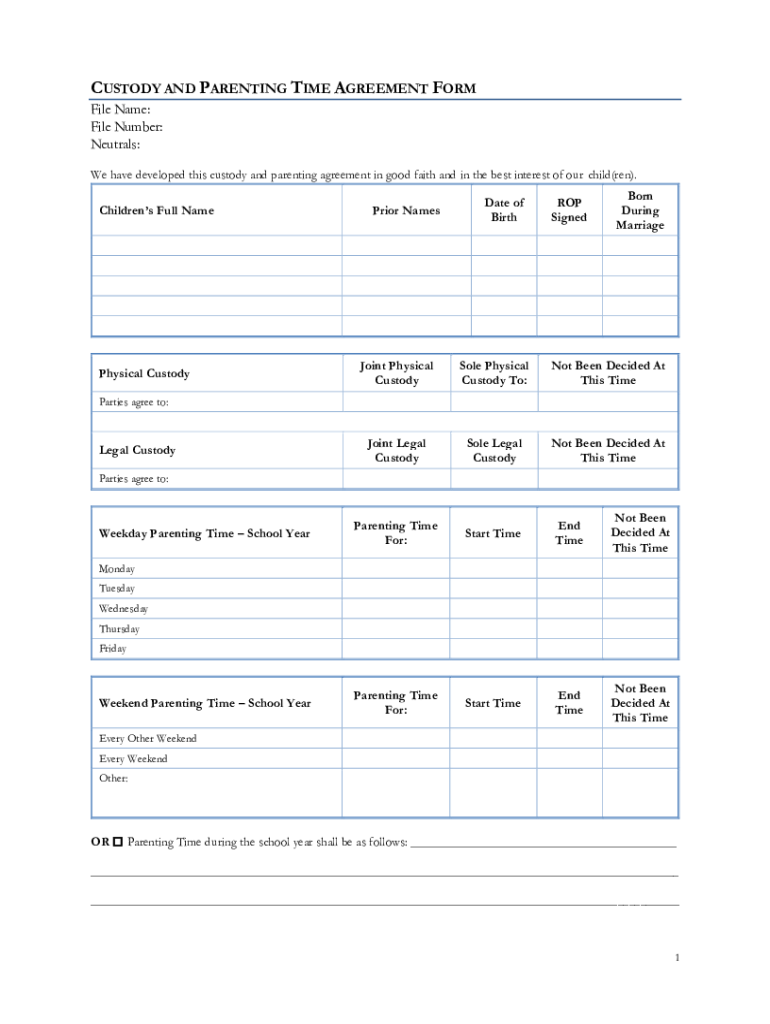
- Begin by entering the children's full names and their dates of birth in the designated fields. This information is crucial for identifying the parties involved.
- Specify the type of custody arrangement by selecting either 'Joint Physical Custody' or 'Sole Physical Custody.' If undecided, indicate that as well.
- Fill out the parenting time schedule, including start and end times for weekdays and weekends during both school year and summer. Be sure to clarify any specific conditions if applicable.
- Detail any transportation arrangements, specifying who will provide transportation or how it will be shared between parties.
- Review all sections carefully to ensure accuracy before saving your changes. Utilize our platform's features to sign and distribute the document as needed.
Start using our platform today to easily complete your CUSTODY AND PARENTING TIME AGREEMENT FORM for free!
It's free
See more CUSTODY AND PARENTING TIME AGREEMENT FORM versions
| Versions | Form popularity | Fillable & printable |
|---|---|---|
| 2018 | 4.7 Satisfied (46 Votes) |
Got questions?
How can I sign my custody agreement template on iOS?
With DocHub, you can rapidly sign your custody agreement template or any other document on iOS, even without setting up extra programs. You can access your DocHub account from any internet-connected browser and complete and sign your document in any preferred method with just a couple of clicks.
Can I sign my 50 50 custody while I edit it?
If you edit your 50 50 custody with DocHub, you will not need to look for other applications or solutions to sign it. An electronic signature is part of DocHub’s extensive editing toolset, which enables you to implement changes in your form without switching between platforms. Simply complete your form, double-check the correctness of the information and place your electronic signature at the end to make it submission-ready quickly.
What age is best for week on week off custody?
How long does it take for OCL to make a decision?
What custody arrangement is best for a child?
Security and compliance
At DocHub, your data security is our priority. We follow HIPAA, SOC2, GDPR, and other standards, so you can work on your documents with confidence.
Learn more


