Medicaid renewal form sc 2026

Get Form
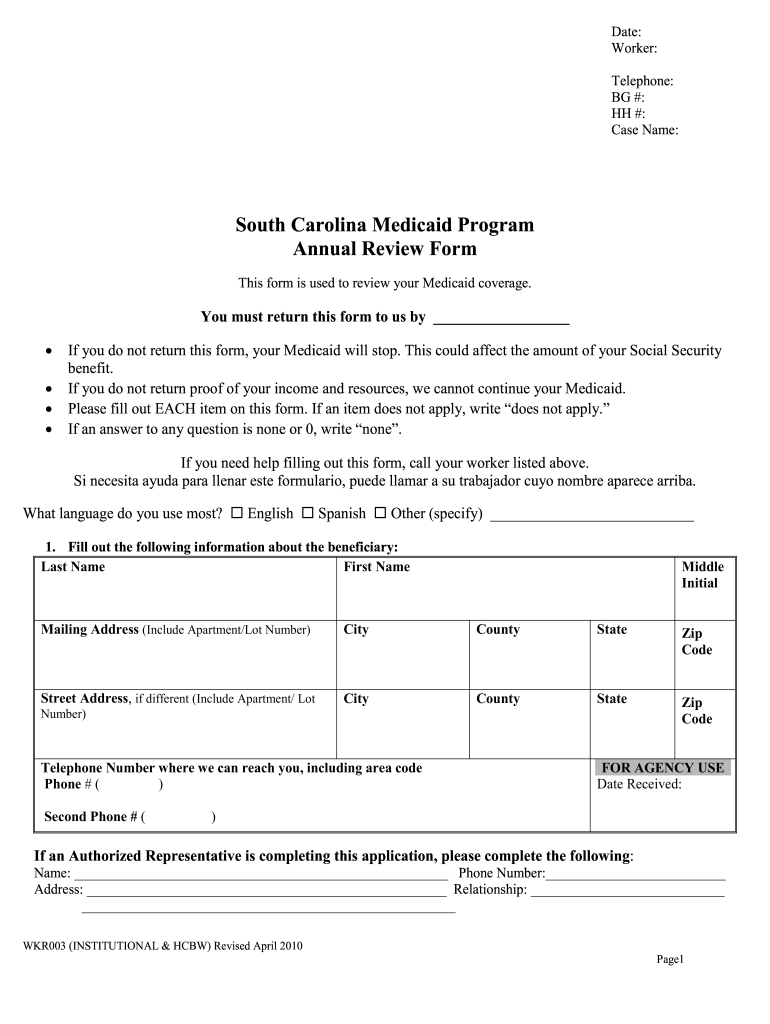
sc medicaid forms Preview on Page 1

Here's how it works

01. Edit your sc medicaid forms online
Type text, add images, blackout confidential details, add comments, highlights and more.
02. Sign it in a few clicks
Draw your signature, type it, upload its image, or use your mobile device as a signature pad.
03. Share your form with others
Send it via email, link, or fax. You can also download it, export it or print it out.

How to use or fill out medicaid renewal form sc with our platform

Form edit decoration
9.5
Ease of Setup
DocHub User Ratings on G2
9.0
Ease of Use
DocHub User Ratings on G2
  1. Click ‘Get Form’ to open the Medicaid Renewal Form SC in the editor.
  2. Begin by filling out your personal information, including your last name, first name, middle initial, mailing address, and contact numbers. Ensure all fields are completed accurately.
  3. List yourself, your spouse, and any dependent children along with their Social Security numbers and dates of birth. Indicate marital status for each individual.
  4. Provide details about employment for you and your dependents. If applicable, enter gross pay before taxes and include proof of income for the past four weeks.
  5. Complete sections regarding any additional income sources such as child support or unemployment benefits. Attach necessary documentation as required.
  6. Review the Rights and Responsibilities section carefully. Ensure you understand your obligations and rights under the Medicaid program before signing.

Start using our platform today to fill out your Medicaid Renewal Form SC easily and for free!

See more medicaid renewal form sc versions

We've got more versions of the medicaid renewal form sc form. Select the right medicaid renewal form sc version from the list and start editing it straight away!
Versions Form popularity Fillable & printable
2014 4.8 Satisfied (192 Votes)
2010 4.2 Satisfied (87 Votes)
be ready to get more

Complete this form in 5 minutes or less

Get form

Got questions?

We have answers to the most popular questions from our customers. If you can't find an answer to your question, please contact us.
Contact us
If you apply through Healthcare.gov and are eligible for Medicaid, they will automatically send us your application. If you need help, please call our Member Help Center at (888) 549-0820. You can also visit SC Thrive for help filling out your application!
Eligibility Criteria for Medicaid in South Carolina For a single individual: The monthly income limit is $2,510. For a family of four: The income limit is $5,200. Aged, Blind, or Disabled (ABD) category: One person has a limit of $1,255, while two people can have a combined limit of $1,704.
California Enrollment. ☎ Call the Medi-Cal Helpline: 800-541-5555, or 916-636-1980. To contact your county for a renewal, find the phone number here.
The South Carolina Long Term Care Assessment Form (SCDHHS Form 1718) is designed to gather necessary information about the medical, psychosocial, and functional status of a person to determine: 1. the level of care required to receive long term care services in a nursing facility or in a community setting and, 2.
South Carolina Healthy Connections Medicaid must be renewed every year. Here are the steps youll need to take to complete the process when you receive your review form.

People also ask

Generally, it takes up to 45 days for Healthy Connections to determine eligibility, though determination times can increase for certain applicant categories.
You can also complete your annual review form online at apply.scdhhs.gov when its time to renew. If you dont have all the info, return your signed and completed form anyway. We will follow up if we need anything. Once we receive your form, your Medicaid will continue while we assess you for the next year of coverage.

Related links