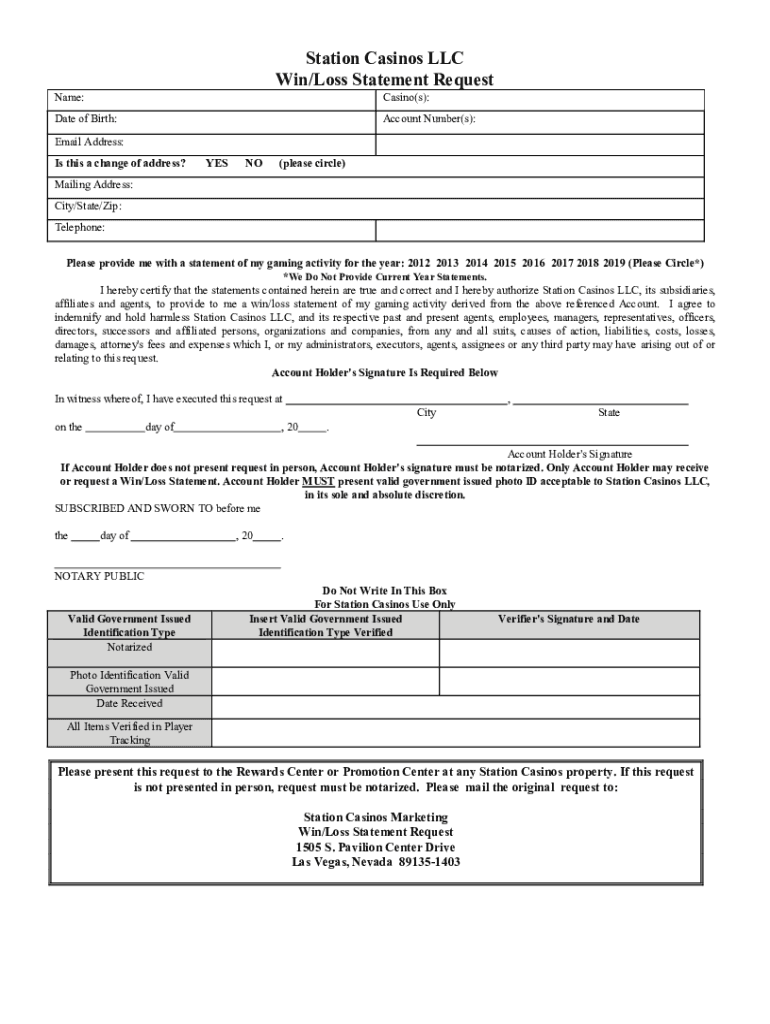
Station loss statement 2026

Get Form
station loss statement Preview on Page 1

Here's how it works

01. Edit your form online
Type text, add images, blackout confidential details, add comments, highlights and more.
02. Sign it in a few clicks
Draw your signature, type it, upload its image, or use your mobile device as a signature pad.
03. Share your form with others
Send it via email, link, or fax. You can also download it, export it or print it out.

How to quickly redact Station loss statement online

Form edit decoration
9.5
Ease of Setup
DocHub User Ratings on G2
9.0
Ease of Use
DocHub User Ratings on G2

Dochub is the greatest editor for modifying your paperwork online. Follow this simple instruction to edit Station loss statement in PDF format online at no cost:

  1. Sign up and sign in. Register for a free account, set a secure password, and proceed with email verification to start working on your forms.
  2. Upload a document. Click on New Document and choose the form importing option: add Station loss statement from your device, the cloud, or a secure link.
  3. Make changes to the sample. Take advantage of the top and left panel tools to redact Station loss statement. Insert and customize text, pictures, and fillable fields, whiteout unnecessary details, highlight the significant ones, and provide comments on your updates.
  4. Get your paperwork accomplished. Send the form to other individuals via email, create a link for faster document sharing, export the sample to the cloud, or save it on your device in the current version or with Audit Trail included.

Try all the advantages of our editor right now!

See more station loss statement versions

We've got more versions of the station loss statement form. Select the right station loss statement version from the list and start editing it straight away!
Versions Form popularity Fillable & printable
2019 4.8 Satisfied (145 Votes)
2017 4.3 Satisfied (25 Votes)
be ready to get more

Complete this form in 5 minutes or less

Get form

Got questions?

We have answers to the most popular questions from our customers. If you can't find an answer to your question, please contact us.
Contact us
What is Profit Loss Statement? Add all revenue earned over the accounting period. Add all expenditures made throughout the accounting period. Subtract total expenses from total revenue to know the difference. If the value is positive, it represents profit; if it is negative, it represents a loss.
You can ask your accountant to prepare a profit and loss statement for your company or you can build one yourself using the steps below.
Manually request a win/loss statment to be mailed to you by downloading and submitting our win/loss request below. Please note: Win/loss statments for the most current year past can be immediately printed from your my|Rewards Boarding Pass online account. (Create or Log In to your STN Account.)
PL is short for profit and loss statement. A business profit and loss statement shows you how much money your business earned and lost within a period of time. There is no difference between income statement and profit and loss. An income statement is often referred to as a PL.
The basic formula is simple: Revenue - Expenses = Profit (or Loss) Gross Profit = Revenue - COGS. Net Profit = Gross Profit - Operating Expenses - Interest - Taxes. Product Sales: $75,000. Materials: $20,000. Gross Profit = $100,000 - $35,000 = $65,000. Rent: $5,000. Net Profit = $65,000 - $45,000 = $20,000.

Security and compliance

At DocHub, your data security is our priority. We follow HIPAA, SOC2, GDPR, and other standards, so you can work on your documents with confidence.

Learn more
ccpa2
pci-dss
gdpr-compliance
hipaa
soc-compliance