
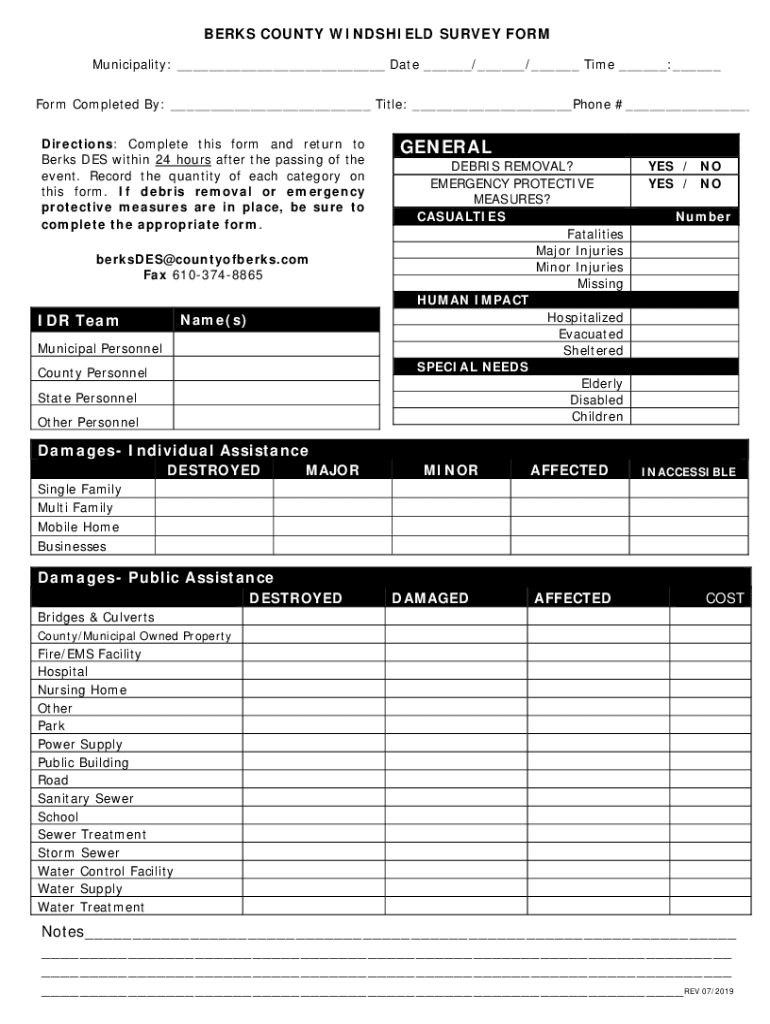







Definition & Purpose of the Berks County Windshield Survey Form
The Berks County Windshield Survey Form is designed to assist municipal personnel in evaluating damages and human impacts following an event, such as a natural disaster. It acts as a structured guide for reporting on the extent of property damage, casualties, and any special assistance required. The survey helps in identifying immediate community needs and distinguishing the severity of an incident across different regions within the county.
Key Functions
- Damage Assessment: Collects data on structural impacts and infrastructure damage.
- Casualty Reporting: Documents any injuries or fatalities resulting from the event.
- Needs Identification: Highlights any special needs or requirements for assistance, ensuring comprehensive aid planning.
How to Use the Berks County Windshield Survey Form
Municipal personnel are typically the primary users of this form, tasked with gathering detailed information post-event. The form provides structured sections to ensure precise data collection.
Step-by-Step Usage
- Initiate Survey: Begin at the site of the event, using the form to guide your observations.
- Record Damage: Log structural damages, specifying categories such as minor, major, or destroyed.
- Collect Casualty Information: Note any casualties with specific details about the nature of injuries or fatalities.
- Identify Special Needs: Indicate any special needs or resources required, such as medical aid or temporary shelter.
Steps to Complete the Windshield Survey Form
Completing the form requires attention to detail and a systematic approach, ensuring all necessary information is captured accurately.
Completing the Form
- Fill Out Personal and Event Information: Include details such as your name, the event name, and date.
- Detail Observations: Use clear, concise language to note your observations in each section of the form.
- Check for Thoroughness: Review all entries for completeness before moving to the next section.
- Submission: Submit the completed form within 24 hours to Berks DES for prompt action.
Who Typically Uses the Windshield Survey Form
The form is primarily used by municipal personnel, emergency responders, and disaster assessment teams responsible for initial assessments after an event.


User Responsibilities
- Accurate Reporting: Users must ensure all data is precise and reflect the current situation on the ground.
- Timely Submission: Forms should be submitted quickly for efficient aid and resource allocation.
- Comprehensive Evaluation: Personnel should cover all relevant areas of the impacted region during the survey.
Key Elements of the Survey Form
Main Sections
- Personal Contact Information: Includes the surveyor's details for follow-up communication.
- Detailed Damage Reporting: A structured section for listing types and severity of damage.
- Casualty Details: Input specifics about any human impact, including injured and missing persons.
- Special Needs Identification: Space to specify any immediate and critical requirements for assistance.
Important Terms Related to the Form
Glossary of Terms
- Minor Damage: Repairs required but the structure is still usable.
- Major Damage: Significant repairs needed; structure compromised but might be salvageable.
- Destroyed: The structure cannot be repaired.
- Special Needs: Requirements for additional resources or support due to the incident.
Submission Methods and Protocols
Submitting the completed survey form can be achieved through multiple avenues, ensuring prompt handling and response.
Methods for Submission
- Online Submission: Upload via the designated county portal for instant access and processing.
- Mail: Send the completed form to the Berks DES office, ensuring receipt within 24 hours.
- In-Person Delivery: Directly hand over the form to a designated official at the county office.
State-Specific Rules for the Form
The survey form follows Pennsylvania’s specific guidelines regarding disaster response and reporting, ensuring alignment with state protocols and requirements.
Compliance Requirements
- Adherence to Guidelines: All users must follow state directives on disaster management and resource allocation.
- Timeliness and Accuracy: The state mandates prompt and accurate submission of data to facilitate efficient disaster response efforts.
This detailed breakdown of the Berks County Windshield Survey Form provides clarity on its usage, completion, and importance, ensuring municipal personnel can effectively respond to and report on disaster events.




