AMVETS LADIES AUXILIARY 2026

Get Form
amvets ladies auxiliary forms Preview on Page 1

Here's how it works

01. Edit your amvets ladies auxiliary forms online
Type text, add images, blackout confidential details, add comments, highlights and more.
02. Sign it in a few clicks
Draw your signature, type it, upload its image, or use your mobile device as a signature pad.
03. Share your form with others
Send amvets ladies auxiliary membership via email, link, or fax. You can also download it, export it or print it out.

How to use or fill out AMVETS LADIES AUXILIARY with our platform

Form edit decoration
9.5
Ease of Setup
DocHub User Ratings on G2
9.0
Ease of Use
DocHub User Ratings on G2
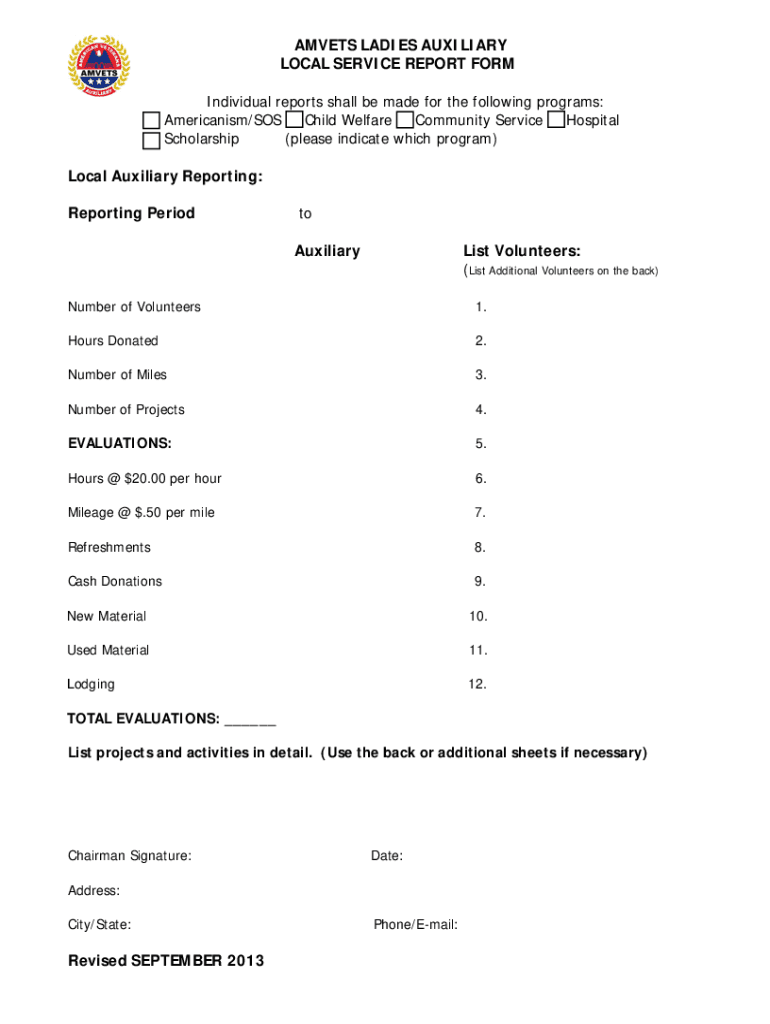
  1. Click ‘Get Form’ to open the AMVETS LADIES AUXILIARY Local Service Report Form in the editor.
  2. Begin by selecting the program you are reporting on, such as Americanism/SOS, Child Welfare, or Community Service. Clearly indicate your choice in the designated field.
  3. Fill in the reporting period by entering the start and end dates. This helps track your activities accurately.
  4. List all volunteers involved in your projects. If there are more than can fit in the provided space, feel free to add additional names on the back of the form.
  5. Complete the sections for hours donated, number of miles traveled, and number of projects completed. Ensure that each entry is accurate for proper evaluation.
  6. In the evaluations section, calculate and enter total hours at $20.00 per hour, mileage at $.50 per mile, and any other relevant expenses like refreshments or cash donations.
  7. Finally, provide a detailed list of projects and activities undertaken during this reporting period. Use additional sheets if necessary for thoroughness.
  8. Sign and date the form at the bottom before submitting it to ensure accountability.

Start using our platform today to streamline your form completion process for free!

See more AMVETS LADIES AUXILIARY versions

We've got more versions of the AMVETS LADIES AUXILIARY form. Select the right AMVETS LADIES AUXILIARY version from the list and start editing it straight away!
Versions Form popularity Fillable & printable
2014 4.1 Satisfied (59 Votes)
2012 4 Satisfied (37 Votes)
be ready to get more

Complete this form in 5 minutes or less

Get form

Got questions?

We have answers to the most popular questions from our customers. If you can't find an answer to your question, please contact us.
Contact us

You need to use only trusted software solutions with strong security compliance to approve your paperwork electronically. DocHub is just the type of service you need! It stores data on Amazon Web Servers and complies with all required security requirements and eSignature laws, so it’s a trusted way to electronically sign your ladies auxiliary near me or other documents with this tool.

If your go-to email service is Gmail, it is simple to incorporate your DocHub editor into your work. Modify your AMVETS LADIES AUXILIARY with DocHub instruments and connect it to your drafts in Gmail. See how effortless it can be to exchange papers and work together having a swift PDF editing solution at hand.

Membership in AMVETS Ladies Auxiliary is open to the mothers, wives, widows, grandmothers, sisters, daughters and granddaughters of AMVETS and female veterans who are currently serving or who have honorably served in the Armed Forces of the United States, including the National Guard and Reserve components, anytime
AMVETS members enjoy savings and benefits from our many partners and participate in post activities for fun, community service, and to help fellow veterans across many aspects of life.

Security and compliance

At DocHub, your data security is our priority. We follow HIPAA, SOC2, GDPR, and other standards, so you can work on your documents with confidence.

Learn more
ccpa2
pci-dss
gdpr-compliance
hipaa
soc-compliance
be ready to get more

Complete this form in 5 minutes or less

Get form