01. Edit your rutgers official transcript request online
Type text, add images, blackout confidential details, add comments, highlights and more.
02. Sign it in a few clicks
Draw your signature, type it, upload its image, or use your mobile device as a signature pad.
03. Share your form with others
Send otc transcript request via email, link, or fax. You can also download it, export it or print it out.
How to use or fill out Official Transcript Requirements - OTC Registrar with our platform
Ease of Setup
DocHub User Ratings on G2
Ease of Use
DocHub User Ratings on G2
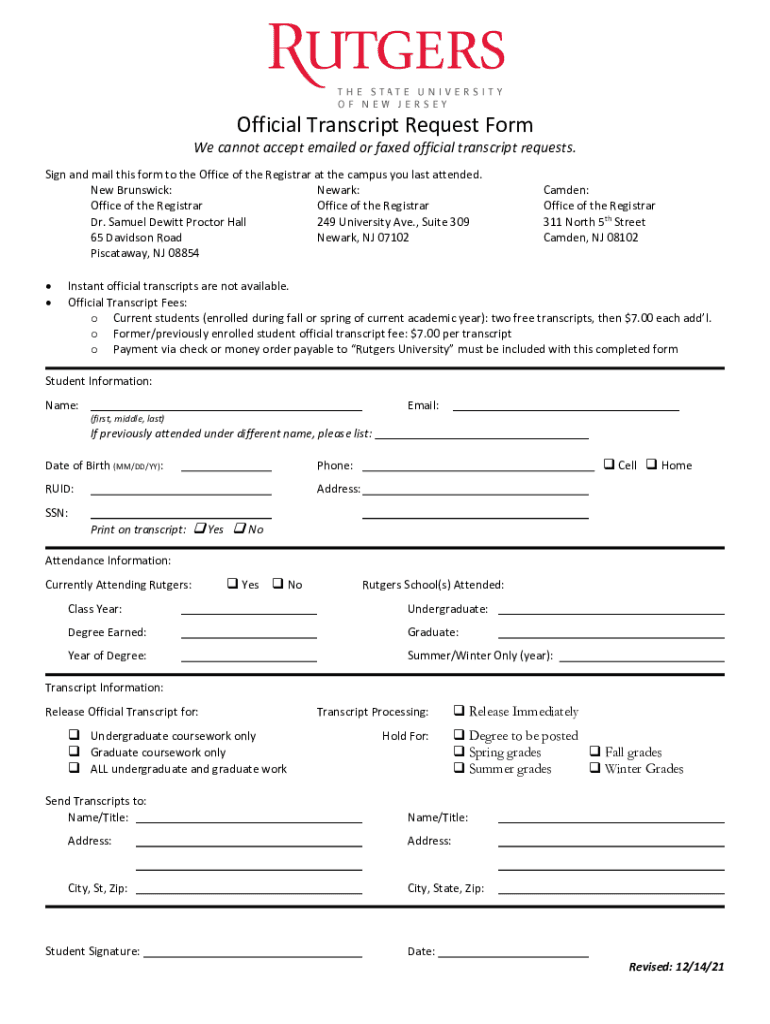
Click ‘Get Form’ to open the Official Transcript Request Form in the editor.
Begin by filling out your Student Information. Include your full name, email, date of birth, phone number, RUID, and address. If you attended under a different name, please specify.
Indicate whether you are currently attending Rutgers by selecting 'Yes' or 'No'. Provide details about the Rutgers School(s) you attended and your class year.
In the Transcript Information section, select what type of transcript you need: undergraduate coursework only, graduate coursework only, or all coursework.
Specify how you would like your transcripts processed by choosing from options such as 'Release Immediately' or 'Hold For Degree to be posted'.
Finally, sign and date the form before mailing it to the appropriate Office of the Registrar based on your last attended campus.
Start using our platform today for free to streamline your transcript request process!
Fill out Official Transcript Requirements - OTC Registrar online It's free
See more Official Transcript Requirements - OTC Registrar versions
We've got more versions of the Official Transcript Requirements - OTC Registrar form. Select the right Official Transcript Requirements - OTC Registrar version from the list and start editing it straight away!
Over-the-Counter Monograph Drug User Fee Amendments
Dec 29, 2025 Without the unique user fee ID number, the payment may not be applied, which could result in FDA not filing an OMOR request, or otherRead more
Cookie consent notice
This site uses cookies to enhance site navigation and personalize your experience.
By using this site you agree to our use of cookies as described in our Privacy Notice.
You can modify your selections by visiting our Cookie and Advertising Notice.