




Here's how it works



How to use or fill out CARE and FERA enrollment - PG&E with our platform

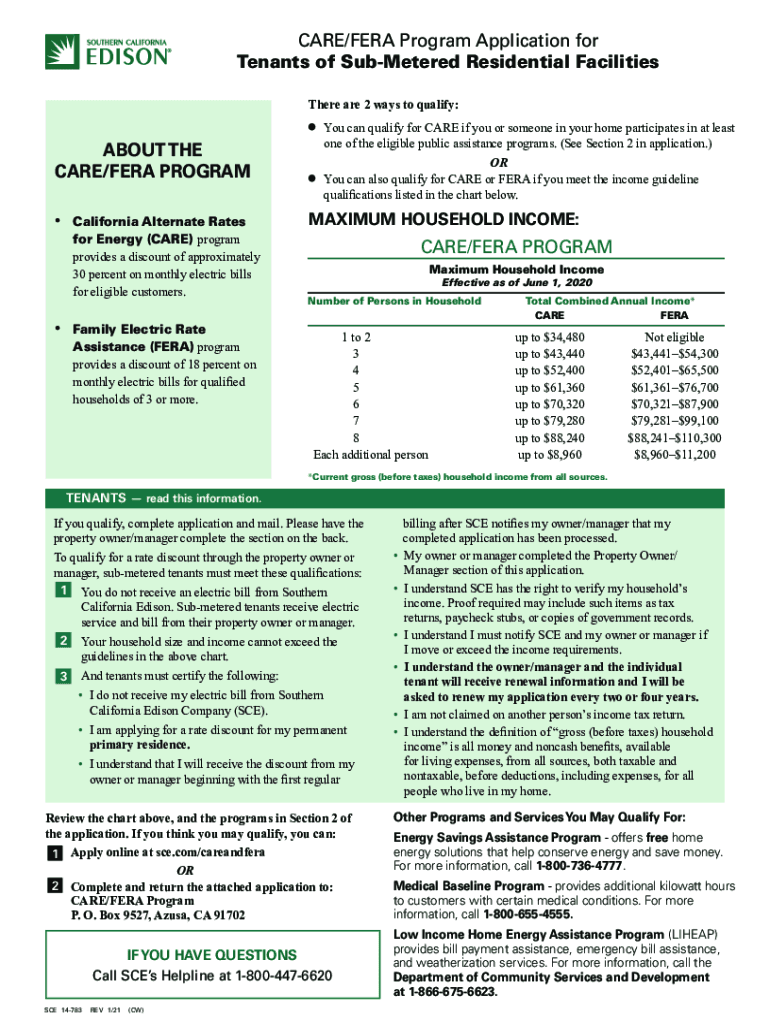
- Click ‘Get Form’ to open the CARE/FERA application in the editor.
- Begin by filling out your personal information in Section 1. Provide your name, home address (no P.O. Box), mailing address if different, and contact details including phone number and email.
- In Section 2, indicate if you or someone in your household participates in any public assistance programs by checking the appropriate boxes.
- If you do not qualify through public assistance, proceed to Section 3. Enter your total combined gross annual household income and check all sources of income listed.
- Finally, complete the Declaration section by signing and dating the application to confirm that all information is accurate.
Start using our platform today for free to streamline your CARE and FERA enrollment process!
It's free
See more CARE and FERA enrollment - PG&E, Pacific Gas and ElectricCARE and FERA enrollment - PG&E, Pacific Gas and ElectricCARE and FERA enrollment - PG&E, Pacific Gas and ElectricCARE and FERA enrollment - PG&E, Pacific Gas an versions
Got questions?
How can I send my CARE and FERA enrollment - PG&E, Pacific Gas and ElectricCARE and FERA enrollment - PG&E, Pacific Gas and ElectricCARE and FERA enrollment - PG&E, Pacific Gas and ElectricCARE and FERA enrollment - PG&E, Pacific Gas an for eSignature?
Upload your CARE and FERA enrollment - PG&E, Pacific Gas and ElectricCARE and FERA enrollment - PG&E, Pacific Gas and ElectricCARE and FERA enrollment - PG&E, Pacific Gas and ElectricCARE and FERA enrollment - PG&E, Pacific Gas an to DocHub (after you’ve set up an account for this). If you need to fill out fields in it, use appropriate tools from the upper pane. For instance, add Signature Fields, assign each to a particular party, and click on Sign → Request signatures from others. Change your message for your recipients and click Send Request. You can also send your form by fax or as a Signing link instead of using email (you’ll locate these options by navigating to the Menu → Send)
How to manage my CARE and FERA enrollment - PG&E, Pacific Gas and ElectricCARE and FERA enrollment - PG&E, Pacific Gas and ElectricCARE and FERA enrollment - PG&E, Pacific Gas and ElectricCARE and FERA enrollment - PG&E, Pacific Gas an from Gmail?
In case your go-to email service is Gmail, you can easily integrate your DocHub editor into your work. Edit your CARE and FERA enrollment - PG&E, Pacific Gas and ElectricCARE and FERA enrollment - PG&E, Pacific Gas and ElectricCARE and FERA enrollment - PG&E, Pacific Gas and ElectricCARE and FERA enrollment - PG&E, Pacific Gas an with DocHub tools and connect it to your drafts in Gmail. See how effortless it can be to exchange papers and collaborate with a swift PDF editing solution at hand.
What is the FERA program in California?
How to qualify for the PGE Care Program in California?
Who is eligible for the free weatherization program in California?
Security and compliance
At DocHub, your data security is our priority. We follow HIPAA, SOC2, GDPR, and other standards, so you can work on your documents with confidence.
Learn more




