Worker's Compensation division - Wisconsin Department of ... 2026

Get Form
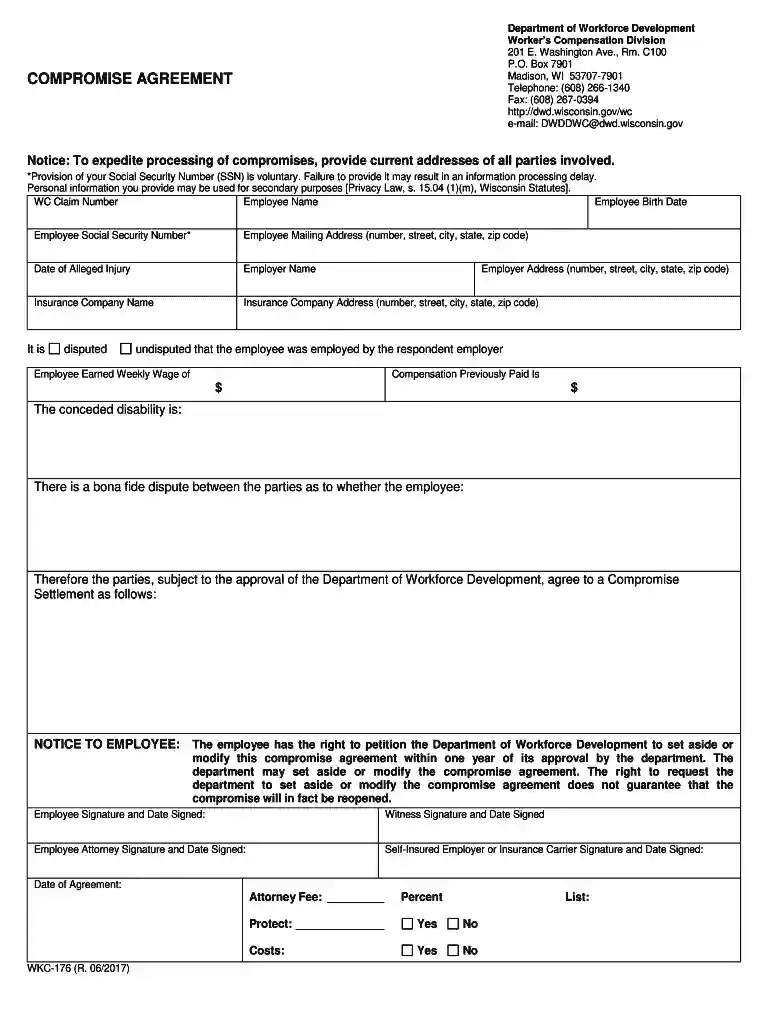
Worker's Compensation division - Wisconsin Department of ... Preview on Page 1

Here's how it works

01. Edit your form online
Type text, add images, blackout confidential details, add comments, highlights and more.

02. Sign it in a few clicks
Draw your signature, type it, upload its image, or use your mobile device as a signature pad.

03. Share your form with others
Send it via email, link, or fax. You can also download it, export it or print it out.

How to use or fill out Worker's Compensation division - Wisconsin Department of ... with our platform

Form edit decoration
9.5
Ease of Setup
DocHub User Ratings on G2
9.0
Ease of Use
DocHub User Ratings on G2
  1. Click ‘Get Form’ to open it in the editor.
  2. Begin by entering the WC Claim Number at the top of the form. This is essential for tracking your case.
  3. Fill in the Employee Name and Birth Date fields accurately to ensure proper identification.
  4. Provide the Employee Social Security Number if comfortable, noting that it is voluntary but may expedite processing.
  5. Complete the Employee Mailing Address section with current details, including street, city, state, and zip code.
  6. Indicate the Date of Alleged Injury and provide information about the Employer Name and Insurance Company Name along with their addresses.
  7. Specify whether it is disputed or undisputed that the employee was employed by the respondent employer.
  8. Enter details regarding Employee Earned Weekly Wage and Compensation Previously Paid in their respective fields.
  9. Review all entries for accuracy before signing. Ensure all parties involved sign where indicated.

Start using our platform today to complete your Worker's Compensation form easily and efficiently!

See more Worker's Compensation division - Wisconsin Department of ... versions

We've got more versions of the Worker's Compensation division - Wisconsin Department of ... form. Select the right Worker's Compensation division - Wisconsin Department of ... version from the list and start editing it straight away!
Versions Form popularity Fillable & printable
2017 4.8 Satisfied (175 Votes)
2009 4.4 Satisfied (57 Votes)
be ready to get more

Complete this form in 5 minutes or less

Get form

Got questions?

We have answers to the most popular questions from our customers. If you can't find an answer to your question, please contact us.
Contact us

Signing documents on a mobile device is fast, simple, and doesn’t require software installation if you have an account with DocHub. Log in from any browser, complete your empty fields with your data, and click on Sign → Create your signature. You can draw your electronic signature the same way you usually do on paper, add its image to your Worker's Compensation division - Wisconsin Department of ..., or type in your name and stylize its look. No matter what option you choose, your documentation will be valid.

With a swift editing system like DocHub, you do not need anything but a browser and internet connection to edit your Worker's Compensation division - Wisconsin Department of ... online easily. Add your file or get the relevant form in DocHub’s catalog, open our editor with a single click, and complete it digitally. To edit your forms anytime, register a free account with DocHub.

Workers compensation is protection mandated by Wisconsin law for a worker and his or her dependents against injury and death occurring in the course of employment. It is not health insurance and is not intended to compensate for disability other than disability caused by injury arising out of employment.
Intentional acts: When a worker intentionally causes their workplace injuries or illnesses, they are not covered under a workers comp insurance policy. Illegal activities: Employee injuries due to illegal activities at the worksite are not covered by an organizations workers compensation insurance policy.
Wisconsin Employers that meet specific requirements are required to carry Workers Compensation insurance unless they qualify for Self-Insured status. Employers receive the assurance they will not be sued for damages, medical care and lost wages if their employees get injured while working.

Security and compliance

At DocHub, your data security is our priority. We follow HIPAA, SOC2, GDPR, and other standards, so you can work on your documents with confidence.

Learn more
ccpa2
pci-dss
gdpr-compliance
hipaa
soc-compliance
be ready to get more

Complete this form in 5 minutes or less

Get form

People also ask

Your obligations have a documented return to work program describing the steps you will take if a worker is injured. maintain a record of work-related injuries. notify your insurer of all workplace injuries within 48 hours.
Intentional acts: When a worker intentionally causes their workplace injuries or illnesses, they are not covered under a workers comp insurance policy. Illegal activities: Employee injuries due to illegal activities at the worksite are not covered by an organizations workers compensation insurance policy.
While workers cannot be fired in Wisconsin while on workers compensation, there are also protections when it comes to returning to the job. For example, employers need reasonable cause to refuse to rehire a worker from their previous job.
Workers compensation is protection mandated by Wisconsin law for a worker and his or her dependents against injury and death occurring in the course of employment. It is not health insurance and is not intended to compensate for disability other than disability caused by injury arising out of employment.
All questions relating to the Wisconsin Workers Compensation Act should be directed to the Department of Workforce Development (DWD) at (608) 266-1340. All questions relating to the Wisconsin Workers Compensation Insurance Pool should be directed to the Wisconsin Compensation Rating Bureau (WCRB) at (262) 796-4540.

Related links