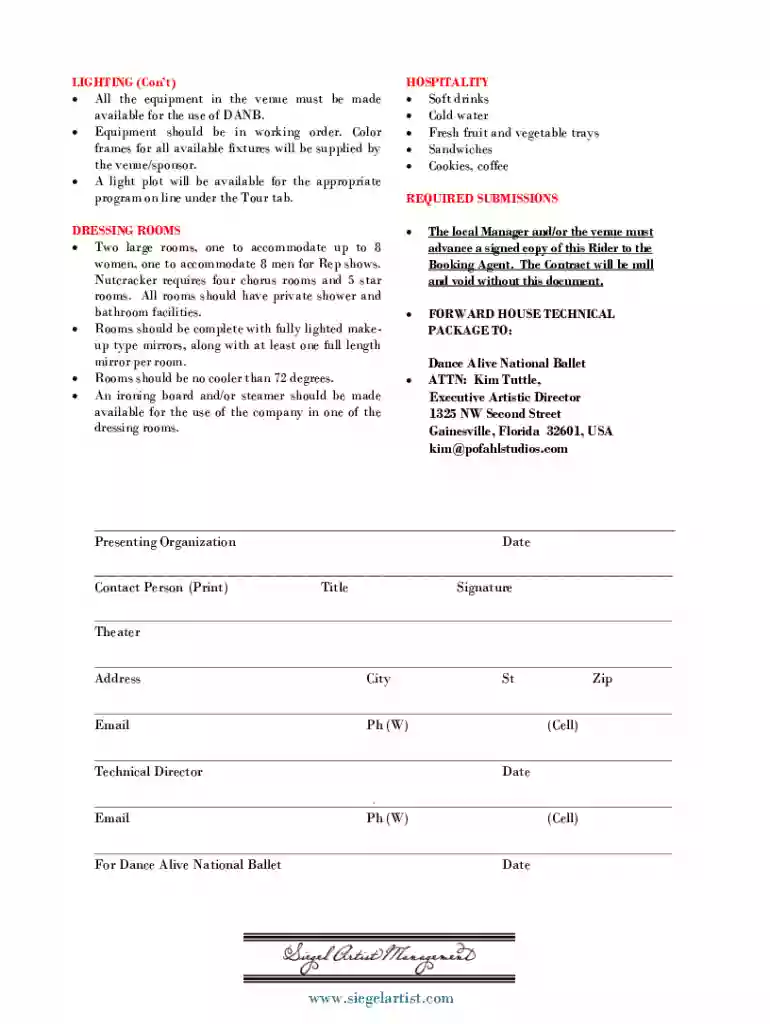
Technical rider template word 2026

Get Form
technical rider template word Preview on Page 1

Here's how it works

01. Edit your technical rider template word online
Type text, add images, blackout confidential details, add comments, highlights and more.

02. Sign it in a few clicks
Draw your signature, type it, upload its image, or use your mobile device as a signature pad.

03. Share your form with others
Send technical rider template via email, link, or fax. You can also download it, export it or print it out.

Overview of a Technical Rider Template

A technical rider template outlines essential requirements for performances, including staging, sound, lighting, and hospitality elements necessary to ensure an event proceeds smoothly. These templates can vary based on the type of performance or artist involved, but they typically adhere to certain key components that ensure clear communication between artists and event organizers.

Key Elements of a Technical Rider Template

A comprehensive technical rider should include the following elements:

  • Stage Requirements

    • Dimensions and layout of the stage.
    • Special conditions for load-in, set-up, and tear-down times.
  • Sound Requirements

    • Specifications for sound systems, including speaker types and placement.
    • Microphone needs for performers, including brands and types.
  • Lighting Requirements

    • Detailed lighting plots, including the number and type of lights required.
    • Specificer preferences for color schemes and effects.
  • Hospitality Provisions

    • Dressing room requirements, including size and specific amenities.
    • Catering preferences such as dietary restrictions and meal types.

How to Use the Technical Rider Template Word

Using a technical rider template can significantly streamline the performance preparation process. When creating or modifying a template, individuals should follow these steps:

  1. Identify Performance Needs: Assess the specific technical and hospitality needs that pertain to the event.
  2. Fill in Template Details: Use the template fields to document requirements clearly.
  3. Collaborate with Event Staff: Share the rider with the technical team and any venue staff to ensure all parties are aligned on requirements.
  4. Make Adjustments as Necessary: Adapt the template to fit different venues or performance types as needed.

Steps to Complete the Technical Rider Template Word

Completing a technical rider template requires attention to detail. Here are steps to ensure thorough completion:

  1. Start with Venue Information: Include the venue name, address, and contact details.
  2. Detail Artist Requirements: Clearly define the requirements for the artist or group in separate sections (stage, sound, lighting, etc.).
  3. Set Timelines: Incorporate a timeline for arrival, set-up, and sound checks.
  4. Review and Finalize: Once completed, review the rider for completeness and clarity, then distribute it to relevant parties.

Examples of Using the Technical Rider Template Word

Different types of performances will each require unique adaptations of a technical rider template:

  • Concerts: A band’s technical rider may include intricate details on sound equipment and lighting effects that enhance musical performances.
  • Theatrical Productions: A theater production's rider might detail the stage layout and props needed for set pieces.
  • Solo Artists: A solo artist’s rider may focus more on minimal sound setups and required hospitality specifics, like dressers or personal items.

These examples demonstrate the adaptability of the template to suit various performance styles.

Who Typically Uses the Technical Rider Template Word

Artists, bands, theater companies, and event planners commonly utilize technical rider templates to ensure that all performance and production aspects are met. These riders serve as a contract between artists and venues, outlining expectations and facilitating smoother logistical execution for events.


  • Bands and Musicians: Require detailed sound and lighting conditions tailored to enhance their performances.
  • Theater Groups: Provide specifications for stage layouts and other technical needs essential for production quality.
  • Event Coordinators: Utilize riders to prepare venues adequately and meet artists' expectations before performances.
decoration image ratings of Dochub

Important Terms Related to the Technical Rider Template Word

Familiarity with key terms enhances understanding and the successful application of a technical rider template:

  • Sound Check: A period before a performance dedicated to testing audio equipment.
  • Load-In: The process of bringing equipment and personnel into the performance venue.
  • Strike: The process of dismantling the set and removing equipment after the conclusion of a performance.

Using these terms accurately is vital for effective communication among all parties involved in the performance.

Legal Use of the Technical Rider Template Word

Ensure compliance and legal integrity when utilizing a technical rider template by considering:

  • Contracts: Each technical rider should be part of a larger contractual agreement outlining the responsibilities of both the artist and the venue.
  • Liability: Clearly defined terms that address liability concerning equipment damage or incidentals during the performance.
  • Permits: Verify that all necessary permits related to sound and light emissions are secured well in advance.

By addressing these legal aspects, parties can mitigate risks related to performances while ensuring a professional and lawful agreement.

Digital vs. Paper Version of the Technical Rider Template Word

Modern practices favor digital formats over traditional paper versions due to their flexibility and accessibility. Consider the advantages:

  • Efficiency: Digital templates allow for easier modifications and sharing among collaborators.
  • Integration: Digital formats can seamlessly integrate with other digital tools or platforms for additional functionality.
  • Storage: The ability to store templates in the cloud ensures access across different devices and easy retrieval when needed.

This shift enhances productivity and ensures that all technical requirements can be communicated clearly and promptly.

Conclusion

Leveraging a well-structured technical rider template in Word format plays a vital role in the success of performances by ensuring that all technical, operational, and hospitality requirements are met. Implementing the tips outlined can streamline the process and facilitate a seamless experience for all parties involved.

See more technical rider template word versions

We've got more versions of the technical rider template word form. Select the right technical rider template word version from the list and start editing it straight away!
Versions Form popularity Fillable & printable
2019 4.8 Satisfied (126 Votes)
2014 4 Satisfied (46 Votes)
be ready to get more

Complete this form in 5 minutes or less

Get form

Got questions?

We have answers to the most popular questions from our customers. If you can't find an answer to your question, please contact us.
Contact us
Technical Rider Template Presenter Name/Address/Phone/Email Artist Names/Address/Phone/Email Venue (or place of engagement) Address Type of performance (concert, workshop, festival, etc.) Length of show (if youre doing specific sets, mention that here) Audience capacity: Load-in to be determined by: Sound Check
A tech rider should list everything you have, everything you need, input list, stage plot, etc. Your mix will be determined during sound check. Every tech does things slightly differently but for me I let each band member know that Im getting ready to go through each instrument.
A Technical Rider should include a Stage Plan (sometimes called a Stage Plot), Channel List (sometimes called an Input List) and an Equipment/Backline List. Your Technical Rider exists to help the sound engineer, promoter or venue by answering questions that could take up precious time at a soundcheck.
A contract rider is an additional document attached to a main contract, providing extra terms or clarifications without changing the original agreement. It is legally binding when all parties agree, and it meets legal criteria. While riders enhance clarity and flexibility, contracts can stand alone.
As far as technical rider examples go, the stage plot diagram is fairly basic. However, it captures all the key points that a sound engineer will be looking for. The positions of musicians, monitors, instruments, and more are all clearly defined. Of course, you can be as detailed as you like with your own stage plot.

Security and compliance

At DocHub, your data security is our priority. We follow HIPAA, SOC2, GDPR, and other standards, so you can work on your documents with confidence.

Learn more
ccpa2
pci-dss
gdpr-compliance
hipaa
soc-compliance
be ready to get more

Complete this form in 5 minutes or less

Get form