




01. Edit your form online
Type text, add images, blackout confidential details, add comments, highlights and more.

Type text, add images, blackout confidential details, add comments, highlights and more.

Draw your signature, type it, upload its image, or use your mobile device as a signature pad.

Send it via email, link, or fax. You can also download it, export it or print it out.
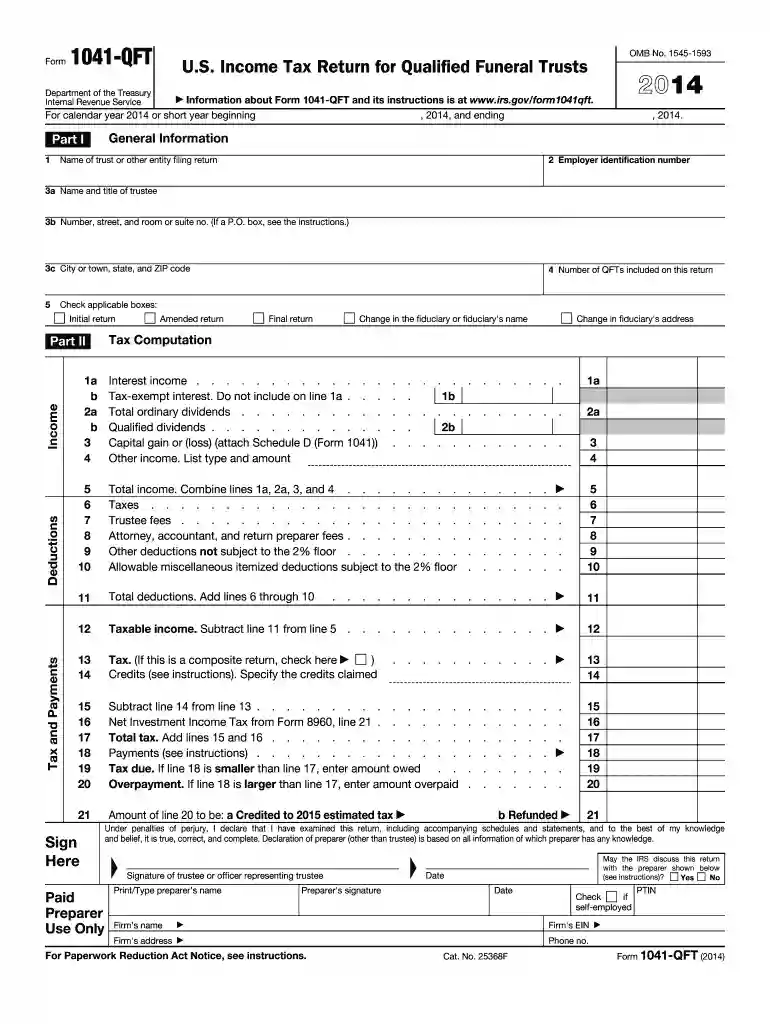
Form 1041-QFT, or the U.S. Income Tax Return for Qualified Funeral Trusts, is used by trustees to report the income, deductions, gains, losses, and tax liabilities associated with qualified funeral trusts (QFTs). It is a specialized tax form for the calendar year 2014 and is essential for trustees managing funeral-related financial assets under IRS guidelines. This form outlines the requirements for registering a trust as a QFT and provides necessary instructions for completing and filing it.
A Qualified Funeral Trust (QFT) allows individuals to set aside funds to cover future funeral expenses. The trust gains a qualified status under certain conditions, including being irrevocable and designated specifically for funeral costs. For taxation, this means handling it distinctly from other trusts, necessitating specific reporting via the 1041-QFT form.
Trustees utilize Form 1041-QFT to accurately report financial activities of the QFT during the specified tax year. This involves declaring income generated from the funds, applying allowable deductions, and calculating overall tax liabilities. It is critical to understand how to correctly apply deductions and capture any pertinent taxable events, ensuring compliance with IRS mandates.
The 1041-QFT 2014 form can be acquired through several avenues:
The IRS has strictly defined the criteria under which a trust qualifies as a QFT, and adherence to these rules is paramount for compliance. Understanding these requirements ensures that a trust is maintained and reported accurately under tax laws.
The standard deadline for submission of the Form 1041-QFT corresponds with the typical tax deadlines, specifically April 15 of the year following the taxable period reported. Late filings may incur penalties unless formal extensions are obtained.
Failure to comply with the filing requirements or inaccurately reporting financial activities may result in significant penalties. These penalties can include fines, interest on unpaid taxes, and potential challenges in trust management moving forward. It is crucial for trustees to ensure full compliance to mitigate such risks.


Only trustees managing a qualified funeral trust are eligible to file Form 1041-QFT. This encompasses situations where an individual sets aside funds in a trust specifically designated for future funeral expenses under irrevocable conditions.
As a U.S.-oriented tax form, it's essential to understand that legal obligations solely apply within the jurisdiction. Any entity or individual tasked with managing funeral trusts within the country must abide by these guidelines.
While Form 1041-QFT is specialized for handling funeral trusts, there are related forms within the IRS portfolio for other trust and estate taxation situations. It is vital for users to ensure they are using the correct variation pertinent to their specific tax circumstance.
Keeping aware of updates or previous versions of the form can aid in historical accountability and compliance, especially if comparing reporting practices over different fiscal years.
Understanding and being proficient in the use of Form 1041-QFT hinged on detailed knowledge of trust financial activities. Trustees must pay careful attention to IRS guidelines and deadlines, ensuring complete and correct filings each year. Emphasizing accuracy, this form not only fulfills legal obligations but also preserves the financial integrity of trust operations.
We've got more versions of the 1041 qft 2014 form form. Select the right 1041 qft 2014 form version from the list and start editing it straight away!
| Versions | Form popularity | Fillable & printable |
|---|---|---|
| 2025 | 4.1 Satisfied (23 Votes) | |
| 2024 | 4.3 Satisfied (33 Votes) | |
| 2023 | 4.4 Satisfied (58 Votes) | |
| 2022 | 4.9 Satisfied (38 Votes) | |
| 2021 | 4.8 Satisfied (59 Votes) | |
| 2020 | 4.2 Satisfied (44 Votes) | |
| 2019 | 4.1 Satisfied (69 Votes) | |
| 2018 | 4.2 Satisfied (79 Votes) | |
| 2017 | 4.2 Satisfied (95 Votes) | |
| 2016 | 4.4 Satisfied (573 Votes) | |
| 2015 | 4.1 Satisfied (74 Votes) | |
| 2014 | 4 Satisfied (27 Votes) | |
| 2013 | 4 Satisfied (23 Votes) | |
| 2012 | 4.3 Satisfied (43 Votes) | |
| 2011 | 4 Satisfied (34 Votes) |
At DocHub, your data security is our priority. We follow HIPAA, SOC2, GDPR, and other standards, so you can work on your documents with confidence.
Page 1041. / ( d I r ;. Page 1042. s zC3 :|L o q *Q G2H7oe J f cH U Y q f t J\ I / D - P r + NhV 1a a Q. GY: 1 dtw 8 -qs A M2 q Z M E@ + 8 j NRead more
Form 1041-QFT (2014) Make the check or money order payable to United States Treasury. Write the. EIN from line 2 of the form and 2014 Form. 1041-QFT onRead more
● Qualified Funeral Trust - IRS 1041 - QFT The trust arose as a result of a contract with a person engaged in the trade or business of providing funeral or


