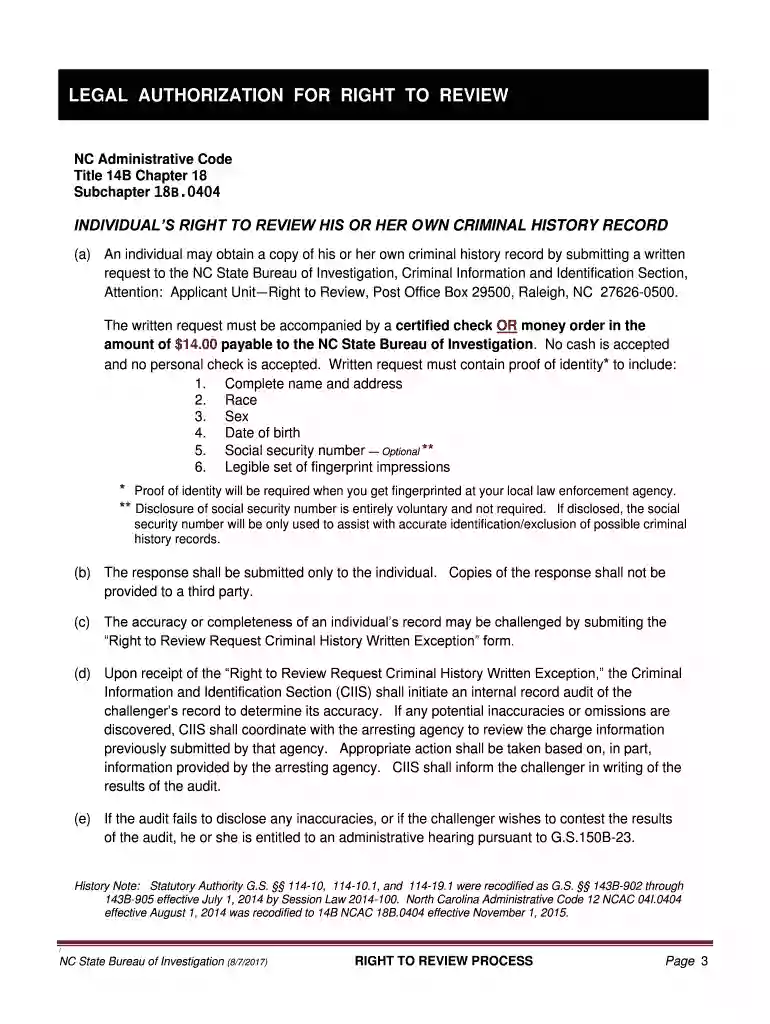
Criminal History Request Form 2026

Get Form
Criminal History Request Form Preview on Page 1

Here's how it works

01. Edit your form online
Type text, add images, blackout confidential details, add comments, highlights and more.

02. Sign it in a few clicks
Draw your signature, type it, upload its image, or use your mobile device as a signature pad.

03. Share your form with others
Send it via email, link, or fax. You can also download it, export it or print it out.

How to use or fill out Criminal History Request Form with DocHub

Form edit decoration
9.5
Ease of Setup
DocHub User Ratings on G2
9.0
Ease of Use
DocHub User Ratings on G2
  1. Click ‘Get Form’ to open the Criminal History Request Form in our editor.
  2. Begin by filling out your personal information. Enter your full name, mailing address, and contact details in the designated fields. Ensure accuracy as this information is crucial for processing your request.
  3. Indicate your sex and race by selecting the appropriate options provided on the form. This data helps in correctly identifying your criminal history record.
  4. In the 'Reason for Request' section, specify that you are requesting a criminal history record for adoption purposes or any other relevant reason.
  5. Once all fields are completed, review your entries for accuracy. Save your changes and download the form if necessary.
  6. Print the completed form and prepare it for mailing along with your fingerprint card and payment as instructed.

Start using our platform today to easily fill out and manage your Criminal History Request Form online, for free!

See more Criminal History Request Form versions

We've got more versions of the Criminal History Request Form form. Select the right Criminal History Request Form version from the list and start editing it straight away!
Versions Form popularity Fillable & printable
2019 4.8 Satisfied (107 Votes)
2017 4.3 Satisfied (49 Votes)
be ready to get more

Complete this form in 5 minutes or less

Get form

Got questions?

We have answers to the most popular questions from our customers. If you can't find an answer to your question, please contact us.
Contact us
Below is a list of states the prohibit employers from asking candidates to pay for their own background checks: Washington, D.C. California. Louisiana.
Although results typically appear instantly, some background checks can take a few days. These background checks typically cost between $30 and $100 and include: Social Security number trace. National criminal search.
Heres what you need to know about background check pricing: Several factors affect the cost of a background check, including the type of check you need and the scope of the check. Background checks may cost anywhere from $25 to $200, but it depends on how much information you need and which vendor you use.
The fastest option is to submit your request online, for both Identity History Summary Checks and Identity History Summary Challenges. Visit edo.cjis.gov. Follow the steps under the Obtaining Your Identity History Summary section. Complete the Applicant Information Form. Get Your Fingerprints. Pay. Review Everything.
The New York State Office of Court Administration (OCA) provides a New York Statewide criminal history record search (CHRS) for a fee of $95.00. You can submit a CHRS request via our on-line Direct Access program or by mailing in a CHRS application form.

Security and compliance

At DocHub, your data security is our priority. We follow HIPAA, SOC2, GDPR, and other standards, so you can work on your documents with confidence.

Learn more
ccpa2
pci-dss
gdpr-compliance
hipaa
soc-compliance

People also ask

Background check platforms:Some websites offer basic background checks on yourself for free. These typically include criminal record searches and other publicly available information. However,be cautious about providing personal information to unfamiliar websites.
Yes, it is very beneficial to do a personal background check before looking for a new job. Thus, you can ensure that the employment history you input is accurate as well as your education and certifications.

Related links