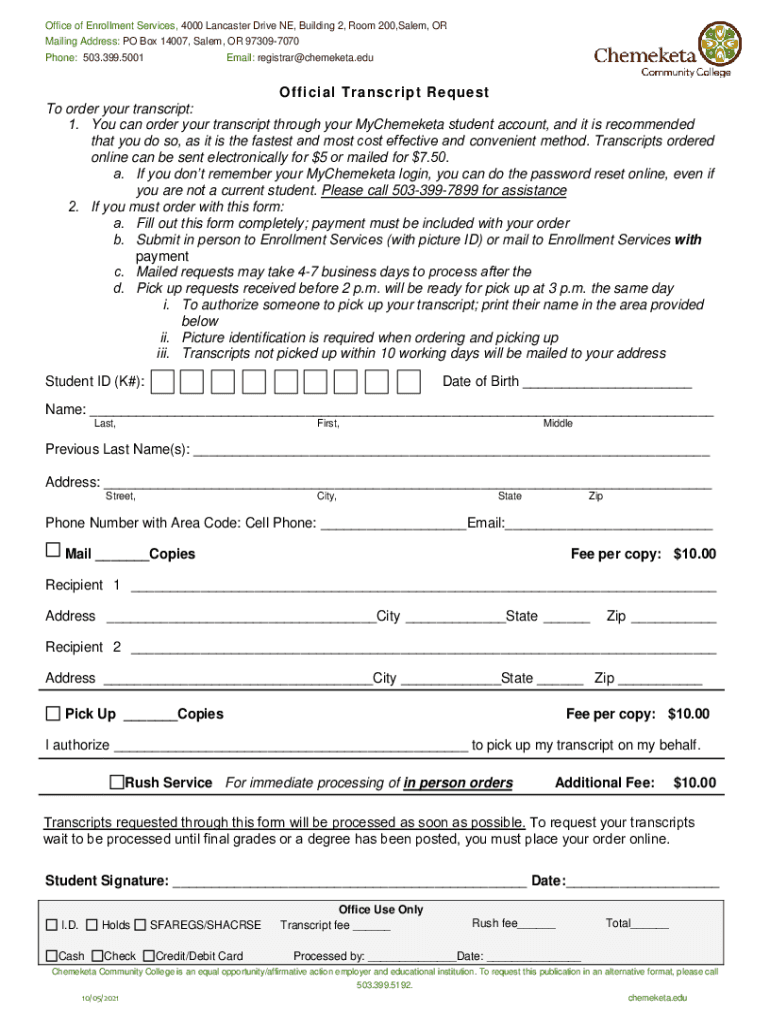
Official Transcript Request - Chemeketa Community College 2026

Get Form
chemeketa community college transcripts Preview on Page 1

Here's how it works

01. Edit your chemeketa community college transcripts online
Type text, add images, blackout confidential details, add comments, highlights and more.
02. Sign it in a few clicks
Draw your signature, type it, upload its image, or use your mobile device as a signature pad.
03. Share your form with others
Send transcript application format via email, link, or fax. You can also download it, export it or print it out.

How to use or fill out Official Transcript Request - Chemeketa Community College with our platform

Form edit decoration
9.5
Ease of Setup
DocHub User Ratings on G2
9.0
Ease of Use
DocHub User Ratings on G2
  1. Click ‘Get Form’ to open the Official Transcript Request in the editor.
  2. Begin by entering your Student ID (K#) and Date of Birth at the top of the form. This information helps verify your identity.
  3. Fill in your full name, including any previous last names, to ensure accurate processing of your transcript.
  4. Provide your current address, including street, city, state, and zip code. This is essential for mailing your transcripts.
  5. Enter your phone number and email address for communication regarding your request.
  6. Indicate how many copies you need and specify whether they should be mailed or picked up. Remember that each copy incurs a fee of $10.00.
  7. If someone else will pick up your transcript, write their name in the designated area and ensure they have picture identification.
  8. Sign and date the form at the bottom to authorize processing. Ensure all required fees are included with your submission.

Start using our platform today to streamline your Official Transcript Request process effortlessly!

See more Official Transcript Request - Chemeketa Community College versions

We've got more versions of the Official Transcript Request - Chemeketa Community College form. Select the right Official Transcript Request - Chemeketa Community College version from the list and start editing it straight away!
Versions Form popularity Fillable & printable
2021 4.4 Satisfied (49 Votes)
2011 4.9 Satisfied (45 Votes)
be ready to get more

Complete this form in 5 minutes or less

Get form

Got questions?

We have answers to the most popular questions from our customers. If you can't find an answer to your question, please contact us.
Contact us
Unofficial Transcript Log in to Self-Service for Students: selfservice.cscc.edu/Student. Click on the Academics icon on the left to expand the menu, then select My Unofficial Transcript from the list. Select the Transcript from the list. You will see your unofficial transcript on the screen.
You can request transcripts electronically or by mail. If sending transcripts electronically, you must use one of the electronic transcript vendors below. If sending transcripts by mail, they must be mailed directly from your registrar.
Here are the steps: Log in to your Student Centre. Log in to your Student Centre account, select the eTranscript option, and submit your request. Wait to receive an email notification. Wait to receive an email notification from MyCreds when your eTranscript is ready to be shared. Log in to MyCreds Purchase share credits.
How to request your official transcripts. Most colleges allow you to order copies of transcripts online, by mail, or in person via the office of admissions or registrars office. Youll complete a transcript request form, pay a small fee, and may have to provide proof of identification.
Some states, including California and New York, have already banned the practice at their public colleges and universities, while Washington has limited it to certain situations.

Security and compliance

At DocHub, your data security is our priority. We follow HIPAA, SOC2, GDPR, and other standards, so you can work on your documents with confidence.

Learn more
ccpa2
pci-dss
gdpr-compliance
hipaa
soc-compliance

People also ask

Current students can view unofficial transcripts online: Log in to MySLCC. Select Academics or search Transcript. Select the Transcript Card. Select Display Transcripts. Select the Transcript Level and Type, and click Submit.
Official Transcripts You can order your transcript online (instructions above) or through your My Chemeketa student account, and it is recommended that you do so, as it is the fastest and most cost effective and convenient method. Otherwise, you must complete an Official Transcript Request form.
Delivery Type Electronic credentials are delivered as soon as the sending institution processes the request, often within one business day. Printed Transcript requests will typically be mailed within 1 business day.

Related links