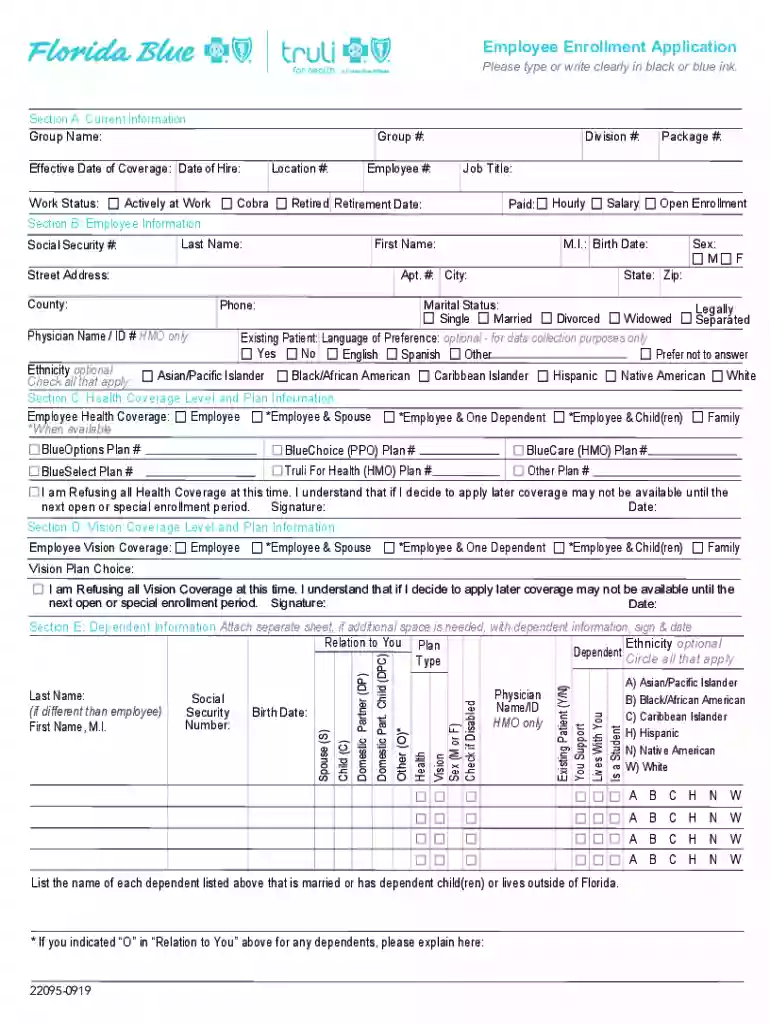
Section B: Employee Information 2026

Get Form
Section B: Employee Information Preview on Page 1

Here's how it works

01. Edit your form online
Type text, add images, blackout confidential details, add comments, highlights and more.

02. Sign it in a few clicks
Draw your signature, type it, upload its image, or use your mobile device as a signature pad.

03. Share your form with others
Send it via email, link, or fax. You can also download it, export it or print it out.

How to use or fill out Section B: Employee Information with our platform

Form edit decoration
9.5
Ease of Setup
DocHub User Ratings on G2
9.0
Ease of Use
DocHub User Ratings on G2
  1. Click ‘Get Form’ to open the Employee Enrollment Application in the editor.
  2. Begin with the Social Security Number field. Enter your SSN clearly, as this is crucial for identification.
  3. Fill in your Last Name and First Name. Ensure that these match your official documents for accuracy.
  4. Provide your Street Address, including Apt. # if applicable, followed by City, County, State, and Zip Code.
  5. Enter your Phone number for contact purposes. This should be a number where you can be easily reached.
  6. If applicable, include your Physician's Name and ID number if you are enrolling in an HMO plan.
  7. Select your Sex and Marital Status from the provided options. This information is essential for demographic purposes.
  8. Indicate whether you are an Existing Patient and select your Language of Preference if desired.
  9. Lastly, check any applicable Ethnicity options to complete this section accurately.

Start filling out Section B today using our platform for a seamless experience!

See more Section B: Employee Information versions

We've got more versions of the Section B: Employee Information form. Select the right Section B: Employee Information version from the list and start editing it straight away!
Versions Form popularity Fillable & printable
2019 4.5 Satisfied (76 Votes)
2014 4.4 Satisfied (160 Votes)
2013 4.3 Satisfied (133 Votes)
be ready to get more

Complete this form in 5 minutes or less

Get form

Got questions?

We have answers to the most popular questions from our customers. If you can't find an answer to your question, please contact us.
Contact us
the documents are either one unexpired document from List A (documents showing both identity and work authorization), or one unexpired document from List B (documents showing identity) and one unexpired document from List C (documents showing work authorization);
List B Documents School ID card with a photograph. Example image not available. Voters registration card. U.S. Coast Guard Merchant Mariner Card. Native American tribal document. Drivers license issued by a Canadian government authority. For persons under age 18 who are unable to present a document listed above:
Background Checks. California employers have the right to perform a lawful background check, which can provide them with highly sensitive and personal information. They can access your criminal record, credit report, driving record, and immigration record.
This includes the individuals full name, contact information, date of birth, Social Security or Tax Identification number, emergency contacts, employment details such as position and date of hire, compensation, tax information, and potentially relevant medical information.
One document from List B (document that establishes identity) AND one document from List C (document that establishes employment authorization). *If you are an E-Verify employer, you may only accept List B documents that contain a photograph. Employees of E-Verify employers must provide their Social Security Number.

Security and compliance

At DocHub, your data security is our priority. We follow HIPAA, SOC2, GDPR, and other standards, so you can work on your documents with confidence.

Learn more
ccpa2
pci-dss
gdpr-compliance
hipaa
soc-compliance
be ready to get more

Complete this form in 5 minutes or less

Get form