Handypdf.compdfaffidavit-of-non-dealerAffidavit of Non-Dealer Transfers of Motor Vehicles And Boats ... 2026

Get Form
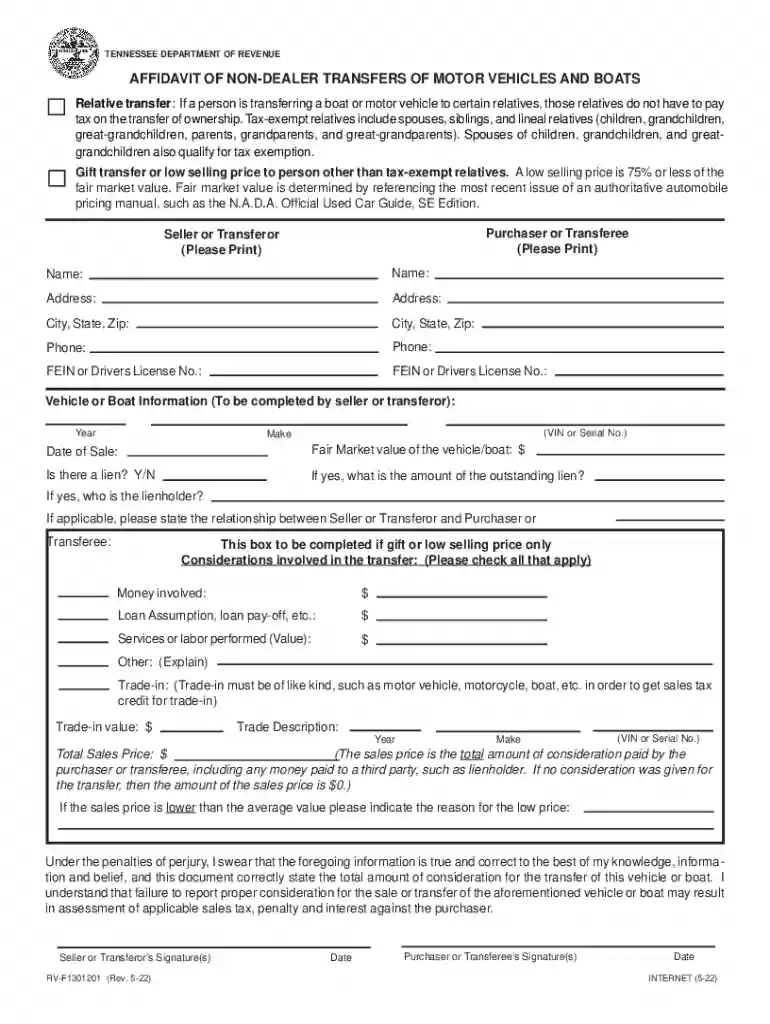
tennessee affidavit form Preview on Page 1

Here's how it works

01. Edit your tennessee affidavit form online
Type text, add images, blackout confidential details, add comments, highlights and more.

02. Sign it in a few clicks
Draw your signature, type it, upload its image, or use your mobile device as a signature pad.

03. Share your form with others
Send rv f1301201 via email, link, or fax. You can also download it, export it or print it out.

How to use or fill out handypdf.compdfaffidavit-of-non-dealerAffidavit of Non-Dealer Transfers of Motor Vehicles And Boats with our platform

Form edit decoration
9.5
Ease of Setup
DocHub User Ratings on G2
9.0
Ease of Use
DocHub User Ratings on G2
  1. Click ‘Get Form’ to open it in the editor.
  2. Begin by filling in the 'Purchaser or Transferee' section. Enter the name, address, city, state, zip code, phone number, and FEIN or driver's license number.
  3. Next, complete the 'Seller or Transferor' section with similar details as above.
  4. In the 'Vehicle or Boat Information' section, provide details such as year, make, VIN or serial number, date of sale, and fair market value.
  5. Indicate if there is a lien on the vehicle/boat and provide details if applicable.
  6. If applicable, check any considerations involved in the transfer and fill in relevant amounts for money involved, loan assumptions, services performed, etc.
  7. Finally, ensure both seller and purchaser sign and date the document at the bottom before submitting.

Start using our platform today to easily complete your Affidavit of Non-Dealer Transfers!

See more handypdf.compdfaffidavit-of-non-dealerAffidavit of Non-Dealer Transfers of Motor Vehicles And Boats ... versions

We've got more versions of the handypdf.compdfaffidavit-of-non-dealerAffidavit of Non-Dealer Transfers of Motor Vehicles And Boats ... form. Select the right handypdf.compdfaffidavit-of-non-dealerAffidavit of Non-Dealer Transfers of Motor Vehicles And Boats ... version from the list and start editing it straight away!
Versions Form popularity Fillable & printable
2022 4.8 Satisfied (45 Votes)
2014 4.8 Satisfied (81 Votes)
2000 4.3 Satisfied (59 Votes)
be ready to get more

Complete this form in 5 minutes or less

Get form

Got questions?

We have answers to the most popular questions from our customers. If you can't find an answer to your question, please contact us.
Contact us
How to fill out the Affidavit of Non-Dealer Transfers of Motor Vehicles? Collect necessary information about the vehicle/boat and parties involved. Fill in the seller and purchaser details accurately. Complete the vehicle or boat information section. Indicate any consideration for the transfer, if applicable.
If the vehicle was received as a gift, an Affidavit of Non-Dealer Transfers of Motor Vehicles and Boats (Gift Affidavit) completed by both the giver and the receiver is needed. In the case of gifts, no sales tax will be due.
Gifted Vehicles If the vehicle was received as a gift, an Affidavit of Non-Dealer Transfers of Motor Vehicles and Boats (Gift Affidavit) completed by both the giver and the receiver is needed. In the case of gifts, no sales tax will be due.
This form consists of several key components that must be filled out accurately. Date: The date on which the affidavit is completed. Name of Deceased: The name of the deceased vehicle owner. Vehicle Details: Information about the motor vehicle such as year, make, model, and VIN.

Security and compliance

At DocHub, your data security is our priority. We follow HIPAA, SOC2, GDPR, and other standards, so you can work on your documents with confidence.

Learn more
ccpa2
pci-dss
gdpr-compliance
hipaa
soc-compliance