Type text, add images, blackout confidential details, add comments, highlights and more.

02. Sign it in a few clicks
Draw your signature, type it, upload its image, or use your mobile device as a signature pad.

03. Share your form with others
Send request for judicial intervention via email, link, or fax. You can also download it, export it or print it out.

How to use or fill out rji with our platform
Ease of Setup
DocHub User Ratings on G2
Ease of Use
DocHub User Ratings on G2
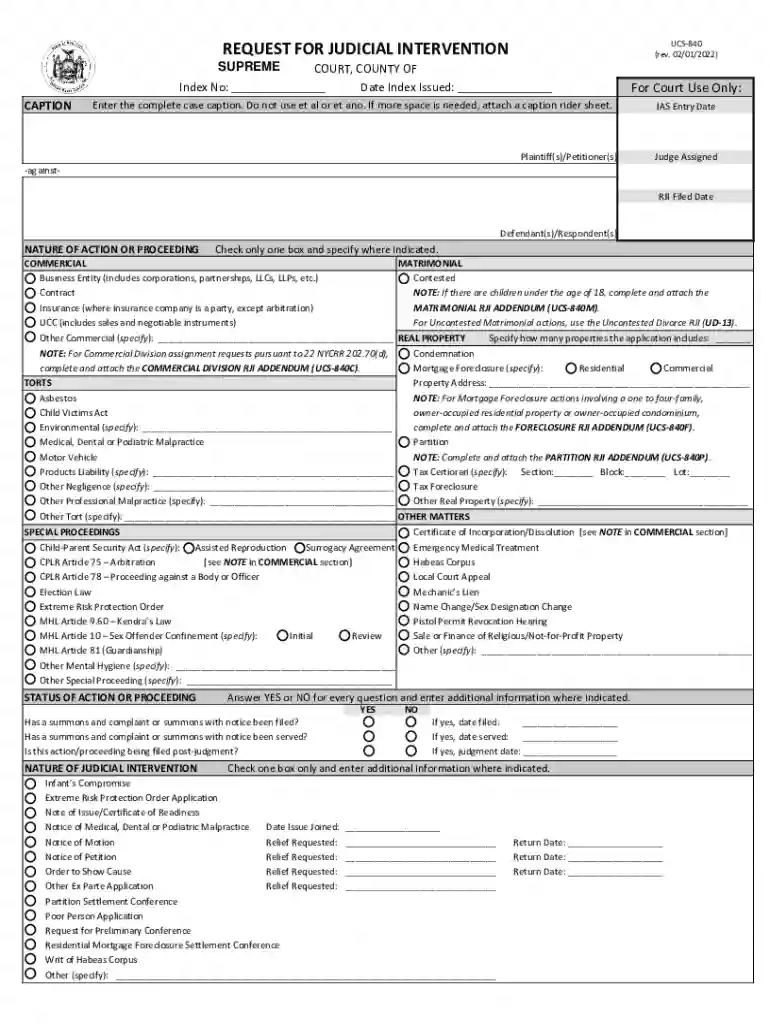
Click ‘Get Form’ to open the rji document in the editor.
Begin by entering the complete case caption in the designated field. Ensure you do not use 'et al' or 'et ano'. If more space is needed, attach a caption rider sheet.
In the 'Plaintiff(s)/Petitioner(s)' section, fill in the names of all parties involved. Include the IAS Entry Date and Judge Assigned if applicable.
Select the nature of action or proceeding by checking only one box and providing any additional specifications required.
For each question under 'STATUS OF ACTION OR PROCEEDING', answer YES or NO and provide dates where necessary.
Complete the 'NATURE OF JUDICIAL INTERVENTION' section by checking one box and entering any relevant details.
List any related cases in the 'RELATED CASES' section, ensuring to include all pertinent information for clarity.
Finally, affirm your information by signing at the bottom of the form and including your attorney registration number if applicable.
Start using our platform today to streamline your rji completion process for free!
The Racial Justice Institute is an interdisciplinary research hub led by a community of thought leaders, scholars and advocates who innovate strategies andRead more
Cookie consent notice
This site uses cookies to enhance site navigation and personalize your experience.
By using this site you agree to our use of cookies as described in our Privacy Notice.
You can modify your selections by visiting our Cookie and Advertising Notice.