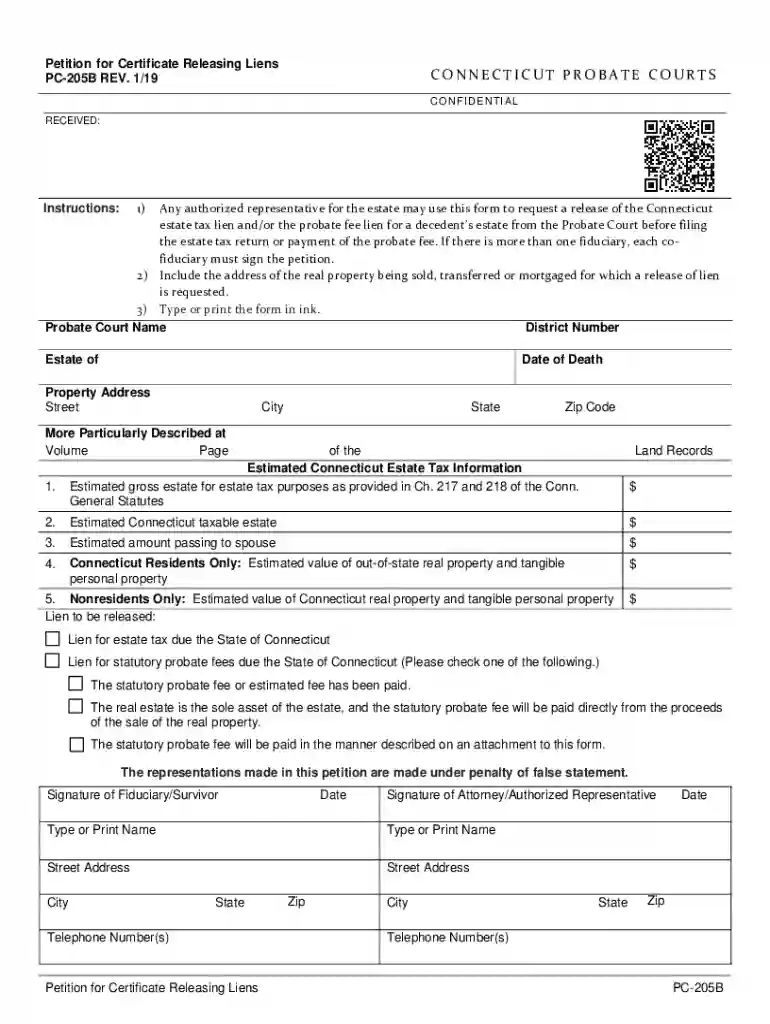
Connecticut liens 2026

Get Form
connecticut liens Preview on Page 1

Here's how it works

01. Edit your connecticut liens online
Type text, add images, blackout confidential details, add comments, highlights and more.

02. Sign it in a few clicks
Draw your signature, type it, upload its image, or use your mobile device as a signature pad.

03. Share your form with others
Send ct liens via email, link, or fax. You can also download it, export it or print it out.

How to use or fill out Connecticut Liens with Our Platform

Form edit decoration
9.5
Ease of Setup
DocHub User Ratings on G2
9.0
Ease of Use
DocHub User Ratings on G2
  1. Click ‘Get Form’ to open the Connecticut Liens document in the editor.
  2. Begin by entering the Probate Court Name and District Number at the top of the form. This information is crucial for identifying the correct court handling your request.
  3. Fill in the Estate of and Date of Death fields accurately, as these details pertain to the decedent's estate.
  4. Provide the Property Address, including Street, City, State, and Zip Code. Ensure this information matches official records for clarity.
  5. In the Estimated Connecticut Estate Tax Information section, input values for gross estate, taxable estate, and amounts passing to a spouse. Be precise to avoid delays.
  6. Select which lien you wish to release by checking the appropriate box regarding estate tax or statutory probate fees.
  7. Finally, ensure all signatures are completed by fiduciaries or authorized representatives before submitting your form.

Start using our platform today to streamline your document editing and signing process for free!

See more connecticut liens versions

We've got more versions of the connecticut liens form. Select the right connecticut liens version from the list and start editing it straight away!
Versions Form popularity Fillable & printable
2019 4.8 Satisfied (211 Votes)
2015 4.8 Satisfied (40 Votes)
be ready to get more

Complete this form in 5 minutes or less

Get form

Got questions?

We have answers to the most popular questions from our customers. If you can't find an answer to your question, please contact us.
Contact us
Search public records online Most counties allow you to search for property recordsincluding liensthrough the county recorder, assessor, or clerks office. You can typically search by property address or parcel number.
How to Attach Connecticut Judgment Liens state the names and last known addresses of the judgment creditor and judgment debtor. identify the court that granted the judgment and the date judgment was entered. include the amount of the original judgment, along with the amount presently due.
Search inquiries for a lien on a property in Connecticut may be directed to the town clerk or the Secretary of State. The Connecticut Secretary of State keeps records of UCC financing statements, IRS liens, judgement liens, vessel liens, and aircraft liens.
A judgment lien expires twenty years after the judgment was rendered, unless the party claiming the lien commences an action to foreclose. Conn. Gen. Stat.
You can begin by checking with your county recorders office, which should maintain local real estate records. That includes active liens and property transactions. Your county clerks office can be another helpful resource.

Security and compliance

At DocHub, your data security is our priority. We follow HIPAA, SOC2, GDPR, and other standards, so you can work on your documents with confidence.

Learn more
ccpa2
pci-dss
gdpr-compliance
hipaa
soc-compliance

People also ask

Members of the public have the right to see any document in any court file, unless a court has sealed the file, or statute has rendered the contents of the file confidential.

Related links