Social department services 2026

Get Form
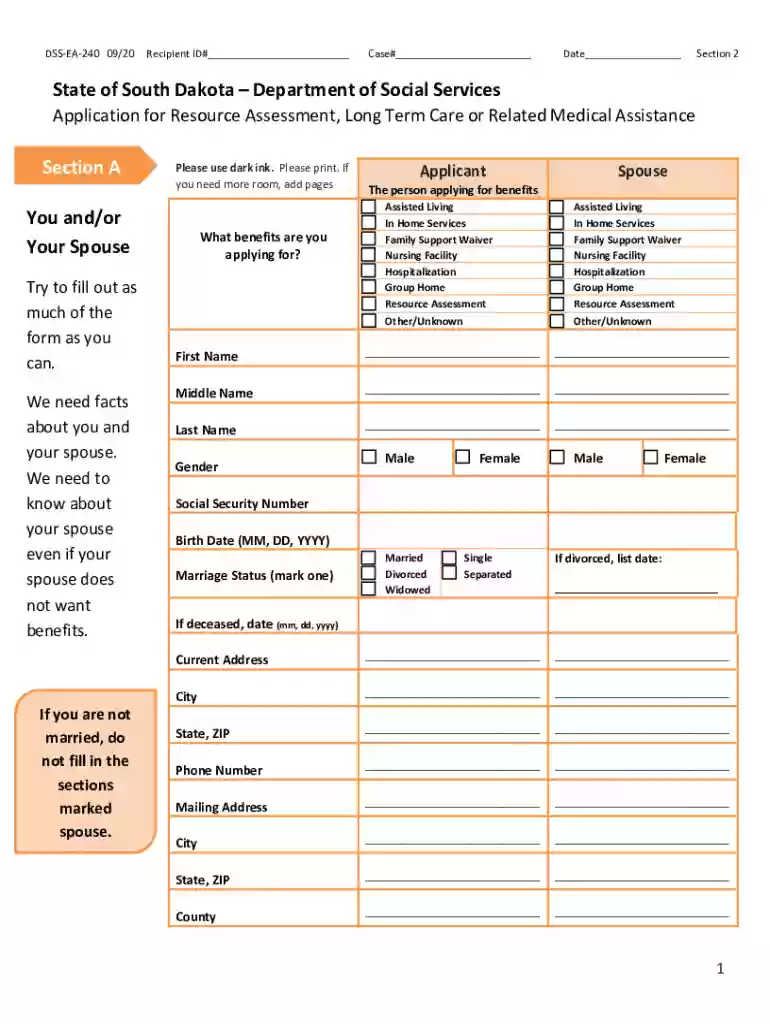
social department services Preview on Page 1

Here's how it works

01. Edit your form online
Type text, add images, blackout confidential details, add comments, highlights and more.

02. Sign it in a few clicks
Draw your signature, type it, upload its image, or use your mobile device as a signature pad.

03. Share your form with others
Send it via email, link, or fax. You can also download it, export it or print it out.

How to use or fill out social department services with our platform

Form edit decoration
9.5
Ease of Setup
DocHub User Ratings on G2
9.0
Ease of Use
DocHub User Ratings on G2
  1. Click ‘Get Form’ to open the social department services application in the editor.
  2. Begin with Section 1, entering your Recipient ID#, Case#, and Date. Ensure all information is accurate.
  3. In Section A, provide details about yourself and your spouse if applicable. Fill in names, gender, Social Security Number, and birth date using dark ink.
  4. Indicate the benefits you are applying for by checking the appropriate boxes. This includes options like Assisted Living or Nursing Facility.
  5. Continue through Sections B to H, answering questions regarding citizenship, resources/assets, income, and any dependents living with you.
  6. Review all sections for completeness. If additional space is needed, utilize our platform's features to add pages as necessary.
  7. Finally, sign and date the application in Section K to authorize the release of information.

Start filling out your application today for free using our platform!

See more social department services versions

We've got more versions of the social department services form. Select the right social department services version from the list and start editing it straight away!
Versions Form popularity Fillable & printable
2020 4.8 Satisfied (159 Votes)
2011 4.8 Satisfied (207 Votes)
2006 4 Satisfied (39 Votes)
2003 4.8 Satisfied (22 Votes)
be ready to get more

Complete this form in 5 minutes or less

Get form

Got questions?

We have answers to the most popular questions from our customers. If you can't find an answer to your question, please contact us.
Contact us

Of course, electronically drawing your signature is appropriate, but only if you utilize a tool that complies with industry regulations and policies. Consider DocHub, which guarantees eSignature validity under ESIGN and UETA requirements. All you need to approve your social department services electronically is an account with DocHub and an internet connection. After you open your paperwork in our editor, click Sign and select the Draw tool.

If you need to edit your social department services online easily, it does not matter what web browser you employ. DocHub’s straightforward editing tools are accessible using any internet browser. Just open the appropriate tab in the editor, add your file, and fill it out without stress.

What a Call from Social Services Might Mean: Someone Made a Report: Most often, a call means someone has contacted the agency with concerns about the safety or well-being of a child (Child Protective Services or CPS) or a vulnerable adult (Adult Protective Services or APS) who they believe is connected to you.
The social worker may then do any of the following: assess your needs (or the needs of the family member) assess if you (or someone else, for example a child) are at risk. offer support and advice. advocate for the person they are concerned about.
Find government benefits and financial help. Food assistance. Health insurance. Housing help. Help with utility bills. Welfare and financial assistance. Social Security. Government checks and payments.

Security and compliance

At DocHub, your data security is our priority. We follow HIPAA, SOC2, GDPR, and other standards, so you can work on your documents with confidence.

Learn more
ccpa2
pci-dss
gdpr-compliance
hipaa
soc-compliance
be ready to get more

Complete this form in 5 minutes or less

Get form