




Here's how it works



How to use or fill out Seniors' Forms And Publications - Alberta Seniors And Housing - Fill ...

- Click ‘Get Form’ to open it in the editor.
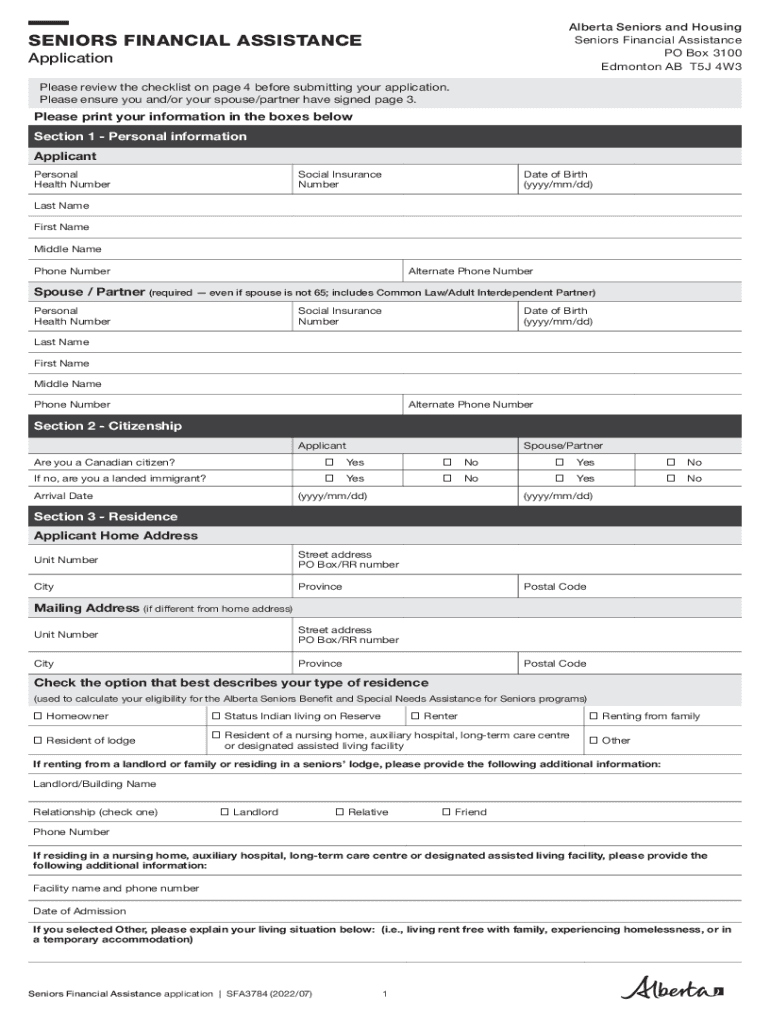
- Begin with Section 1, where you will enter your personal information. Fill in your last name, first name, middle name, health number, social insurance number, and date of birth. Ensure all fields are completed accurately.
- Proceed to Section 2 to confirm citizenship status for both you and your spouse/partner. Select 'Yes' or 'No' for Canadian citizenship and provide the arrival date if applicable.
- In Section 3, provide your home address and mailing address if different. Indicate your type of residence by checking the appropriate box.
- Complete Section 4 regarding Old Age Security eligibility. Answer whether you receive OAS and if not, indicate if you have applied.
- For direct deposit details in Section 5, attach a pre-printed void cheque or complete a Direct Deposit Request form as instructed.
- Sign and date the application in Section 6. Ensure that both applicant and spouse/partner signatures are included.
- Review the checklist in Section 9 to ensure all required documents are included before submission.
Start filling out your application today using our platform for free!
It's free
See more Seniors' Forms And Publications - Alberta Seniors And Housing - Fill ... versions
Got questions?
How can I eSign my Seniors' Forms And Publications - Alberta Seniors And Housing - Fill ... in Word?
Microsoft Word doesn’t have signing tools to generate valid eSignatures and enforceable forms. Fortunately, DocHub is an online eSignature-compliant editor that supports various file formats, including .doc files. Sign in to your account and import the Word edition of your Seniors' Forms And Publications - Alberta Seniors And Housing - Fill ... from your device and cloud, or URL - our editor will automatically turn it into an editable PDF. Make all necessary modifications in your form and click Sign to generate your own legally-binding electronic signature. You will find four signing options from which to choose.
Can I sign my Seniors' Forms And Publications - Alberta Seniors And Housing - Fill ... while I edit it?
When you edit your Seniors' Forms And Publications - Alberta Seniors And Housing - Fill ... with DocHub, you simply will not need to look for other applications or services to eSign it. An electronic signature is part of DocHub’s extensive editing toolset, which allows you to implement changes in your form without switching between platforms. Just complete your form, double-check the correctness of the information and put your electronic signature at the end to make it submission-ready within minutes.
Security and compliance
At DocHub, your data security is our priority. We follow HIPAA, SOC2, GDPR, and other standards, so you can work on your documents with confidence.
Learn more


