Oath nationality 2026

Get Form
oath nationality Preview on Page 1

Here's how it works

01. Edit your oath nationality online
Type text, add images, blackout confidential details, add comments, highlights and more.

02. Sign it in a few clicks
Draw your signature, type it, upload its image, or use your mobile device as a signature pad.

03. Share your form with others
Send oath renunciation via email, link, or fax. You can also download it, export it or print it out.

How to use or fill out oath nationality with our platform

Form edit decoration
9.5
Ease of Setup
DocHub User Ratings on G2
9.0
Ease of Use
DocHub User Ratings on G2
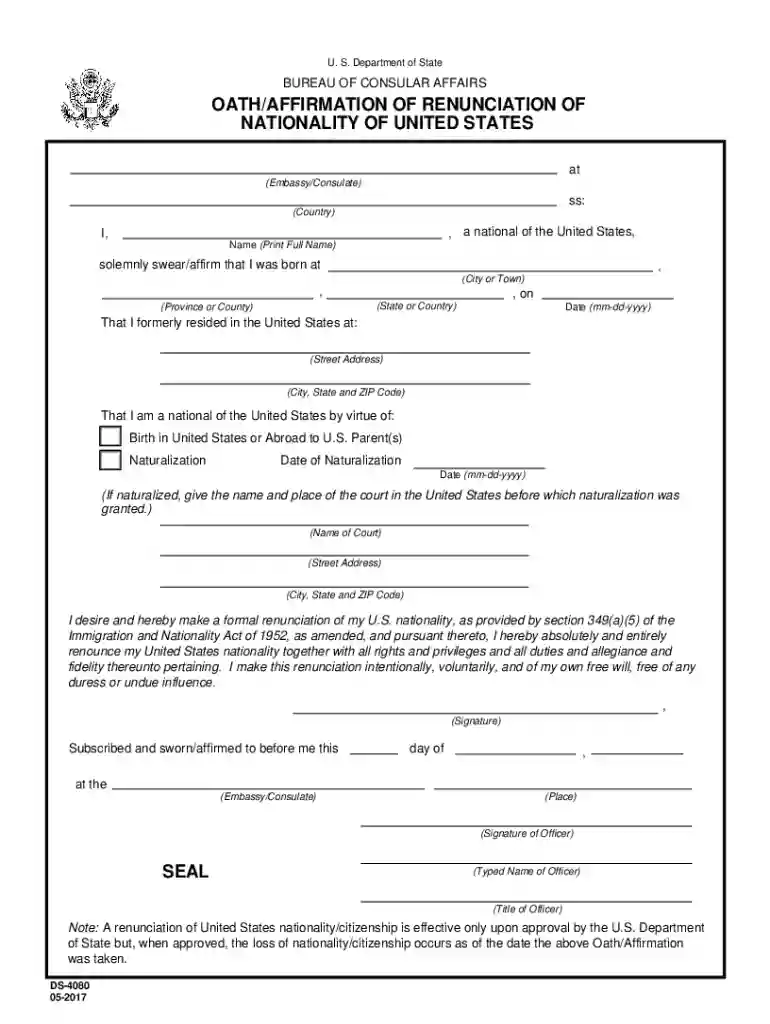
  1. Click ‘Get Form’ to open the Oath/Affirmation of Renunciation of Nationality in the editor.
  2. Begin by entering your full name in the designated field. Ensure that it matches your official documents.
  3. Fill in your place of birth, including city or town, state or country, and date of birth in the specified format (mm-dd-yyyy).
  4. Provide your previous U.S. residence details, including street address, city, state, and ZIP code.
  5. Indicate how you acquired U.S. nationality by selecting either 'Birth' or 'Naturalization.' If naturalized, include the date and court information.
  6. Carefully read the renunciation statement and ensure you understand its implications before signing.
  7. Sign the document where indicated and have it witnessed by an officer at the embassy or consulate.

Start using our platform today to complete your Oath/Affirmation form easily and for free!

See more oath nationality versions

We've got more versions of the oath nationality form. Select the right oath nationality version from the list and start editing it straight away!
Versions Form popularity Fillable & printable
2017 4.8 Satisfied (240 Votes)
2013 4.3 Satisfied (169 Votes)
be ready to get more

Complete this form in 5 minutes or less

Get form

Got questions?

We have answers to the most popular questions from our customers. If you can't find an answer to your question, please contact us.
Contact us
Solemnly, freely, and without mental reservation, I hereby renounce under oath all allegiance to any foreign state. My fidelity and allegiance from this day forward is to the United States of America. I pledge to support, honor, and be loyal to the United States, its Constitution, and its laws.
Oath takers can affirm, rather than swear, and omit reference to God. Oaths of office date back at least to the time of ancient Rome, and, since then oaths have become a staple of representative government. Oaths have been a requirement for public office from the nations inception.
An oath is a public pledge that a person will perform some action or duty, generally with the promise of doing so truthfully. An oath can also be used as a way of promising oneself to support a cause or an entity. Oaths are often done in the name of a deitylike swearing under Godthough this is not always the case.
You are not a U.S. citizen until you take the Oath of Allegiance at a naturalization ceremony. You will receive your Certificate of Naturalization after taking the Oath of Allegiance.
An immigrant completes many requirements to become a U.S. citizen. The final step is to take an Oath of Allegiance. You promise to be loyal to the United States and give up loyalty to other countries. You promise to defend the Constitution and obey the laws of the United States.

Security and compliance

At DocHub, your data security is our priority. We follow HIPAA, SOC2, GDPR, and other standards, so you can work on your documents with confidence.

Learn more
ccpa2
pci-dss
gdpr-compliance
hipaa
soc-compliance
be ready to get more

Complete this form in 5 minutes or less

Get form