Mc 350ex 2026

Get Form
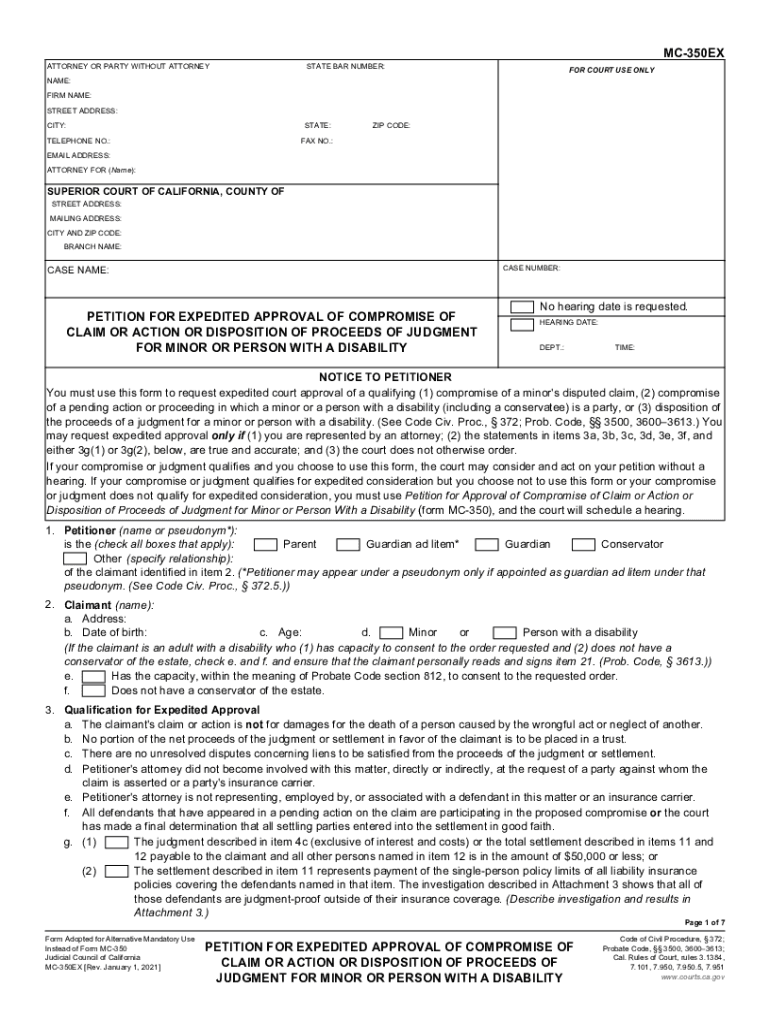
mc 350ex Preview on Page 1

Here's how it works

01. Edit your mc 350ex online
Type text, add images, blackout confidential details, add comments, highlights and more.
02. Sign it in a few clicks
Draw your signature, type it, upload its image, or use your mobile device as a signature pad.
03. Share your form with others
Send mc350ex via email, link, or fax. You can also download it, export it or print it out.

How to use or fill out mc 350ex with our platform

Form edit decoration
9.5
Ease of Setup
DocHub User Ratings on G2
9.0
Ease of Use
DocHub User Ratings on G2
  1. Click ‘Get Form’ to open the mc 350ex in the editor.
  2. Begin by filling in your details in the 'Attorney or Party Without Attorney' section. Include your name, firm name, address, and contact information.
  3. In the 'Superior Court of California' section, enter the relevant court details including case name and number.
  4. Complete the 'Petition for Expedited Approval' section by checking applicable boxes and providing necessary information about the claimant and their injuries.
  5. Fill out the 'Qualification for Expedited Approval' section carefully, ensuring all statements are true before proceeding.
  6. Continue through each section detailing the claim, incident specifics, treatment received, and any medical expenses incurred.
  7. Review all entries for accuracy before saving or submitting your completed form through our platform.

Start using our platform today to streamline your document editing and form completion process for free!

See more mc 350ex versions

We've got more versions of the mc 350ex form. Select the right mc 350ex version from the list and start editing it straight away!
Versions Form popularity Fillable & printable
2021 4.8 Satisfied (173 Votes)
2010 4.4 Satisfied (291 Votes)
be ready to get more

Complete this form in 5 minutes or less

Get form

Got questions?

We have answers to the most popular questions from our customers. If you can't find an answer to your question, please contact us.
Contact us
A California court must approve all settlements done on behalf of a child under the age of 18. A parent or guardian ad litem can file an MC-350 form (or an MC-350EX form for expedited service) to petition the court to approve a compromise of a minors claim. There may be a filing fee.
A petition for approval of compromise of claim of minor or adult person with a disability is filed when parties have agreed to settle a claim of a minor or adult person with a disability. The law doesnt allow a minor or person with a disability to settle their own claim without an adult guardian.
Probate Code 3500 provides that when a minor has a disputed claim for damages, money or other property and does not have a guardian of the estate, the following persons have the right to compromise the claim: Either parent if the parents of the minor are not living separate and apart.
The Petition for Compromise of Minors Claim (MC 350) must be fully completed and verified by the parent/guardian ad litem/conservator (signed and dated under penalty of perjury). PC 1021, CRC 7.103. The MC 350 is a required document that must be used.
Settlements Under $5,000 This is because California law permits Judges to order the funds to be paid directly to custodial parents if the total settlement is $5,000.00 or less. If the total settlement for the minor exceeds $5,000.00, then a Minors Compromise and a subsequent hearing must commence.
be ready to get more

Complete this form in 5 minutes or less

Get form

People also ask

Order to Deposit Funds Into Blocked Account (MC-355) States the courts decision (order) to deposit funds into a blocked account (a bank or other account requiring a court order to deposit or withdraw funds). Get form MC-355.
5. Petition for expedited approval of compromise of claim or action or disposition of proceeds of judgment for minor or person with a disability.

Related links