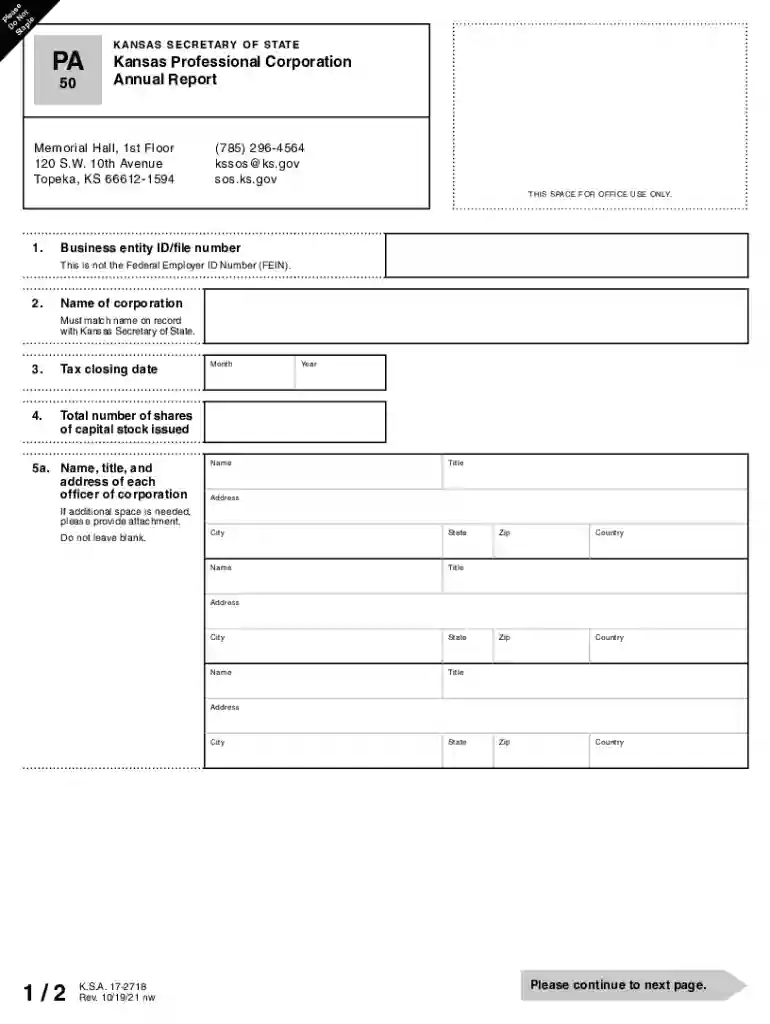
Kansas annual report 2026

Get Form
kansas llc annual report Preview on Page 1

Here's how it works

01. Edit your kansas llc annual report online
Type text, add images, blackout confidential details, add comments, highlights and more.

02. Sign it in a few clicks
Draw your signature, type it, upload its image, or use your mobile device as a signature pad.

03. Share your form with others
Send kansas business center annual report via email, link, or fax. You can also download it, export it or print it out.

How to use or fill out kansas annual report with our platform

Form edit decoration
9.5
Ease of Setup
DocHub User Ratings on G2
9.0
Ease of Use
DocHub User Ratings on G2
  1. Click ‘Get Form’ to open the Kansas Annual Report in the editor.
  2. Begin by entering your Business Entity ID/file number, ensuring it is not the Federal Employer ID Number (FEIN).
  3. Input the name of your corporation, which must match the name on record with the Kansas Secretary of State.
  4. Fill in the tax closing date by selecting the appropriate month and year.
  5. Indicate the total number of shares of capital stock issued.
  6. List each officer's name, title, and address. If more space is needed, attach additional pages.
  7. Provide names and addresses for each member of the board of directors and shareholders, ensuring no fields are left blank.
  8. Answer whether all listed officers, directors, and shareholders are qualified persons as defined by law. If not, provide details as required.
  9. Finally, declare under penalty of perjury that all information is true and correct by signing and providing your printed name and title.

Start filling out your Kansas Annual Report online for free today!

See more kansas annual report versions

We've got more versions of the kansas annual report form. Select the right kansas annual report version from the list and start editing it straight away!
Versions Form popularity Fillable & printable
2021 4.8 Satisfied (95 Votes)
2017 4.3 Satisfied (114 Votes)
2011 4.4 Satisfied (813 Votes)
be ready to get more

Complete this form in 5 minutes or less

Get form

Got questions?

We have answers to the most popular questions from our customers. If you can't find an answer to your question, please contact us.
Contact us
Kansas requires LLCs to file a Biennial Report (every two years) rather than file one annually. The fee due when filing the Biennial Report is $100 $110, again with the additional fee being if you file by mail.
Businesses must renew their Kansas Certificate of Authorization every two years to avoid expiration and/or cancellation. Each Certificate a business holds needs renewed separately by the Principal in responsible charge.
Starting January 1, 2024, Kansas businesses will file information reports with the Kansas Secretary of State every two years instead of an annual report every year. The content of the report will not change. Transitioning from annual filling to biennial will reduce paperwork for Kansas business owners.
Starting January 1, 2024, Kansas businesses will file information reports with the Kansas Secretary of State every two years instead of an annual report every year. The content of the report will not change.
Key Things to Know About Annual Reports Almost Every State Requires It: All US states require some form of annual report filing, except Ohio. That means if your business is registered anywhere else, youve got to file a yearly business report to stay in good standing.

Security and compliance

At DocHub, your data security is our priority. We follow HIPAA, SOC2, GDPR, and other standards, so you can work on your documents with confidence.

Learn more
ccpa2
pci-dss
gdpr-compliance
hipaa
soc-compliance
be ready to get more

Complete this form in 5 minutes or less

Get form