01. Edit your connecticut judicial case look up online
Type text, add images, blackout confidential details, add comments, highlights and more.

02. Sign it in a few clicks
Draw your signature, type it, upload its image, or use your mobile device as a signature pad.

03. Share your form with others
Send judicial branch ct via email, link, or fax. You can also download it, export it or print it out.

How to use or fill out Public Assistance - Connecticut Judicial Branch - CT.gov with our platform
Ease of Setup
DocHub User Ratings on G2
Ease of Use
DocHub User Ratings on G2
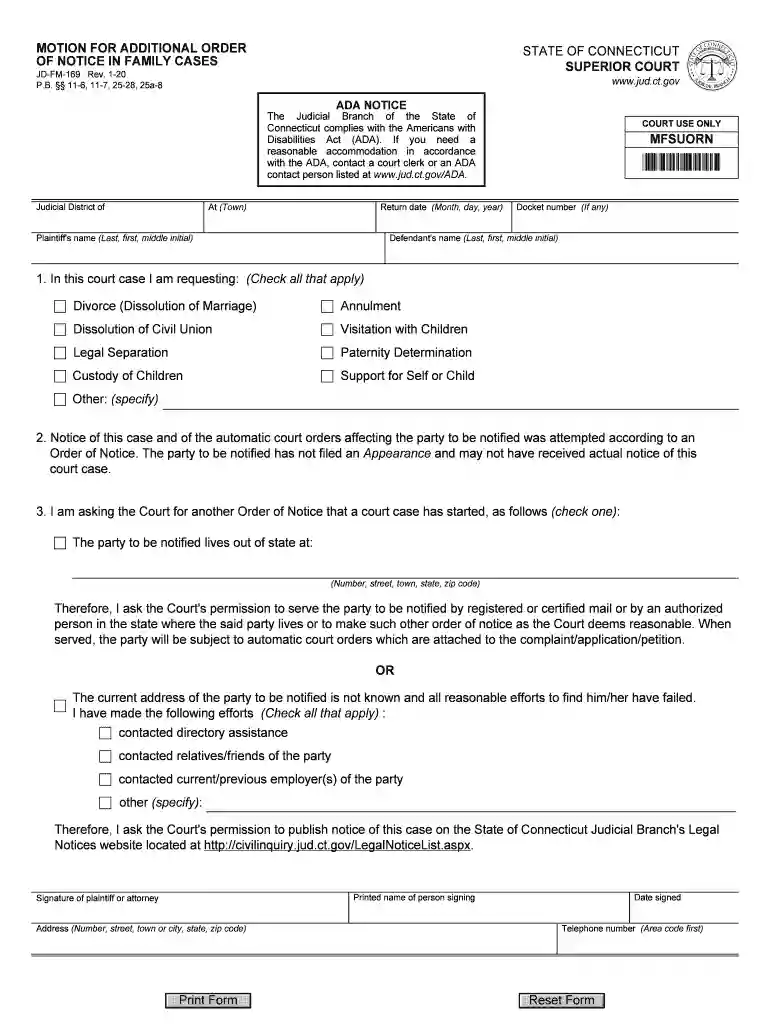
Click ‘Get Form’ to open the Public Assistance form in the editor.
Begin by entering the Judicial District and Town where your case is filed. This information is crucial for proper identification of your case.
Fill in the Return Date, ensuring it follows the format of Month, Day, Year for clarity.
Input the Plaintiff's name using Last, First, and Middle Initial. This identifies who is initiating the motion.
Select all applicable requests from Section 1 by checking the boxes next to options like Divorce or Custody of Children.
In Section 3, indicate how you wish to notify the other party by checking either option regarding their address status and providing necessary details.
Complete your contact information at the bottom, including your printed name, signature, address, and telephone number before submitting.
Start filling out your form today for free using our platform!
Fill out Public Assistance - Connecticut Judicial Branch - CT.gov online It's free
See more Public Assistance - Connecticut Judicial Branch - CT.gov versions
We've got more versions of the Public Assistance - Connecticut Judicial Branch - CT.gov form. Select the right Public Assistance - Connecticut Judicial Branch - CT.gov version from the list and start editing it straight away!
Paying a speeding ticket is a guilty plea, which results in fines, demerit points on your license, and higher insurance costs. Going to court can reduce or eliminate penalties, such as lowering fines, reducing points, or even dismissing charges with the help of an attorney.
How to pay a citation online in CT?
You may pay your ticket or plead not guilty online at .jud.ct.gov. You may also call the Centralized Infractions Bureau at (860) 263-2750 to pay your ticket or plead not guilty.
Can I pay fines online through CT Judicial?
The State of Connecticut Centralized Infractions Bureau now allows you to pay infractions online. The link below will take you to the State of Connecticut Judicial Branch to pay your infraction.
How do I check if I have a warrant in CT?
determining the guilt or innocence of persons accused of breaking the law; resolving disputes involving civil or personal rights; interpreting constitutional provisions of laws enacted by the legislature and deciding what is to be the law of the state when none exists for certain situations.
What types of cases does CT Judicial handle?
Divisions of Superior Court - CT Judicial Branch. The Superior Court hears civil, criminal, family and juvenile matters. Civil Division hears cases in which someone is being sued to protect civil, personal or property rights.
Security and compliance
At DocHub, your data security is our priority. We follow HIPAA, SOC2, GDPR, and other standards, so you can work on your documents with confidence.
Penalties for Late Payments If the ticket is not paid within 15 calendar dates after ticket issuance, the said fine will double. Failure to pay within 30 days of ticket issuance will result in the said fine tripling.
Related links
Judge Michael R. Sheldon - Connecticut Judicial Branch
Judge Michael R. Sheldon was born and raised in Schenectady, New York, where he attended public schools before attending Princeton University.
This is the official website of the State of Connecticut Judicial Branch. It is the mission of the Connecticut Judicial Branch to resolve matters brought
Cookie consent notice
This site uses cookies to enhance site navigation and personalize your experience.
By using this site you agree to our use of cookies as described in our Privacy Notice.
You can modify your selections by visiting our Cookie and Advertising Notice.