




Here's how it works



How to use or fill out Confidential Statement for Financing Studies & Sponsorship with our platform

- Click ‘Get Form’ to open the Confidential Statement for Financing Studies & Sponsorship in the editor.
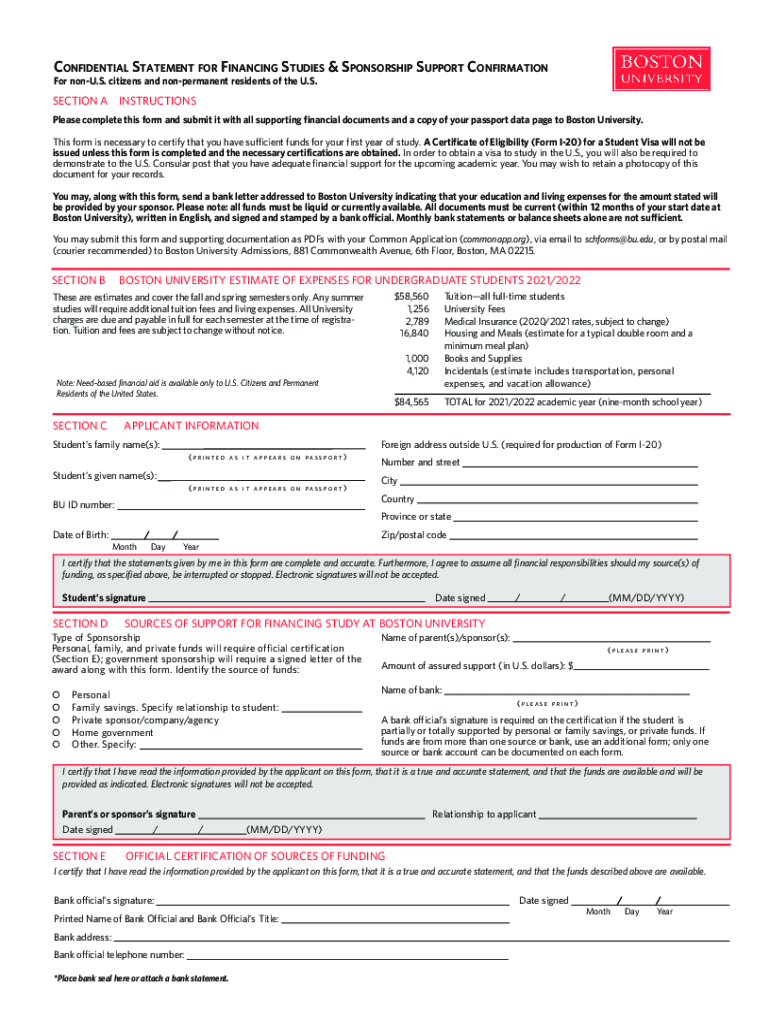
- Begin with Section A by entering your personal information, including your family name and given name as they appear on your passport. Ensure accuracy as this is crucial for visa processing.
- Provide your foreign address outside the U.S. This is necessary for the production of Form I-20. Double-check that all details match your passport.
- In Section D, certify that the statements are complete and accurate by signing electronically within our platform. Remember, electronic signatures are mandatory.
- Complete Section E by having a bank official certify the sources of funding. Ensure their signature and bank seal are included, as this validates your financial support.
Start filling out your Confidential Statement today using our platform for free!
It's free
See more Confidential Statement for Financing Studies & Sponsorship ... versions
Got questions?
How can I sign my Confidential Statement for Financing Studies & Sponsorship ... without printing?
eSignatures are a perfect alternative to traditional signing, as they save time, effort, and costs people spend on printing, scanning, and paper delivery. You can eSign your Confidential Statement for Financing Studies & Sponsorship ... utilizing a trustworthy and powerful online document management services like DocHub. It complies with primary eSignature standards (ESIGN and UETA), so all forms approved there are legally binding and have the same validity as physically signed ones.
Can I edit Confidential Statement for Financing Studies & Sponsorship ... on my phone?
As a comprehensive document editing service, DocHub is available on smart phones. Open DocHub in your choice of mobile browser and use our intelligent mobile-friendly toolset to complete your Confidential Statement for Financing Studies & Sponsorship ....
Security and compliance
At DocHub, your data security is our priority. We follow HIPAA, SOC2, GDPR, and other standards, so you can work on your documents with confidence.
Learn more




