Department motor vehicles 2026

Get Form
notice of recorded lien mv 901 Preview on Page 1

Here's how it works

01. Edit your notice of recorded lien mv 901 online
Type text, add images, blackout confidential details, add comments, highlights and more.
02. Sign it in a few clicks
Draw your signature, type it, upload its image, or use your mobile device as a signature pad.
03. Share your form with others
Send mv 901a via email, link, or fax. You can also download it, export it or print it out.

How to use or fill out department motor vehicles with our platform

Form edit decoration
9.5
Ease of Setup
DocHub User Ratings on G2
9.0
Ease of Use
DocHub User Ratings on G2
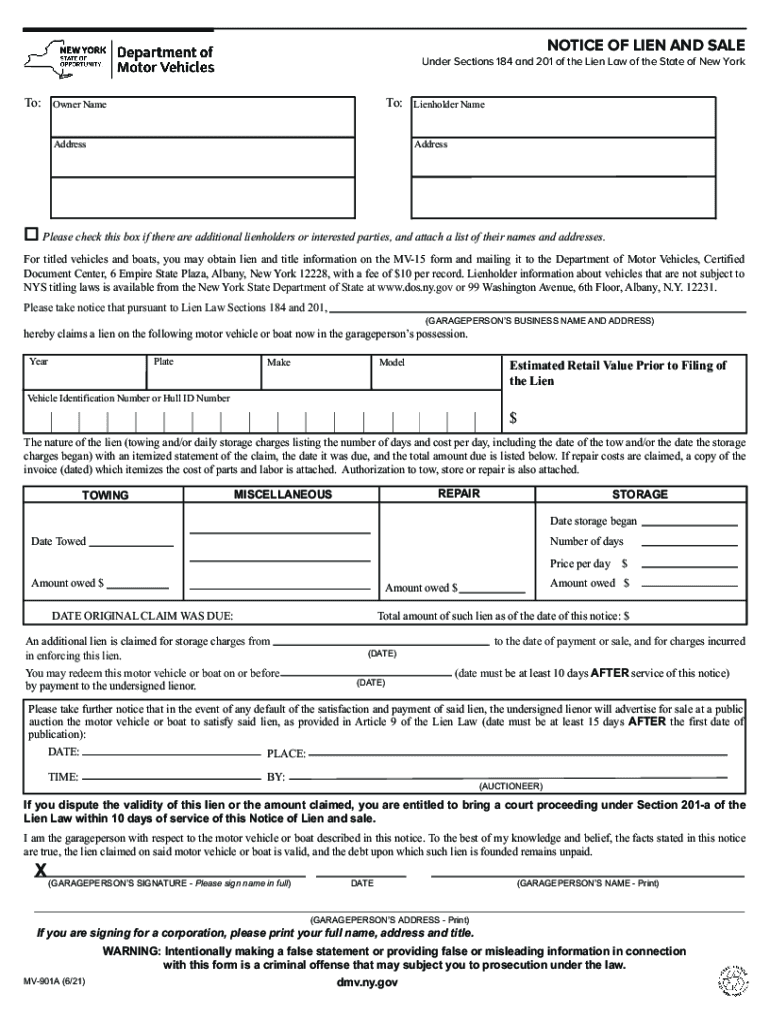
  1. Click ‘Get Form’ to open the Notice of Lien and Sale in the editor.
  2. Begin by entering the Owner Name and Address in the designated fields. This information is crucial for identifying the vehicle owner.
  3. Next, input the Lienholder Name and Address. If there are additional lienholders, check the box provided and attach a list of their names and addresses.
  4. Fill in details about the vehicle or boat, including Year, Plate Number, Make, Model, Estimated Retail Value, and Vehicle Identification Number (VIN) or Hull ID Number.
  5. Provide an itemized statement of the lien nature, including towing charges, storage fees, and any repair costs. Attach relevant invoices if necessary.
  6. Complete the dates for when storage began and when the vehicle was towed. Specify the price per day and total amount owed for each category.
  7. Finally, sign and date the form as the garageperson. Ensure all information is accurate before submission.

Start using our platform today to streamline your document editing process for free!

See more department motor vehicles versions

We've got more versions of the department motor vehicles form. Select the right department motor vehicles version from the list and start editing it straight away!
Versions Form popularity Fillable & printable
2021 4.8 Satisfied (75 Votes)
2016 4.3 Satisfied (164 Votes)
2011 4.4 Satisfied (282 Votes)
be ready to get more

Complete this form in 5 minutes or less

Get form

Got questions?

We have answers to the most popular questions from our customers. If you can't find an answer to your question, please contact us.
Contact us

Sure, you’ll find numerous applications for this on the web. Nonetheless, if you need to eSign your mv 901 notice of recorded lien without installing extra software, DocHub is the optimum choice you can make. This robust editor works on mobile devices just as on desktops. Open our editor in your preferred internet browser, register or sign in to your account, and start managing your paperwork.

Having a swift editing platform like DocHub, you do not require anything but a web browser and connection to the internet to modify your mv 901 pdf online swiftly. Upload your document or get the relevant form in DocHub’s catalog, open our editor with a single click, and finish it digitally. To edit your forms anytime, sign up a free profile with DocHub.

Mid-Week Days: Tuesday to Thursday are generally the best days to schedule your DMV appointment. Advantages: Mid-week appointments tend to have lower wait times and less crowding, providing a more efficient and pleasant experience.
Driver licensing and vehicle registration in the United States are handled by the state government in all states but Hawaii, where local governments perform DMV functions. In Canada, driver licensing and vehicle registration are handled at the provincial government level.
To obtain an ID for the first time: You must schedule an appointment. You must provide required identification documents(opens in new window) to prove your full legal name, date of birth, identity, and lawful presence in the United States.
be ready to get more

Complete this form in 5 minutes or less

Get form