Type text, add images, blackout confidential details, add comments, highlights and more.

02. Sign it in a few clicks
Draw your signature, type it, upload its image, or use your mobile device as a signature pad.

03. Share your form with others
Send it via email, link, or fax. You can also download it, export it or print it out.

How to use or fill out Texas Form 84 with DocHub
Ease of Setup
DocHub User Ratings on G2
Ease of Use
DocHub User Ratings on G2
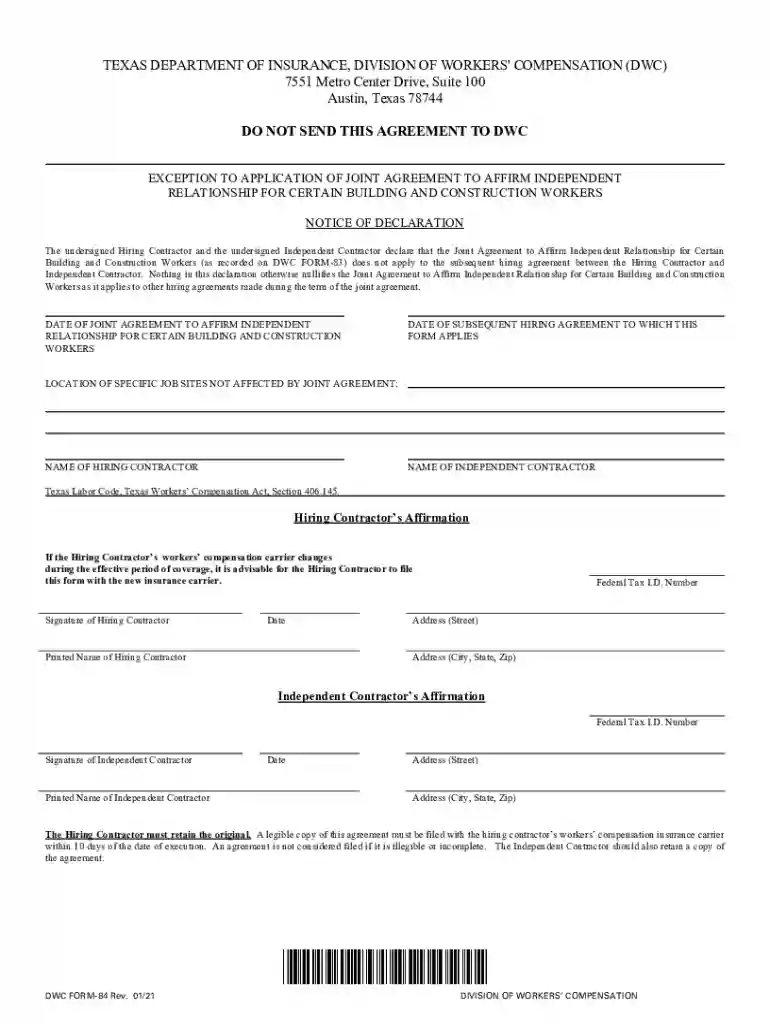
Click ‘Get Form’ to open Texas Form 84 in our editor.
Begin by entering the 'Date of Joint Agreement' and 'Date of Subsequent Hiring Agreement' in the designated fields. Ensure these dates are accurate as they are crucial for record-keeping.
Fill in the 'Location of Specific Job Sites Not Affected by Joint Agreement' section. This helps clarify which job sites are relevant to this declaration.
Next, input the 'Name of Hiring Contractor' and 'Name of Independent Contractor'. Double-check spelling to avoid any discrepancies.
Complete the affirmation sections for both the Hiring Contractor and Independent Contractor. This includes signatures, printed names, dates, Federal Tax I.D. Numbers, and addresses.
Review all entries for accuracy. Once satisfied, save your document. You can easily export it or share it directly from our platform.
Start using our platform today to fill out Texas Form 84 quickly and efficiently!
Texas form 84 pdfTexas form 84 instructionsTexas form 84 onlinePrintable texas form 84Form 05-158 instructionsForm 05-169Form AP-114 instructionsWhat is long Form 05-158
Security and compliance
At DocHub, your data security is our priority. We follow HIPAA, SOC2, GDPR, and other standards, so you can work on your documents with confidence.
Form 1098-T (Tuition Statement) is an informational return that educational institutions are required to issue to each student that is enrolled.Read more
Cookie consent notice
This site uses cookies to enhance site navigation and personalize your experience.
By using this site you agree to our use of cookies as described in our Privacy Notice.
You can modify your selections by visiting our Cookie and Advertising Notice.