DocHub form-library433242-hotlineHotline: 1800-2222 333 Fax: 6304 8229 Please Read This-2026

Get Form
DocHub form-library433242-hotlineHotline: 1800-2222 333 Fax: 6304 8229 Please Read This Preview on Page 1

Here's how it works

01. Edit your form online
Type text, add images, blackout confidential details, add comments, highlights and more.
02. Sign it in a few clicks
Draw your signature, type it, upload its image, or use your mobile device as a signature pad.
03. Share your form with others
Send it via email, link, or fax. You can also download it, export it or print it out.

How to use or fill out the form-library433242-hotline: 1800-2222 333 Fax: 6304 8229 Please Read This with our platform

Form edit decoration
9.5
Ease of Setup
DocHub User Ratings on G2
9.0
Ease of Use
DocHub User Ratings on G2
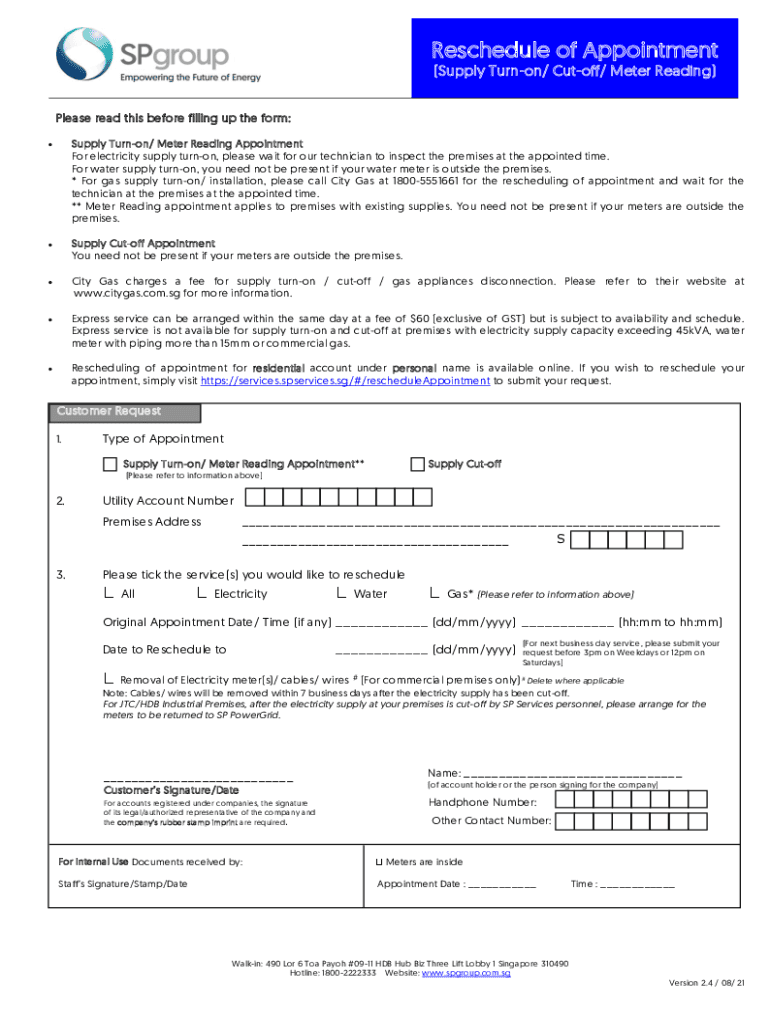
  1. Click ‘Get Form’ to open it in the editor.
  2. Select the type of appointment you need by choosing either 'Supply Turn-on/ Meter Reading Appointment' or 'Supply Cut-off'.
  3. Enter your Utility Account Number and Premises Address in the designated fields.
  4. Tick the service(s) you wish to reschedule, such as Electricity, Water, or Gas.
  5. Fill in the Original Appointment Date and Time if applicable, followed by your desired Reschedule Date.
  6. If applicable, indicate if you require the removal of electricity meters/cables/wires for commercial premises.
  7. Sign and date the form. Ensure that for company accounts, a legal representative's signature and company stamp are included.

Start filling out your form today for free and streamline your appointment rescheduling process!

See more DocHub form-library433242-hotlineHotline: 1800-2222 333 Fax: 6304 8229 Please Read This versions

We've got more versions of the DocHub form-library433242-hotlineHotline: 1800-2222 333 Fax: 6304 8229 Please Read This form. Select the right DocHub form-library433242-hotlineHotline: 1800-2222 333 Fax: 6304 8229 Please Read This version from the list and start editing it straight away!
Versions Form popularity Fillable & printable
2021 4.8 Satisfied (136 Votes)
2019 4.4 Satisfied (207 Votes)
2019 4 Satisfied (55 Votes)
2018 4.3 Satisfied (134 Votes)
be ready to get more

Complete this form in 5 minutes or less

Get form

Got questions?

We have answers to the most popular questions from our customers. If you can't find an answer to your question, please contact us.
Contact us
Step 1: Navigate to your Play Store account in your browser and sign in to your Google account (you may already be logged in). Step 2: Scroll down to Account in the left-hand menu and click Order History from the top menu. From here, search for the content you want to return. Step 3: Choose Request a Refund.
As you can see, while DocHub and are similar in many ways, they also have some notable differences when it comes to plan options and versatility. If youre just beginning to collect e-signatures or own a small company, DocHub may be the better option for you.
Subscriptions purchased through other marketplaces - learn more. Transactions older than 180 days. has one of the best money-back guarantees in the industry. If you are a self-serve subscriber, you can request a refund within 180 days after your initial purchase date.
DocHub is a cloud-based platform that enables users to create, edit and collaborate on PDFs online. It also offers a legally binding electronic signature feature, meaning users can sign their contracts online using the tool and replace wet ink signatures.
Account Administrators who purchased their plan on .com can update or cancel their accounts and request refunds. If you cancel your account per the Terms and Conditions before 30 days pass, you may request a refund for the full purchase price.

Security and compliance

At DocHub, your data security is our priority. We follow HIPAA, SOC2, GDPR, and other standards, so you can work on your documents with confidence.

Learn more
ccpa2
pci-dss
gdpr-compliance
hipaa
soc-compliance

People also ask

Yes, DocHub is safe. The platform uses strong encryption to protect your documents, and it prioritizes secure storage to keep your data confidential. Additionally, the Online Signature Generate feature ensures that your e-signatures are secure and legally binding.