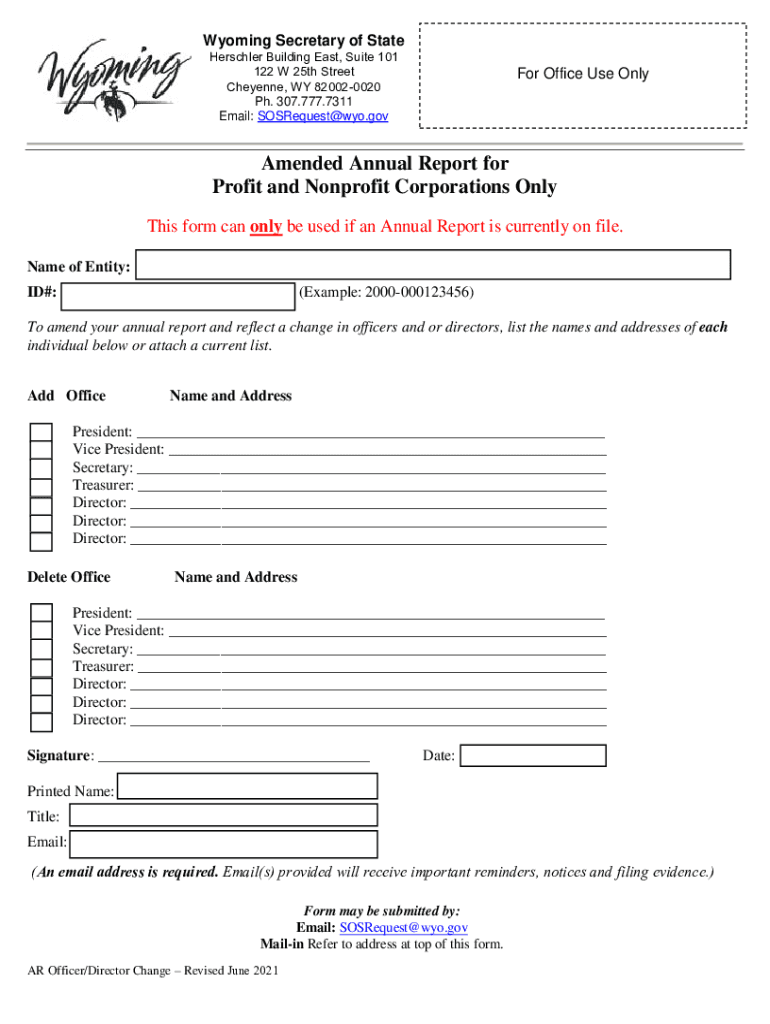
Update the Officers / Directors 2026

Get Form
Update the Officers / Directors Preview on Page 1

Here's how it works

01. Edit your form online
Type text, add images, blackout confidential details, add comments, highlights and more.
02. Sign it in a few clicks
Draw your signature, type it, upload its image, or use your mobile device as a signature pad.
03. Share your form with others
Send it via email, link, or fax. You can also download it, export it or print it out.

How to use or fill out Update the Officers / Directors with DocHub

Form edit decoration
9.5
Ease of Setup
DocHub User Ratings on G2
9.0
Ease of Use
DocHub User Ratings on G2
  1. Click ‘Get Form’ to open it in the editor.
  2. Begin by entering the name of your entity and its ID number at the top of the form. This information is crucial for identifying your corporation.
  3. In the 'Add Office' section, fill in the names and addresses of new officers or directors. Ensure accuracy as this reflects your current leadership structure.
  4. If you need to remove any officers or directors, proceed to the 'Delete Office' section and provide their names and addresses accordingly.
  5. Complete the signature field, including your printed name, title, and email address. The email is essential for receiving important notifications regarding your submission.
  6. Once all fields are filled out correctly, review your entries for accuracy before submitting via email or mail as indicated on the form.

Start using our platform today to streamline your document editing and ensure a hassle-free experience!

See more Update the Officers / Directors versions

We've got more versions of the Update the Officers / Directors form. Select the right Update the Officers / Directors version from the list and start editing it straight away!
Versions Form popularity Fillable & printable
2021 4.8 Satisfied (31 Votes)
2021 4.3 Satisfied (64 Votes)
2019 4.3 Satisfied (175 Votes)
2013 4.4 Satisfied (33 Votes)
be ready to get more

Complete this form in 5 minutes or less

Get form

Got questions?

We have answers to the most popular questions from our customers. If you can't find an answer to your question, please contact us.
Contact us
Step 1: Log in and select your company, then go to the Directors tab and click Appoint Director or select the director you would like to resign and click Terminate Director. Step 2: Capture the details of the change and click Next. Step 3: Confirm the director details and click Save.
The process is formalized through resolutions and documentation: Board Resolutions: Required for officer appointments and often for director appointments, depending on the entitys structure. Shareholder Resolutions: For corporations, shareholder approval is necessary to appoint or remove directors.
Updating information in the register of members Companies must update the register of members when there are any changes in membership or the details relating to its existing members. This includes in the following situations: The company issues new shares to new or existing members.
File Form DIR-6: Used for Intimation of Change in Particulars of Director to the Registrar of Companies (RoC). Must be digitally signed by the director and certified by a professional (CA/CS/CMA). Documents needed: Proof of new address (utility bill, rent agreement) PAN copy. Passport-size photo. Directors DSC.
A board of directors (BofD) is the governing body of an organization and is responsible for setting the organizations overall strategic direction, selecting and managing its top executives, and protecting the interests of its stakeholders.

Security and compliance

At DocHub, your data security is our priority. We follow HIPAA, SOC2, GDPR, and other standards, so you can work on your documents with confidence.

Learn more
ccpa2
pci-dss
gdpr-compliance
hipaa
soc-compliance

People also ask

All companies must maintain a register of directors, detailing each directors name, service address, nationality, date of birth, and appointment dates. This register is stored at the companys registered office and must be updated within 14 days of any changes.

Related links